Live casino table guides · South Island guide
Live casino disconnection: round IDs and settlement records
 Best casinos available in New ZealandUpdated 7 November 2026

When a live casino session drops, the connection status alone does not tell you whether a wager was accepted or how the round was settled. Reconnect through the same account, compare the round history with the operator’s bet and transaction records, note any round or bet identifiers, and ask the operator to reconcile the exact event against the published rules. A refund is not automatic in every game or circumstance.
The short answer
A dropped video or frozen table does not, by itself, prove that a bet failed, remained active, was cancelled or settled. The useful question is not simply whether the stream disconnected; it is what the account and game records say about the individual wager and round. Reconnect safely, identify the event, preserve the evidence, and ask the casino operator to reconcile the provider round with the account ledger. Do not assume a refund, and do not place the same wager again while its status is unclear.
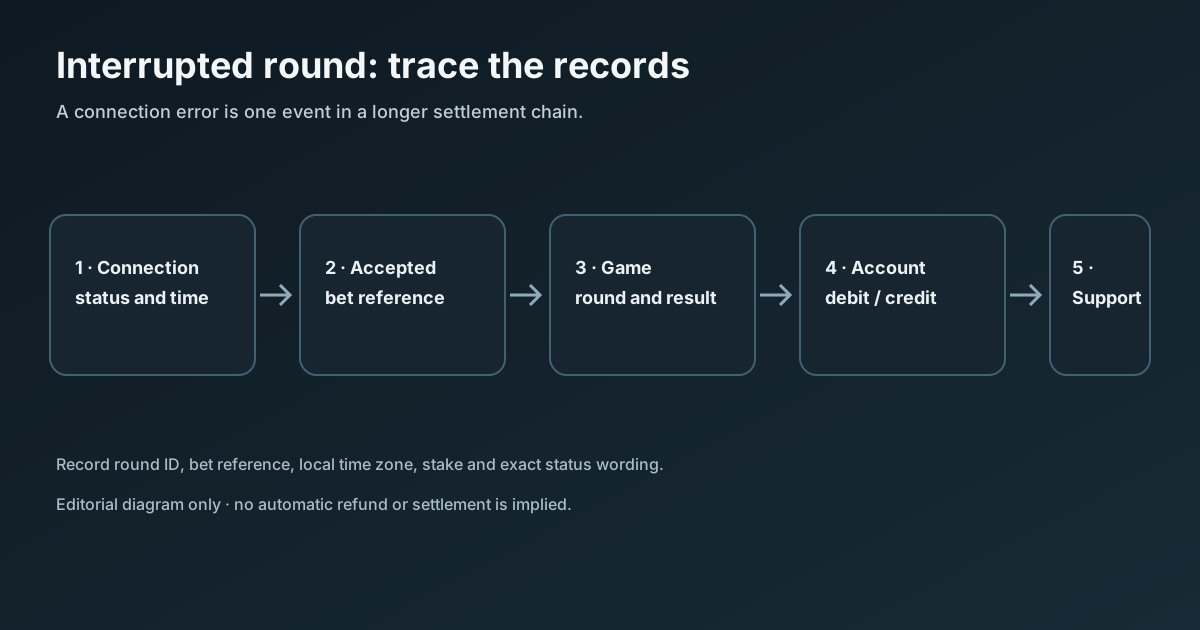
Start with four separate facts: whether the bet was accepted, whether the game round proceeded, what result the rules assign to the round, and whether the operator’s account record posted the corresponding debit or credit. These events can appear in different screens and at different times. A connection interruption can happen before a bet is submitted, while a bet is being confirmed, after betting closes, during a player decision, or after the result but before the account display refreshes. Each point can have different rules.
The practical record to assemble is the game name and table, local date and time with time zone, round ID if shown, bet or transaction reference, stake, market or seat, result and the before-and-after account balance. Then compare the game’s History panel with the casino’s account or bet history. If the two do not line up, send the operator a concise support request with the identifiers and screenshots. The operator, not a general guide, can see the account-side transaction and request supplier-level investigation.
What can happen at each point in a round
The phrase “I disconnected during a round” covers multiple states. A live table usually has a betting window, a point after betting closes, a result or decision sequence, and some form of account settlement. Exact labels and timing vary. A video overlay may lag behind the underlying game server; a browser tab may show a reconnect screen even though the server has continued processing the round. Conversely, a visible chip or bet slip may not prove final acceptance if the table has not confirmed it.
Use the following distinctions when reading records:
| State to establish | What to look for | What it does not establish on its own |
|---|---|---|
| Bet submitted | Bet slip, chip placement, button press or confirmation prompt | That the server accepted the wager |
| Bet accepted | A confirmed wager in the game history or operator bet record | That the round has finished |
| Round underway | Round ID, table sequence, dealer event or round history entry | The final result or account credit |
| Round result recorded | Game history showing the completed outcome | That the wallet ledger has refreshed |
| Settlement posted | Account debit, return, win or void entry linked to the wager | Why a disputed amount was classified that way |
The distinction matters most near the betting deadline. If an entry appears in the account history, save its wording and reference rather than paraphrasing it as a “loss” or “refund.” Some operator histories show one line per wager, others group several side bets under a round, and a balance panel may update later than the game history. Record the displayed status exactly: pending, accepted, settled, void, returned, rejected or another label.
Do not treat a round ID and a transaction ID as interchangeable. A provider may use one identifier for the game event while the casino uses a separate reference for each wager, wallet debit or credit. One round can contain several selections or seats. If you made multiple bets, list them separately and connect each one to the round where possible. This avoids a support agent having to guess which line you are asking about.
Reconnect without creating a second problem
If the page says reconnecting, give the session a moment to restore before changing several things at once. When the game returns, check the current round and recent-history controls first. Do not refresh repeatedly while a decision may still be pending, switch accounts, open duplicate sessions, or submit a replacement bet to see whether the first one “went through.” Those actions can make the timeline harder to reconstruct and may create an additional wager.
If the game cannot resume, use the operator’s account history from a separate, trusted route such as the site’s account menu. Confirm that you are signed into the same account and the same casino domain or app. If you reach support, say that the stream disconnected and ask them to identify the round and wager state. Do not share a password, one-time code, full payment credential or remote-access code to prove what happened. Support should not need those secrets to locate a bet by account and event reference.
Write down the time shown by your device and the time zone, not only “about five minutes ago.” If you are in New Zealand, the date in one screen may be displayed in New Zealand local time while another record is stored in UTC or the operator’s own system time. A timestamp without a zone can shift the search window by hours. If the operator history offers filters, search a short interval around the event and then widen it if no match appears. Do not infer the correct time zone from the operator’s company address.
Where the device still shows an error code, copy its exact spelling and punctuation. “Connection lost,” “round pending,” “bet rejected,” and “reconnecting” are not equivalent statements. A screenshot should include enough of the interface to show the game, status and time, but crop or cover unrelated personal details before sending it. Keep the original capture privately in case support asks for an uncropped version through a secure, authenticated channel.
Find the round ID and the accepted-bet record
The round ID may be displayed in a game history panel, the account’s casino history, a detail view for an individual wager, or a downloadable statement. Some interfaces show it only after opening a completed entry. Start with the history control inside the game, then compare the same date and title in the operator account. A provider title in the history can differ from the public game name, so record both if they are visible.
A good event note contains: the account username or safe account reference used with support; game and table name; round ID; bet reference; date, local time and time zone; stake and currency; selected market, side bet or seat; status shown before interruption; displayed outcome after reconnecting; and the relevant debit, payout or return lines. If you did not see a round ID, state that plainly. Never invent an identifier from a screen sequence, session token or web address.
Check for an accepted-bet indicator, not just a visual chip. Depending on the interface, that evidence may be a confirmed bet in History, a balance debit associated with the wager, a provider round entry or a support reference. A balance difference alone is not enough to identify the cause: it could reflect other bets, a delayed display, a currency conversion, a pending transaction or another account action. Compare the amount, currency and timestamp in the same record.
For multiple wagers in one round, make a small table before writing to support. Include one row per bet, its market or seat, stake, individual status and any reference. A total-only complaint can hide a partial acceptance—for example, one line might be accepted while another was rejected—or a separate side bet may settle differently. Do not assume that all selections in a multi-bet round share one outcome merely because they were entered together.
Read game history and the account ledger together
Game history answers what the game records for its round. The operator ledger answers what the casino account recorded for the wallet. They are related records, but they may not have identical labels or granularity. A result can be visible in the provider history while the corresponding account line remains pending or appears later. A transaction can appear in the account history without displaying the full game event. The reconciliation is the link between those two views, usually through a round ID, bet ID, transaction reference or the combination of title and timestamp.
For each line, compare the following fields where they exist: event date and zone, title or provider, round reference, accepted stake, debit, return or payout, currency, status and balance after the event. If an operator groups a completed round under one transaction, preserve the group’s detail. If the provider history shows only the final result, do not reconstruct missing intermediate values from animation or memory. Ask support for the underlying bet record and the reason a status was assigned.
Settlement words need care. “Win” can refer to the game result, while “credited” refers to a wallet entry. “Returned” may mean the original stake was put back; “void” may describe a round state; “rejected” may mean a wager was not accepted. Operators can use their own vocabulary. Quote what the interface displays and request a definition if the label is unclear. Do not state that a void or refund is due unless the exact published rules support that conclusion for the event.
If the account history and game history disagree, capture both views with the same event time and identifiers. Record when each screen was checked, because a later refresh can change a pending state. Avoid repeatedly refreshing during the first check; note the initial state, then recheck after a reasonable interval or according to the operator’s published processing guidance. The purpose is not to pressure a result into appearing but to preserve an accurate sequence for investigation.
Why a refund is not automatic
Round handling is controlled by the applicable game rules, provider procedure and operator terms. A disconnection before a wager is accepted can be treated differently from a disconnection after betting closes. A game may continue in the player’s absence, use a default action, hold the round for review, cancel it after a system error, or settle it normally. A supplier’s published rule for one title is not proof that a different table or operator uses the same rule.
For example, a published Evolution Race Track guide hosted by an operator describes a specific error-handling process and says its placed wagers remain valid and are settled during disconnection, with outcomes visible in History after reconnecting. The same guide discusses a different treatment when a system error cannot be resolved. That is an example of a game-specific help document, not a universal rule for every Evolution table, every live supplier or every New Zealand-facing casino. The exact rule page in the game you used is the one to preserve and ask support to apply.
The same caution applies to generic articles that repeat a “before or after no more bets” rule. That line can be a useful clue about where to look, but the deadline label, accepted status and error policy differ by supplier and game. A rule from a third-party help site may be old, belong to a particular operator, or describe a different version. Use it as a search lead only. The casino’s current in-game help and account-specific response control the case.
An operator might need to check a provider record or investigate an interrupted service event. The time taken and the available remedy are governed by that operator’s published process; this article cannot promise an automatic return, a specific timeframe or a particular result. Ask for the rule clause and record used to determine the outcome. If the operator’s response does not explain the transaction, make one focused follow-up with the relevant references rather than sending multiple unstructured messages.
Build a concise support request
Send the request through the casino’s authenticated support channel. Keep the subject specific, such as “Round settlement check – [game] – [date/time NZST or NZDT].” In the message, state the exact question: “Please confirm whether bet reference [reference] was accepted, what result was recorded for round [ID], and how the related wallet entries were settled under the applicable game rules.” This asks the operator to reconcile evidence without telling them what answer to give.
Include the event table and two or three relevant screenshots. If a field is missing, mark it “not shown” rather than leaving a blank that could be read as forgotten. Mention whether you reconnected, when you checked the game History, and what the account transaction list showed. Ask the operator to state whether its answer is based on the provider round record, the wallet ledger or both, and to identify the version of the rule that applied.
Do not send a long narrative about every previous loss, a theory about how the result was generated, or a request to compensate an unrelated session. Those details make the target event harder to audit. Keep the first message to one event, then add facts only if support asks. If the issue concerns several rounds, prepare a separate row for each ID and say whether they are connected to the same interruption.
Save the ticket number, submission time, support reply and any case status. If the operator asks for a recording, provide only material that does not expose another person’s data or security credentials. If the first response is generic, ask which specific records were checked and whether any transaction remains pending. A calm, evidence-led request is easier to route to the correct provider or payments team than a demand based only on the frozen screen.
A device and connection checklist
Once the round is identified and no further decision is pending, note the device, browser or app, operating-system version if known, and connection type. Record whether the stream froze, the whole page became unresponsive, or only the game frame reconnected. If the issue repeats, capture the approximate time and visible error each time. This helps the operator distinguish a local network symptom from a table or account event without assuming the cause.
Avoid using a public Wi-Fi session for account support or uploading screenshots that contain personal details. If you move from Wi-Fi to mobile data after the event, make a note of that change. A switch in network can restore access, but it cannot prove that an earlier wager was or was not accepted. Do not install a browser extension, remote-control app or unofficial game client because a stranger in chat suggests it. Troubleshooting should use the official casino and device settings only.
Before reconnecting, if practical, check whether the browser has other tabs playing the same account. Close duplicate game sessions only after recording the state shown. If the operator asks you to clear cookies or reinstall its app, first confirm that doing so will not remove local evidence you still need. The account-side history should remain the authoritative transaction record, but preserving the visible error can help support reproduce a technical report.
A practical evidence checklist
Use this checklist before opening a ticket:
- Write down the casino account and the exact game or table name.
- Record the date, local time and time zone shown by your device.
- Save the visible round ID, wager reference and transaction reference, if available.
- List each stake, currency, market or seat separately.
- Copy the precise status or error wording from the game.
- Check the in-game History after reconnecting and note when you checked it.
- Check the operator’s account bet history and wallet transactions for matching entries.
- Capture the before-and-after balance only as supporting context, not as proof by itself.
- Open the exact game help and preserve the relevant disconnection or unfinished-round rule.
- Ask the operator to reconcile the game record and wallet ledger; do not assume a refund.
If you have no ID, the support team can often begin with account, game, time, stake and table details, but the operator decides what it needs. Do not send unrelated personal documents before the operator explains why they are necessary and how to submit them securely. A support agent should not ask you to disclose your login password or an authentication code in an ordinary message.
Questions readers ask
The stream stopped after I placed a chip. Does that prove my bet was accepted?
No. A chip on the screen can be a visual selection before server confirmation. Check the game history and account bet record for an accepted wager or reference. If neither screen makes the status clear, ask the operator to confirm whether the server accepted the bet. Do not place the same stake again as a test; a second accepted entry could create a separate wager.
I can see a round ID but no wallet transaction. Is the game broken?
Not necessarily. The round record and wallet ledger can update at different times or use separate references. Record the ID, time and game result, then ask support to link the round to the account transactions. A missing line in one screen is a reason to reconcile, not proof of a fault or of a guaranteed refund.
The casino says the round settled, but I was not connected to see it. What should I request?
Ask which bet references were accepted, what result and player-decision rule were applied, the amount debited or credited, and which published game rule controls the disconnection. If the game history is accessible, compare it with the operator’s explanation. If there was a player decision, ask what default action the rules assign while disconnected; do not assume it is always stand, fold or another fixed choice.
Can the operator cancel a round and return the original stake?
Some specific rules describe cancellation and stake returns for defined errors; other rules say accepted bets remain valid and settle. The answer depends on the exact event and applicable terms. Ask the operator to quote the relevant clause and state whether the event was treated as a client disconnection, server error, rejected bet or cancelled round. A general guide cannot decide an account-specific case.
Which timestamp should I give if the casino history uses another time zone?
Give both the local time shown on your device and the named zone, such as New Zealand local time on that date, and the displayed operator time if available. Keep the date with each time. New Zealand’s offset changes seasonally, so avoid converting from memory. The operator can search its event logs using a wider window if the clock formats differ.
Should I send the operator my full card or banking details?
No, not for identifying a game round. Use the authenticated account channel and the round or bet references. Do not send a password, one-time code, full card number or bank login. If the operator needs to verify identity or a payment, follow its formal secure process and provide only the requested information through that process.
How long should I wait before contacting support?
Follow the operator’s published guidance for pending transactions or unfinished rounds. If it gives no interval and the balance or round status remains unclear after reconnecting and checking history, contact support with the evidence rather than guessing. Keep the case number and ask whether the round is pending review or fully settled. Do not assume a generic processing estimate applies to every game.
What if support cannot locate the event?
Reply once with the exact account, local timestamp and zone, game name, stake, currency and any reference shown in History. Include the support case number and say which records you already checked. Ask whether the time was searched in a different zone and whether the provider title differs from the lobby name. If there is still no explanation, use the operator’s published complaints route and keep the correspondence.
New Zealand context and personal wellbeing
For a New Zealand reader, the Department of Internal Affairs says in its current customer guidance that online casinos which served people in New Zealand before 1 May 2026 may continue operating until 1 December 2026, while providers must not advertise to people in New Zealand. This article contains no operator recommendation and does not establish that a particular platform is eligible, licensed or available. Check official DIA information for the current transition details and the operator’s own account terms before relying on any game access or complaint route.
If an interruption or disputed balance has made you feel pressured to keep playing to recover money, stop the session and step away from the account while the record is checked. Do not chase a settlement by placing replacement bets. Our New Zealand safer-gambling support guide lists support options. The purpose of this checklist is to help document one event clearly, not to encourage another round.
Sources and verification boundaries
- Evolution Race Track game rules, operator-hosted PDF — accessed 7 October 2026; used only as a title-specific example of a disconnection and History policy.
- Cloudbet Help Centre: checking whether a round completed and finding its round ID — accessed 7 October 2026; operator-specific navigation example, not a universal interface.
- Evolution Games — accessed 7 October 2026; the site describes a free-play showcase, age gating and jurisdiction-dependent availability, not account settlement for a separate casino.
- New Zealand DIA information for online casino customers — checked 7 October 2026 for the transition statement.
No claim is made that all live providers use the same cutoff, default decision, history fields, cancellation rule or refund process. The exact operator and game help controls the case.