Live casino table interface · South Island guide
Live casino seats, betting windows and table limits
 Best casinos available in New ZealandUpdated 7 November 2026

A live casino table can offer reserved player positions, observer wagers such as Bet Behind, or an unlimited-seat format where participants share a game outcome but make individual decisions. The countdown shows when a betting window is open; it does not prove a wager reached the game server. Before a round, inspect the table’s seat model, minimum and maximum stake, timer, confirmation state and history controls. These settings vary by title, table and operator.
The short answer
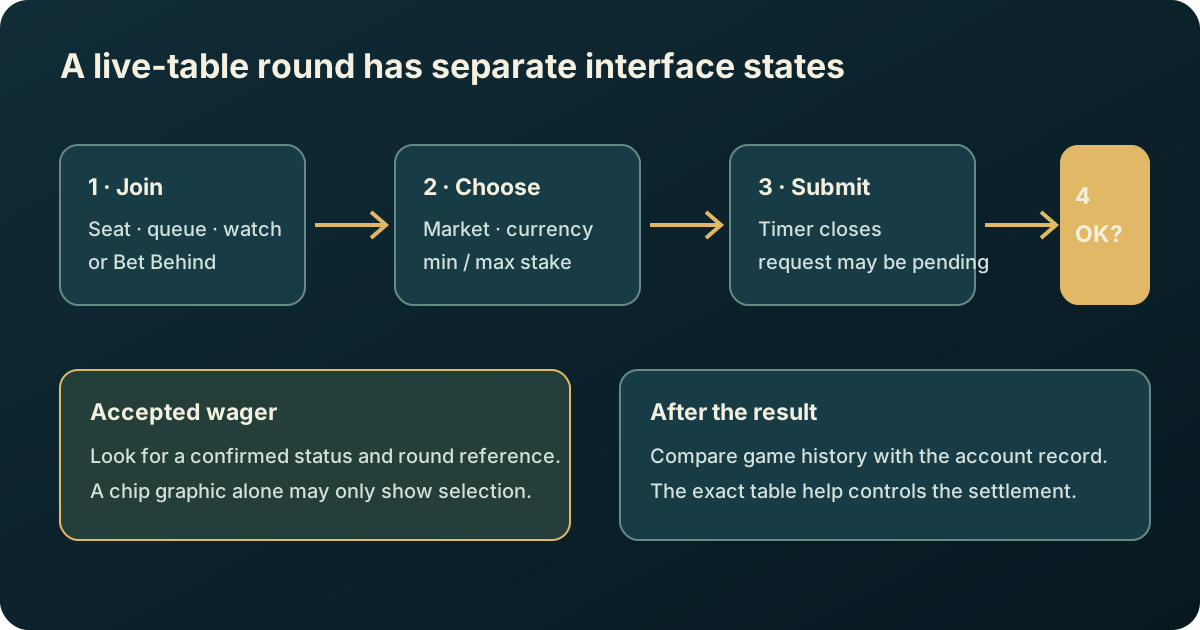
Live tables do not all use the same participation model. A conventional blackjack or roulette table may show a limited number of player seats. A person who cannot take a seat may be able to watch or, where the title supports it, place a separate Bet Behind wager on another player’s hand. An “Infinite” table can remove the physical seat queue and let many people join a shared round, while each participant still makes their own permitted choices. These are product designs, not universal settings.
The betting timer is a deadline for placing or changing a wager, not a receipt. A chip appearing on the screen can be an optimistic interface animation, a selected amount, a pending request or a confirmed wager. Look for the table’s explicit accepted status and the operator’s corresponding account history. If the display is ambiguous, avoid submitting the same wager again just to test it.
Before joining, inspect five details: whether the table reserves seats, what happens when those seats are full, the betting window and any later decision timers, the minimum and maximum stake for the relevant bet, and the way the game confirms and records accepted bets. The supplier’s public rules help explain product mechanics; the exact operator lobby and in-game help control the limits available to an account. Neither an Evolution product listing nor this guide confirms that a particular table is offered to New Zealand customers.
Seat, spectator and wager are different states
A seat is a place in the table interface that may allow a participant to make decisions tied to that position. A spectator can usually watch without occupying a seat. A wager is a monetary instruction sent for a defined market or hand. Those states can overlap, but they are not synonyms: a person may watch without a bet, wait for a seat while watching, or follow another player through an observer-bet feature without controlling that player’s decisions.
The distinction matters in games where player choices change the round. At a seated blackjack table, the seat can determine which hand is being played and when the player may hit, stand, split or double, subject to the game rules. A spectator has no such control. With Bet Behind, an observer can select a separate stake that follows the result of a visible player’s hand. The observer’s wager is still their own transaction, and a Bet Behind selection does not give them the seated player’s decision rights.
At a roulette table, a “seat” may be a social or interface position rather than a place needed to place a number bet. A product may support direct betting without a numbered player chair. Do not infer the rules from camera framing: a studio may show physical chairs even when the game allows non-seated bets, or the interface may show a seat map that is not a hard limit on all participants.
Read the exact table label and help. Terms such as “seat”, “player”, “observer”, “spectator”, “Bet Behind”, “unlimited” and “shared hand” describe different things. If the interface uses a label without defining it, check whether joining that area changes the hand, creates a separate bet, or only opens a viewing state. A broad promotional term should not substitute for the product rules.
Reserved seats, queues and Bet Behind
Some live blackjack products display a finite number of seats. If all positions are occupied, the client may let a newcomer wait, observe or place an allowed observer wager. Evolution’s published live blackjack page describes standard tables with seven seats and a Bet Behind option for people waiting for a position; its Infinite Blackjack product instead describes an unlimited-seat format. These examples show why the table name matters. A different supplier or operator may use another number, queue behaviour or observer-bet rule.
When a seat is full, distinguish a queue from an available observer market. A queue may record only an intention to sit when someone leaves. It may not place a stake or reserve a future hand. Bet Behind, if offered, is a separate betting path that normally asks which visible hand or player to follow and what amount to wager. Check whether it is available for every hand, whether side bets are supported, and whether the observer stake is subject to a different minimum or maximum.
If the table presents a “join queue” action, read its status after tapping. The interface may show a position, a waiting label or an invitation to take a vacant seat. None of these means that a monetary bet has been made. If the seat becomes available, the client may ask the user to accept it; there may be a countdown to confirm. A missed invitation can return the user to the queue or remove them, depending on the product. Record what the screen says rather than assuming one standard process.
An observer wager should be checked for its own settlement terms. It can follow the selected hand’s result but may not copy every action or side bet. A seated player might split a pair or double down; an observer’s bet can have a defined rule for how those decisions affect the following wager. That rule is not safely inferred from ordinary blackjack knowledge. Open the observer-bet help and confirm the table’s treatment before staking anything.
An unlimited-seat game avoids the ordinary queue by designing the round differently. Evolution’s Infinite Blackjack page describes unlimited participation and shared two-card starting hands with individual decisions. That is a product-specific implementation, not a promise that all participants receive identical outcomes in every live game. An “infinite” label should be read as a seat-capacity description, not as an unlimited stake, unlimited number of bets or unlimited time to decide.
How to read a betting window
A betting window is the period during which the interface accepts new wagers or permitted edits for a round. A countdown clock gives an approximate visual cue about the closing point. The exact event sequence is more important than the animation: a request must be submitted, received by the game or operator, accepted under the current rules, and associated with the correct round. A local chip animation may appear before the full sequence is complete.
Start by locating the timer and the “no more bets” or equivalent message. Notice whether the timer counts down from the start of betting, whether it resets after a dealer action, and whether the table has a different timer for player decisions after the initial bet. A blackjack decision clock is not the same as the original betting window. A roulette table’s closing countdown should not be treated as a guarantee that a click at zero will be accepted.
Many interfaces allow a participant to enter a stake, select chips and then confirm. Others send each chip selection immediately. Some provide undo or repeat buttons while betting remains open. Determine which action actually commits the bet: tapping a chip, pressing a confirm button, selecting a preset, or completing a second confirmation. The game help should describe this flow. If it does not, a no-stake training screen or a support explanation is safer than testing with a live wager.
The request can be declined for several reasons: betting may have closed; the selected market may be unavailable; the stake can be below the minimum or above the maximum; the balance may be insufficient; the connection may have dropped; or the operator may reject the request. A red outline or an error toast can be transient. Check for a final status in game history or the account’s bet record. If the client stays in a pending state, do not keep pressing confirm.
| Interface signal | What it may indicate | What to verify |
|---|---|---|
| Highlighted chip or selected stake | Amount chosen locally | Whether a separate submit/confirm step remains |
| Chip shown on the layout | Bet visualised by the client | Accepted status and round reference |
| Countdown still running | Betting period appears open | The game’s actual close message and server response |
| “Bet accepted” or equivalent | Client reports successful acceptance | Matching history or operator record when available |
| “Rejected”, “closed” or “pending” | Request was not clearly completed | Error wording, round ID and account transaction state |
Use the exact wording in a record. “Placed” can mean that a user selected a position; “accepted” is stronger evidence that the system took the wager. “Settled” describes what happened after the round result. The labels are operator- and product-dependent, so a support request should quote them rather than convert them into a conclusion.
Minimum and maximum stakes are layered
The minimum and maximum shown in a lobby card may refer to the main bet only. Inside the game, the table can apply separate limits to a main wager, side bet, hand, market or observer bet. A table can also use per-round, per-selection or total-exposure limits. A displayed minimum is not necessarily the amount required to sit down, and a displayed maximum does not mean every optional market can be staked up to that figure.
Read the currency alongside the limits. The same number can represent NZD, AUD, USD or another currency. If the lobby shows “$”, open the cashier or account settings and verify the currency code before interpreting it as New Zealand dollars. Do not calculate an affordable session from the symbol alone. Conversion, account balance and any operator-specific rules can change what is actually available.
For multi-part wagers, check if the maximum applies to each part or the combined amount. Suppose a table offers a main hand and two side bets. A limit of 100 might apply separately to each selection, or it might cap the total across all of them. Only the help or bet slip can resolve the question. The same is true where several seats or hands are active: do not multiply a per-hand limit unless the interface explicitly says that the limit resets for each hand.
Limits can vary by table, currency, jurisdiction, time or operator. A supplier’s public page may describe high-stakes and lower-stakes tables, but an operator decides which table appears in its lobby and which account controls apply. A search result or another casino’s screenshot cannot establish a New Zealand operator’s live limit today. Save the table name and help version if a limit matters to a complaint or later comparison.
When a limit is shown in a compact lobby tile, inspect the full table details before joining. Look for the minimum, maximum, currency, side-bet limits, any commission or fee, and whether a progressive or optional feature changes the amount at risk. If the values are absent, ask the operator before choosing the table. A missing field should remain unknown, not be filled in from another table with a similar name.
A careful join-and-check sequence
Use a predictable sequence to reduce interface mistakes. First, confirm the provider and exact game title. Second, open the table rules and stake limits. Third, identify whether the table uses assigned seats, a queue, Bet Behind or an unlimited-seat model. Fourth, check whether joining is free observation or creates a paid wager. Fifth, confirm the account currency and balance. Only then decide whether to continue.
When the round opens, wait until the betting controls are visible and the correct market is selected. Enter a stake that is within the displayed range. If the interface shows a combined amount, calculate the total of all selected positions before committing. Review the bet slip for accidental duplicates, side bets or chips left from a previous layout. Make sure you are not following a different player than intended in a Bet Behind screen.
Submit once and wait for a clear response. If the countdown is nearly finished, a quick double tap can create uncertainty: the first request may have succeeded even if the screen has not refreshed, and the second may be treated as an additional bet. A pending spinner is not a reason to repeat the action. Wait for the result state or check the official history once the interface allows it.
Before the round begins, note the accepted amount and selection. After it settles, compare the result panel with the bet history. A hand result and a balance change are related but separate views. If the game offers round details, save the round or bet identifier and the displayed time. For a table you use repeatedly, learning where these records live is more valuable than memorising visual design that may change after an update.
For a first visit to a new layout, use non-monetary help or a permitted demo when available. Do not assume a demo contains the same table limits, currency or operator status as a real-money game. A demo can clarify which button confirms a bet; it cannot prove that a live-money request was accepted or establish local availability. If practice mode is absent, the product’s help page is the appropriate reference.
Common interface misunderstandings
A visible seat is not a promise of instant play. A chair icon may indicate a position, a reserved hand or a place in a queue. The text beside it should say whether the seat is open, occupied or waiting. If the action says “watch”, it may not grant decision rights.
A full table is not always closed to observers. Some products allow Bet Behind; some only allow watching; some let the user wait for a seat. Look for a distinct observer selection and its own limits. Do not infer that an available “follow” button mirrors every action taken by the seated player.
A countdown does not validate a late click. The visual timer can be behind or ahead of the server state. The accepted/rejected response and recorded bet status matter more than the last frame of the countdown. A wager sent as betting closes can be treated according to the applicable game rules.
A chip graphic may not mean a confirmed bet. It might be a draft placement or a local animation. The clearest confirmation is an explicit accepted status tied to a round or an entry in history. If no such status appears, describe the evidence as uncertain.
A table maximum is not necessarily a session maximum. It can apply per wager, market or hand. The operator may separately impose deposit, account or responsible-gambling limits. A table stake limit is not a substitute for a personal spending limit.
Mobile screens and connection conditions
On a narrow screen, controls can move into drawers or collapse behind icons. That makes the betting timer, limit label or accepted status easier to miss. Rotate only when the game permits it and avoid resizing the browser during a live decision. Before staking, locate the help button, history control and bet-slip summary in the current layout. A responsive design should keep critical actions reachable, but the exact mobile implementation is product-specific and should be checked in the actual client.
A connection indicator can describe the video stream, the game session or both. A sharp picture does not prove that the wagering channel is connected; a frozen picture does not by itself prove that the round has stopped. If the client loses connection, wait for a safe reconnection and inspect the round record before taking another action. This article does not promise a refund or a particular treatment for an interrupted round. The game and operator’s current help govern it.
Avoid having multiple browser tabs open to the same live session. A second tab can show a stale timer, duplicated controls or a different stream state. If you change devices, fully close or log out of the original session where possible, then re-open the game from the authenticated operator account. Do not share one-time passwords or account credentials with anyone who offers to “fix” a seat or wager.
If you need accessibility assistance, check whether the table offers captions, sound controls, keyboard navigation or a larger display mode. Do not assume that visual timers have an audio equivalent or that a colour alone identifies an accepted wager. If an essential confirmation is inaccessible, stop before staking and ask the operator for an accessible explanation of the control. This is a usability check, not a reason to bypass the game’s confirmation sequence.
Practical checklist before placing a wager
Use this checklist at the table rather than relying on a memory of another game:
- Identity: exact supplier, game title and table variant.
- Participation: assigned seat, queue, spectator, Bet Behind or unlimited seats.
- Decision rights: what choices the selected position can make and which remain with another player.
- Window: where betting opens and closes; whether later decision timers are separate.
- Stake: currency, minimum and maximum for every selected bet type.
- Submission: which control sends the wager and whether it requires confirmation.
- Acceptance: what message or record identifies a successfully accepted stake.
- Settlement: where to find the result, round reference and account transaction.
- Connection: how to recover safely if the stream or interface pauses.
- Personal limit: whether the amount fits a pre-set entertainment budget.
If even one monetary detail remains unclear, do not treat a similar table’s settings as a substitute. Ask support for the exact table rule or choose another activity. The safest comparison is between two current rule panels with the same currency and product title—not between a lobby card and a third-party review.
Frequently asked questions
Does “infinite seats” mean unlimited betting?
No. It describes a participation format that can avoid a finite seat queue. Each bet can still have minimum and maximum limits, the operator can set account restrictions, and the round has a defined betting window. Confirm the game’s own help and the operator’s table display.
If the timer reaches zero, was my last chip accepted?
The timer alone cannot answer that. Look for the final accepted or rejected status and, where available, a matching history record. If the state is pending, do not submit the same wager again until you know what happened.
Can I bet while waiting for a blackjack seat?
Some products provide Bet Behind for observers; others only offer a queue or spectator mode. The supplier’s live blackjack page documents this feature for selected products, but you must check the exact table and rules. Observer betting does not make you the seated player.
Are the limits the same at every casino?
No. Limits can vary by supplier title, operator, table, currency and market. The current in-game help and operator lobby are the relevant sources for the account using that table.
Is this guide confirming that a particular table is available in New Zealand?
No. A supplier catalogue or product page does not establish which New Zealand-facing operator offers that title. Availability and account eligibility need direct confirmation from the operator.
What should I save if a bet looks uncertain?
Record the exact table title, local time and time zone, round identifier if shown, selected market, stake and currency, status wording, and any related account-history line. Keep screenshots private and redact unrelated personal information before sharing them through an authenticated support channel.
Interface clarity does not remove the financial risk of a wager. Set a personal limit before opening a table, and use the site’s safer-gambling information if you need help setting boundaries or taking a break.
Sources and verification boundary
- Evolution, Live Blackjack and Infinite Blackjack, checked 7 October 2026: supplier examples of seven-seat tables, Bet Behind and an unlimited-seat product. These examples are not universal settings.
- Evolution, Live Casino catalogue, checked 7 October 2026: product and table limit information varies by title/table.
- Competitor comparison checked 7 October 2026: BetMGM blackjack explainer and PrimeCasino betting-window explainer. Used only to identify common interface questions; not used as authority for a current operator’s limits.
- No search-volume, ranking or account-specific operator data was supplied. Seat availability, timers and min/max amounts must be verified in the actual operator client.