Crypto account guide · South Island guide
Crypto casino marketing preferences: emails, push alerts and privacy settings
 Best casinos available in New ZealandUpdated 7 November 2026

A marketing unsubscribe and an account-notice preference are different controls. Check email, SMS, in-app and device-level push settings separately; preserve the setting, time and confirmation; and use the sender’s verified route if marketing continues. New Zealand’s Privacy Commissioner explains privacy rights, while DIA guidance and the Unsolicited Electronic Messages Act cover commercial electronic messages and functional unsubscribe facilities.
The short answer
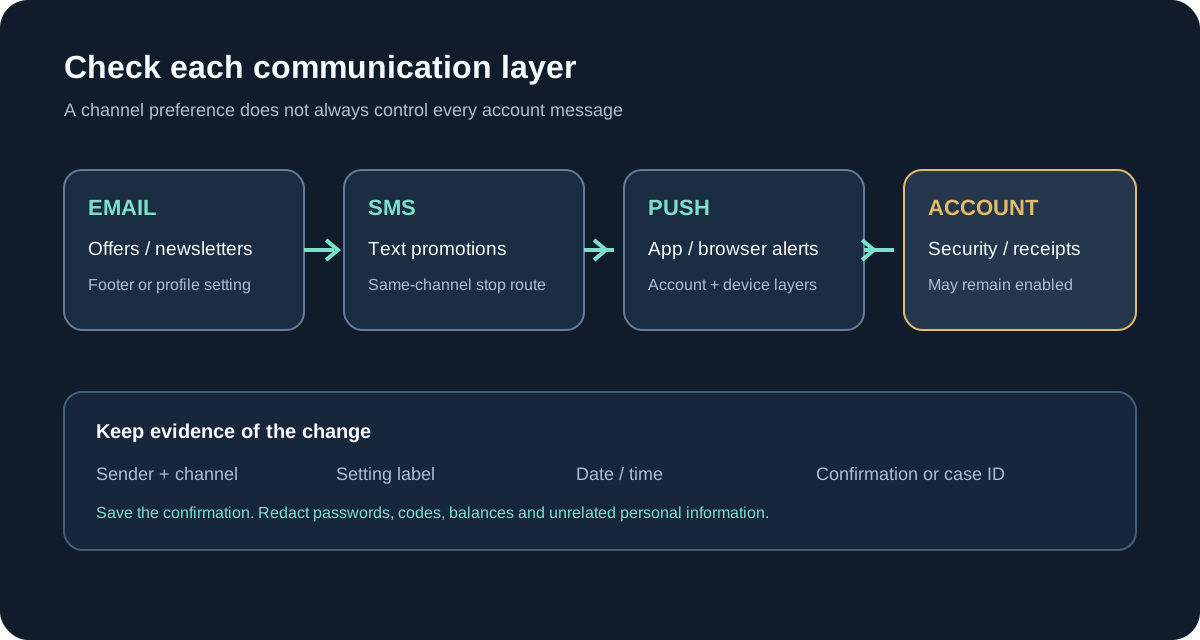
To stop crypto-casino promotions, identify which channel is sending them, use that channel’s own unsubscribe or preference control, and keep a dated record of the change. Email marketing, SMS, in-app messages and push notifications can have separate settings. A message that confirms a login, withdrawal or security event may be operational rather than promotional, so turning off offers does not necessarily switch off every account notice. The exact controls depend on the operator and the device.
Start with the sender shown on the message and the account’s communication settings. Do not click a link in a message that looks suspicious. Open the operator’s site or app using a saved address, sign in through the normal route, and find its communications or privacy area. If the message comes from an external marketing provider, record the visible sender and ask the operator through verified support whether that sender acts for it.
New Zealand’s Privacy Commissioner says businesses should explain what personal information they collect and how they use it, and that people can ask organisations to access or correct information about them. The Commissioner’s privacy guidance does not tell a specific casino which buttons its interface contains. Separately, the Department of Internal Affairs describes the unsubscribe requirements for commercial electronic messages. This guide uses those sources for a practical record-keeping checklist, not as a conclusion about a particular account or legal dispute.
First separate promotions from account messages
Look at the purpose and content of the message rather than judging by its subject line alone. “A new offer is available”, a bonus announcement, a tournament invitation or an invitation to return is plainly promotional in ordinary language. A receipt, password-reset code, withdrawal-status update or security warning may be needed to complete or protect an account action. Some messages mix both purposes, such as a transaction confirmation with an offer appended underneath. Save a copy and treat the promotional part as a separate preference question.
The Unsolicited Electronic Messages Act 2007 defines commercial electronic messages and contains an exception for a message that facilitates, completes or confirms a commercial transaction the recipient previously agreed to. DIA examples include order and payment confirmations. That does not make every message from a service transactional, and it does not mean that a sender can label an offer “account information” to avoid your preference. If a message mixes an account event with an unrelated promotion, record the full message and ask the sender to identify which communication category and setting it uses.
Do not expect a marketing unsubscribe to disable risk or security notices. A login alert can be important even after promotional consent is withdrawn. Likewise, keeping transaction messages enabled does not mean you consented to newsletters or casino offers. The account may present a single “email” toggle that does not distinguish these categories; if so, ask support what it controls before changing it, and preserve the answer.
Map every channel before changing settings
Create a small channel inventory. Record the address, number, app or device that receives the message, the visible sender, the last message date, and the available preference control. The point is to avoid changing only email and then assuming the phone or in-app channel was included. Do not enter a real password or one-time code into a spreadsheet or screenshot.
| Channel | Where a preference may appear | Evidence to retain | Common limitation |
|---|---|---|---|
| Message footer, account profile, communication preferences | Original message, sender address, unsubscribe confirmation | One-click control may apply to one list or brand only | |
| SMS or text | Reply instruction or account notifications settings | Message, short code or sender label, reply and timestamp | A keyword may stop texts from one sender but not email |
| App push | Operator app settings and the phone’s notification settings | Account toggle and device permission state | Device-level blocking may hide both offers and useful alerts |
| In-app inbox | Message centre categories or account preferences | Category name, setting state, dated screenshot | Removing a notice may not change future delivery preferences |
| Browser notification | Site permission in the browser | Origin, permission state, browser and device | Browser permission may be independent of account consent |
The labels are only examples. An operator might call a preference “offers”, “news”, “marketing”, “product updates” or “communications”. Write down the exact label shown rather than translating it into a broader promise. If the interface has separate boxes for email, SMS and push, change only the categories you intend to stop and preserve a record of each change.
Use the correct control for each channel
If the email appears genuine, use its unsubscribe link or open the account’s communication preferences directly. Read the confirmation screen before submitting. Some pages ask you to choose which list to leave or require a final confirmation; others may offer a channel switch instead of a full opt-out. Save the page or confirmation message and note the date and time. If the link asks for your password again, verify the domain independently before entering credentials.
Do not forward an unsolicited unsubscribe link to a friend or post it publicly. Such links may contain a unique account token. Never paste that token into a public support forum. If the email is clearly phishing, do not interact with its links; use the operator’s published security channel and, where relevant, your email provider’s report function.
SMS and text messages
Read the sender’s stop instruction carefully. If it says a reply such as STOP is available, check that the instruction belongs to the message’s sender and use the same text channel. DIA says a text unsubscribe facility must let a person respond using the same method, and the unsubscribe must be free. Do not send account credentials or verification codes by text. Preserve the incoming message and the reply confirmation, but redact unrelated personal details if sharing them.
If you do not recognise the sender, do not reply with sensitive information. Use the operator’s official account preferences or a verified support contact to ask whether the sender is an authorised messaging provider. A phone’s “block sender” function can reduce interruptions on that device, but it may not register an account-level opt-out. Record the difference between a device block and a request to the business.
App and browser notifications
There can be two layers: the operator’s own setting and the phone or browser permission. An app-level “promotions” control might stop offer alerts while retaining security notifications. An operating-system toggle may suppress everything from the app, including login warnings. A browser permission may be attached to a particular site origin and device rather than to the account itself. Inspect each layer and write down which one you changed.
If a notification appears on a shared device, remove the device from the account if the operator provides that control, then change the device permission. Do not assume that deleting the app withdraws marketing consent. If you reinstall later, a preference stored on the account might still be active. Ask support whether the setting is account-wide, device-specific or controlled by a separate provider.
New Zealand unsubscribe basics in plain language
DIA’s guidance for the Unsolicited Electronic Messages Act says commercial electronic messages with a New Zealand link need consent, accurate sender information and a functional unsubscribe facility. Its current explanatory material says the facility should be clear, free and likely to remain functional for at least 30 days after a message is sent. DIA also says an unsubscribe request should be actioned within five working days. The Act’s text describes consent as withdrawn five working days after an unsubscribe facility is used.
Those points concern commercial electronic messages and are not a universal answer for every notification, service message, platform alert or country. Whether a message is commercial depends on its content and circumstances. A transaction confirmation may fall within a statutory exception, while an offer in the same email may raise a different question. Do not use this short summary to decide a complex dispute. Save the message and check the current official guidance if the category is unclear.
The same caution applies to timing. A campaign already queued before the preference changed might arrive shortly afterwards, but a queued-message explanation does not automatically settle whether a request was processed correctly. Record when you made the request, the confirmation shown, and when any later message arrived. Ask the operator to confirm the processing date and which lists or channels were updated.
Keep a clear record of the change
Take a screenshot of the preference screen before and after changing it if the page displays a clear state. Include the account section name, channel, toggle label, date and time. Avoid capturing a full balance, wallet address, identity document or authenticator code. A cropped image should preserve enough context to show which site or app setting changed without exposing unrelated information.
Save the original promotional message with its full sender details and the footer where the unsubscribe control appeared. If you receive a confirmation email, keep that too. For a text, preserve the incoming message, the stop instruction, your outgoing request and the response. A short timeline is easier to review than a large folder of uncategorised screenshots.
Use neutral filenames such as “email preference 2026-10-08” or “SMS opt-out confirmation”. Do not alter the original text to add commentary; make a separate note for your interpretation. If your device automatically converts times or hides the timezone, state the device setting. If a support reply supplies a case number or processing date, place it beside the relevant message.
If marketing continues after you opt out
First confirm that the later message came from the same sender or an associated brand. Check the full sender address, account brand and footer; similar names can belong to unrelated businesses or impersonators. Compare the later message with your saved confirmation and note whether the channel or list differs. An email opt-out may not cover SMS, another brand within a group, or a third-party campaign if the original preference was narrowly scoped.
Contact the operator through its published, verified support channel. State the date and channel of your request, quote the preference label, provide a redacted copy of the confirmation and identify the later message. Ask which sender or provider sent it, when the opt-out was applied, and whether other promotional categories remain enabled. Do not include a password, one-time code, seed phrase or complete payment details.
DIA’s guidance identifies the Department as the enforcement body for the Unsolicited Electronic Messages Act and explains how to report suspected spam. For SMS, its information page describes forwarding a commercial text to 7726. Check the current DIA instructions before reporting, because contact routes can change. A complaint to the regulator is not a substitute for asking the sender to stop, and this guide cannot decide whether a specific message breaches the Act.
Privacy settings are separate from marketing choices
An account may include settings for analytics, device recognition, personalised content or cookies. These are not necessarily the same as a marketing subscription. Turning off push alerts may not change how a platform processes account data; opting out of offers may not remove transaction history required for account operations. Read the privacy notice beside the setting and record the exact purpose it describes.
The Office of the Privacy Commissioner says organisations should tell people when personal information is collected and how it will be used, and should safeguard it against loss, misuse and unauthorised access. The Commissioner also explains that people can request access to personal information and seek correction of information they believe is wrong or misleading. These rights are distinct from an unsubscribe control. This page does not turn into a personal-information access request guide; it only flags that a marketing preference does not answer every privacy question.
If you are concerned about how your information was used, first raise the concern with the organisation and keep its response. The Commissioner’s page says that, before making a privacy complaint to the Office, a person should complain directly to the business or organisation. Follow the official guidance for the current process and avoid sending more personal information than the complaint requires.
A practical preference audit
Use this sequence when you want a clean record of your choices:
- Identify the sender, channel, date and apparent purpose of each message.
- Open the account by a known route; avoid links in suspicious messages.
- Find the marketing preference for email, text, app push and browser notifications separately.
- Check whether account, security and transaction notices have their own category.
- Change only the choices you intend to change and read any final confirmation.
- Record the displayed setting, timestamp and confirmation or case number.
- Check the relevant device-level permissions without assuming they replace the account request.
- Preserve later messages and compare the sender and category with your original request.
- Ask verified support to explain any channel or list that remains active.
- Use current DIA or Privacy Commissioner guidance if the concern involves a legal or privacy issue.
This checklist is not a recommendation to keep or resume gambling. Its purpose is to help a person reduce unwanted communications and retain a clear record. If an account is restricted, self-excluded or closed, do not use a marketing setting to try to regain access or bypass that status. Use the account’s official support route and respect the restriction.
What this guide cannot confirm
No operator-specific preference screen, email list, text sender, push system or privacy notice was available for this assignment. The guide therefore does not say that a particular casino provides a one-click unsubscribe, supports channel-by-channel toggles, will retain a stated history period or offers a particular complaint outcome. Those details must be confirmed in the current account interface or by verified support.
The site’s NZ audience also makes the boundary around casino promotion important. DIA states that online casino advertising is prohibited during the current transition and that advertising rules apply to third parties publishing or arranging advertisements.
When a preference change does not appear to work
A preference screen is only one part of a communication path. An operator may use a separate mailing platform, app notification service, or a brand group with more than one sender name. A saved preference can also be displayed before the change reaches every system. These are possibilities to check, not claims about any specific casino. If a message arrives after a change, preserve it and ask the sender to identify the category and the date the preference reached the relevant system.
Look at the visible sender, full email address, message footer, destination domain shown by your mail client, and account brand. Do not click a link merely to identify where it goes. If the message appears suspicious, use the contact details obtained from the account or the operator’s known website instead. This helps distinguish a genuine preference problem from impersonation or a message sent by an unrelated company.
For an app push alert, record whether it came from the app itself or from a browser. Operating systems show the app or website that generated a notification, while account settings may separately govern what categories can be sent. If you turn off notifications at device level, that can stop display on that device without changing the account-side subscription. Conversely, account-side opt-out may leave login, security, payment or service notices enabled. Those notices may be important to account security, so do not assume they are marketing simply because they arrive by email or text.
Keep a brief chronology rather than forwarding a large mailbox. A useful record includes the original message date, the preference change date, the displayed status, a confirmation number if shown, and any later contact. Redact other people’s addresses and unrelated account information. If the business replies that a message was operational rather than promotional, ask it to explain the purpose and the category that generated it. Keep the reply with the original evidence. This provides a clear basis for a follow-up without making unsupported claims about what the law requires in a particular case.
A privacy request is a different task
Turning off promotions does not itself ask an organisation to explain all information it holds about you. If your concern is wider than unwanted messages, first identify the actual question: which data was collected, what purpose was stated, who received it, or whether a particular record is inaccurate. A narrow request is easier to route than a vague request to “delete everything”, especially when some records may be retained for account, security, or legal purposes.
The Office of the Privacy Commissioner says people can ask an organisation for access to their personal information and request correction of information they believe is wrong, incomplete or misleading. It also says that an organisation generally needs to respond to an access or correction request within 20 working days. That timeframe relates to privacy access and correction requests; it is not an unsubscribe-processing deadline and should not be applied to marketing settings. The OPC page describes these rights across organisations in New Zealand, but this guide cannot determine whether a particular offshore operator is subject to a specific obligation in a specific case.
If you make an access or correction request, describe the information sought and a reasonable date range. Use the official account channel, retain the wording and note when it was received. Do not send identity documents unless the organisation explains why it needs them and provides a secure verification method. If the request is about a marketing preference, keep it separate so the business can tell whether you want messages stopped, personal data accessed, or a record corrected.
The Privacy Commissioner recommends first raising a privacy concern with the organisation. If that does not resolve it, use the Commissioner’s current complaint guidance. For commercial electronic messages, consult current Department of Internal Affairs instructions as well. The two routes address different issues: a privacy concern is not automatically a spam complaint, and an unsubscribe request is not a complete privacy inquiry.
Sources and verification boundary
Official sources checked 8 October 2026: Office of the Privacy Commissioner — Your privacy rights; OPC — opt-in and opt-out for marketing emails, updated October 2025; New Zealand Unsolicited Electronic Messages Act 2007; DIA — Unsubscribing; and DIA — Online gambling for advertisers. These sources support the general NZ communications and advertising boundary only. No operator-specific setting or message was tested.
Sponsored offers shown by the shared site components are separate from the editorial game or account evidence above. They do not establish local eligibility or verify an operator configuration. Read the current operator terms and local requirements independently.