Crypto account guide · South Island guide
Crypto casino account statement: reconcile deposits, play and withdrawals
 Best casinos available in New ZealandUpdated 7 November 2026

A crypto casino account statement is an internal platform record, not a blockchain explorer. To reconcile it, choose a time window, preserve the displayed unit and timezone, separate settled entries from reserved amounts, total each type of movement, and compare the calculated closing balance with the platform’s recorded balance. Duelbits’ current help materials describe transaction and bet-history areas, but do not establish a universal export format or a single combined statement for every casino.
The short answer
To reconcile a crypto casino account statement, use the casino’s own transaction or account history to explain changes in its internal balance. Start with the opening balance at a specific timestamp, list every credit and debit inside the same time window, account for pending or reserved amounts separately, and compare the result with the closing balance shown by the platform. Keep the asset ticker, internal ledger unit, display currency and game stake denomination in distinct columns. A blockchain transfer record can prove that a wallet sent an asset; it does not by itself prove how the casino credited, converted, reserved or later used that asset.
The practical difficulty is that crypto-facing services may show several records in different places. A cashier can list deposits and withdrawals, a profile can list transactions, and a separate bet-history screen can show game activity. Some screens may show a local-currency estimate that updates with an exchange rate. Others may use an internal platform unit. A reader should not assume that one number is an exportable statement or that every event appears in one chronological table.
This guide gives a reproducible method for assembling those records and finding the point where totals diverge. It uses Duelbits’ publicly available help pages as a dated example of transaction-history and display-currency language. It does not claim that Duelbits is available to New Zealand customers, that its interface is identical to other casinos, or that any provider offers a downloadable statement. Ask the named operator what records it can provide if the screens are incomplete.
What counts as an account ledger
An account ledger is the operator’s record of balance-affecting events within the service. Depending on the platform, it may include deposits credited, withdrawals initiated or completed, bets accepted, game returns, refunds, bonuses, fees, corrections, and movements between balance categories. The term can describe an actual downloadable file, a transaction history screen, or an internal report supplied by support. The word alone does not tell you which records are included, how long they remain available, or whether timestamps reflect your device, the operator’s server, or a payment system.
Treat every record by its source. The account screen is evidence of what the platform says it credited or debited. A game history can identify stakes and payouts associated with a round. A wallet or exchange history records actions in that external service. A blockchain explorer displays network transactions and confirmations. These layers may refer to the same deposit, but they are different ledgers with different identifiers and timing. Keep the references alongside each other rather than merging them into a single line prematurely.
The Wazdan provider and game pages elsewhere on this site are unrelated to account accounting. A supplier’s RTP or maximum-win field says nothing about whether a casino statement contains every session event. For game-specific settlement records, use the game guide and operator support. The present page stays focused on account-level reconciliation and does not reproduce the separate live-round dispute checklist.
Before adding numbers, identify the unit
A reliable reconciliation begins with the unit shown on each row. That may be a native cryptocurrency amount, a platform token or coin, a fiat-denominated ledger, or a display-only estimate in NZD. The same account can present more than one of these. The balance header may be a conversion for readability while the underlying balance is stored in a different unit. A game can also express its stake in a default currency that differs from the account header. These distinctions are covered in more detail in the existing crypto casino balance denomination guide.
Write down the exact label, ticker or currency code as shown. Do not silently convert a value such as 0.0012 BTC into NZD, or an operator’s internal “coin” into US dollars, and then treat the converted amount as the amount originally credited. If a conversion is necessary for a personal comparison, preserve both the original figure and the converted estimate, plus the exchange rate source and timestamp. The conversion is a separate calculation, not a replacement for the source record.
Duelbits’ help article about display currencies, checked on 8 October 2026, says its displayed fiat currency changes values shown on screen while the platform’s internal balance is held in a USD-equivalent unit described there as Duelbits coins. The same article notes that its display figures use exchange rates and may show small differences after conversion. That is a platform-specific example. It illustrates why a currency selector should not be assumed to change the underlying ledger, and it must not be generalized to another casino.
Fix the statement period and timestamp basis
Choose an unambiguous interval before exporting or copying rows. Record the start and end timestamps with an explicit timezone, ideally using the timezone displayed in the account interface or specified by the operator. If the page provides only local time, write down the device timezone and daylight-saving status that applied when you viewed it. If the operator’s support response uses a server timezone, keep that as a separate field. Do not shift rows between timezones without retaining the original timestamp.
Set your opening balance at the last reliable moment before the first included event, and the closing balance at the first reliable moment after the last event. A common error is to select “today” in a local interface while the operator’s records group activity by UTC or another server setting. An entry just after midnight in one timezone can appear on the prior date in another. The numbers may be correct while the rows seem to fall outside your chosen date filter.
Capture the filter settings with your notes: date range, timezone, currency, account section, and whether completed or pending transactions are included. If the system paginates results, check every page and note how many rows were displayed. A screenshot of the date filter and column labels can preserve context, but it is not a substitute for the underlying file when an official export is available. The export may include fields that a screenshot cuts off.
Build a transaction inventory without mixing categories
Copy each visible event into a working table before calculating totals. Useful columns are timestamp, event type, source identifier, amount, unit, status, balance category, and source screen. If an operator file supplies additional data such as a fee or conversion amount, retain the original field names. Never overwrite the raw record with a normalized description. A separate notes column can explain your interpretation without changing what the platform displayed.
Use practical event categories: external deposit credited; withdrawal requested; withdrawal completed; wager accepted; game return; bonus or promotional credit; fee; correction or reversal; transfer between account pockets; and pending or reserved movement. The exact categories depend on the operator. A row labelled “adjustment” should remain an adjustment until support explains it. Do not relabel it a refund simply because the amount matches an earlier stake.
When the same event appears in two places, mark the records as a possible match rather than counting both. For example, a cashier credit and a transaction-history credit may be two views of one deposit, not two separate credits. Match by reference number, amount, unit and timestamp tolerance. If an operator uses different IDs across screens, ask support whether those IDs refer to the same event. Keep unmatched entries visible instead of forcing a one-to-one match.
Separate available, pending and reserved funds
The word “balance” is not always one simple number. An account may show total funds, available funds, funds reserved for a withdrawal, funds locked in an active game, promotional credit, or pending deposits. These categories can move at different times. A withdrawal request may reduce the spendable balance before the transaction is marked complete. A game stake may be accepted and temporarily reserved before the round’s final result is posted. A pending deposit may appear in a status panel but not yet be included in the credited total.
For reconciliation, make a separate column for status and do not add a pending amount to the settled balance unless the interface says it is included. Use a bridge such as: settled balance plus pending credits, less reserved withdrawals and active stakes, equals the screen’s displayed total only if the operator defines that total that way. If the operator does not state the calculation, avoid asserting a formula for the UI. Instead, reconcile the settled ledger independently and ask support which categories feed the header figure.
Promotional credits also need their own classification. A bonus amount may be conditional, non-withdrawable, subject to wagering, or shown separately from cash. This guide does not infer any bonus rule. Record the label and status from the current terms, and do not count promotional value as a cash deposit unless the operator explicitly defines it as withdrawable cash. If an entry disappears, the reason should be checked in the promotion terms or with support.
The basic arithmetic check
For one unit and a consistent settled time window, a simplified calculation is:
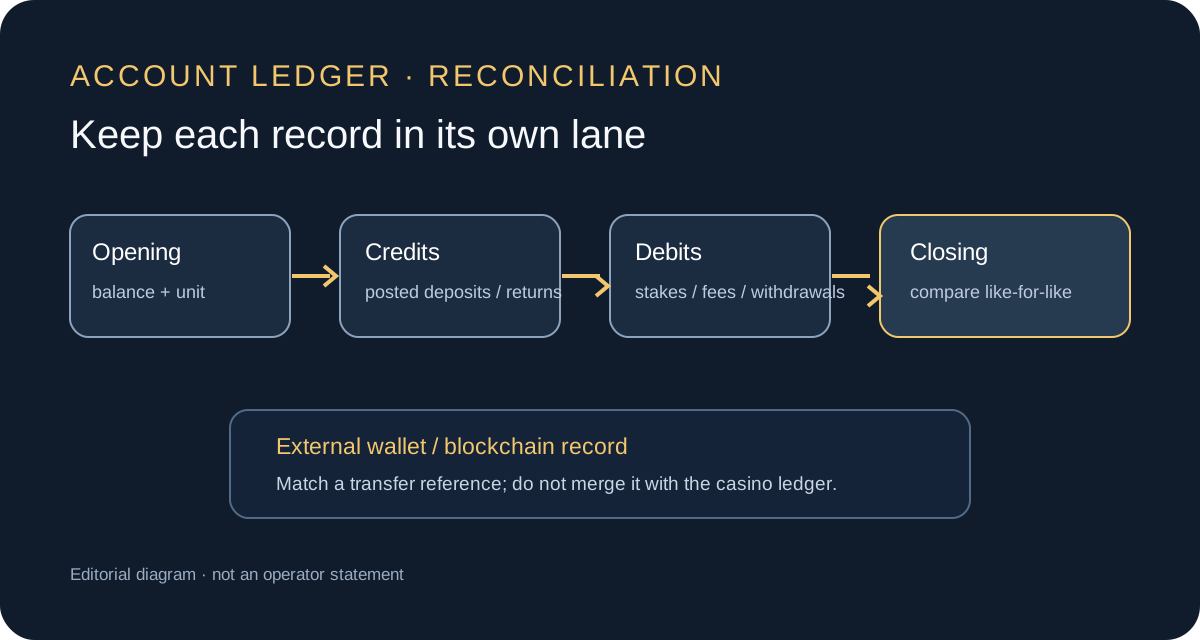
Opening balance + settled credits − settled debits = calculated closing balance.
Credits can include deposits that have been posted, game returns, refunds, or other positive adjustments. Debits can include accepted stakes, completed withdrawals, fees, or negative corrections. List each category rather than recording only the grand total. This makes it easier to see whether a mismatch relates to deposits, gameplay, cash-out, a fee or a timing difference.
For a casino ledger that records individual stakes and payouts, an illustrative structure is opening account amount + credited deposits + game payouts + refunds + positive adjustments − stakes − completed withdrawals − fees − negative adjustments. This is not a promise that every operator records every event at the same level or that every game payout appears as its own row. It is a working model for asking which movements the operator’s statement includes. If the site records only net round outcomes, do not subtract a stake and add a payout again without checking whether that payout is already net.
Perform the calculation with the original unit and sensible precision. Do not round each row into NZD before adding them, because repeated rounding can create a difference. First total the source-unit entries, then compare that result with the source-unit closing balance. If you need an NZD estimate, apply the chosen rate as a separate step and label it as an estimate. The operator’s conversion and your personal conversion may use different rates or timestamps.
A worked example with deliberately simple numbers
Suppose an account begins a UTC day with 0.0100 units of an internal dollar-linked ledger balance. During the period, the operator posts a 0.0050 deposit, records 0.0010 in accepted game stakes, records 0.0004 in settled game returns, and posts a 0.0020 completed withdrawal. Ignoring fees and other adjustments, the calculated end balance would be 0.0124 units: 0.0100 + 0.0050 − 0.0010 + 0.0004 − 0.0020. The example is arithmetic only; it is not a statement about a platform’s actual accounting unit, wager handling or current casino rules.
If the header shows a different NZD estimate but the internal balance remains 0.0124, the first question is whether the chosen fiat display rate changed. If the internal ledger also differs, inspect the event rows and statuses. A pending withdrawal, rounding, an omitted wager, or a late adjustment may explain why two screen totals do not match. The correct explanation depends on the operator’s records, not on a guess from the size of the difference.
If the platform reports a closing value of 0.0114, the one-unit difference in the example should be traced to a missing row or a mistaken classification. Check whether the 0.0010 stake was already represented in a net round outcome, whether the return amount was gross or net, whether the withdrawal had actually settled, or whether a fee was charged. Do not add a speculative “miscellaneous” row to force agreement. A reconciliation is useful precisely because it shows what remains unexplained.
Match the account ledger to external transfer records
An external wallet can show that a transaction was broadcast or confirmed, but an account ledger answers whether the platform credited an internal balance and how it classified the credit. The matching process should preserve the external record’s asset, network, amount and timestamp alongside the operator’s deposit entry. The TXID itself and its anatomy are outside this guide’s scope; use the platform’s own deposit instructions and the wallet’s record when a deposit is missing.
Allow for the stages between sending and posting: a wallet may submit a transfer, a network may confirm it, a payment provider may process it, and the casino may then credit the account. A timestamp can differ at each stage. A transaction that appears in an external wallet does not automatically establish the amount the casino credited, especially if its rules convert to an internal denomination or apply a disclosed charge. Compare the exact operator deposit reference and status.
For withdrawals, distinguish request, review, processing, completion and arrival in the destination wallet. A platform entry marked requested is not the same as a completed blockchain transfer. A wallet may receive a different net amount if a network fee applies, but do not assume a particular fee without the operator’s current terms. Record both the amount the operator says left the account and the amount received externally, then ask support to explain any disclosed deduction or status gap.
When game rows are missing or bundled
Transaction histories do not always show every round as a separate financial line. Some sites provide a high-level bet history with game name, round ID, stake and payout. Others may show a single net change, a session summary, or separate records for a stake and result. The account ledger’s granularity is an operator design choice. Before concluding a row is missing, identify which screen is intended to contain game-level events and which screen is only a wallet transaction history.
Compare one short interval first. Select a period with a small number of events and note the balance before play, the game history entries, and the account total after settlement. This makes it easier to see whether the history is gross or net. Do not turn this into a test with money at risk; use existing records. If the fields are unclear, request an explanation for a specific event rather than creating new wagers to see how the screen reacts.
If a particular accepted bet or settlement is at issue, keep that round’s reference and use the operator’s published help or support process. A single game-round record answers a different question from an account ledger. This article stays focused on assembling account-level movements and identifying which record is missing from a total.
How to request a statement or missing data
If the interface has no export button, do not assume that the records are unavailable or that a screenshot is the only option. Ask the operator whether it can provide an account transaction report for a named period and which categories it contains. Request the file format, timezone, currency basis, status definitions, and whether bets and payouts are itemised or only summarised. Ask how long the record can be retained and whether the date filter includes pending events. Keep the response with the period you are reconciling.
Duelbits’ help centre, checked on 8 October 2026, describes viewing transaction history through the wallet panel and transaction history, and its registration/account article describes a Transactions section for deposit and withdrawal history. Those public pages do not establish that a single downloadable statement exists, nor that all game stakes and adjustments appear in the same report. Use them as an example of where to look in that service, not as a universal interface map.
When contacting support, provide a narrow date range, the displayed unit, the relevant account or transaction identifiers, and the balance values at the start and end. Ask which specific row or category explains the difference. Avoid sending a password, authentication code, private key, recovery phrase or full payment credentials. A legitimate records request should not require secret wallet access. Remove unrelated personal data from screenshots if the platform allows you to do so without obscuring the event being discussed.
Preserve records safely
Save the original export without editing it, then create a separate working copy for calculations and annotations. Use a clear filename with the platform, date range and extraction date, but avoid putting account passwords, full identity numbers or wallet secrets in the filename. Keep one copy in a secure location with access controls. If cloud storage is used, consider whether the file contains account identifiers or sensitive financial history and choose its sharing permissions deliberately.
If the platform offers CSV or spreadsheet data, inspect the column names before sorting or filtering. Preserve the raw row order and original timestamp string. Spreadsheet software can automatically reinterpret long IDs, leading zeros, dates and decimal separators. Import fields as text where appropriate, and keep a copy of the untouched source. For a PDF or screenshot, store the extraction date and source screen in a note. This is record-keeping guidance, not accounting or tax advice.
Do not share a complete statement publicly to seek help. Redact email addresses, full names, account IDs, payment details and other identifiers. Keep enough information to explain the discrepancy, such as a partial reference or final digits, but do not publish authentication details. If a file is sent to support, use the operator’s verified support channel rather than a link from an unsolicited message.
Diagnose common differences methodically
Start by asking whether the difference is only in a display estimate. Compare the internal unit at the exact same time and check the selected currency. Next, compare the date interval and timezone, including the boundary rows. Then inspect status: a pending deposit, reserved withdrawal or unsettled game event may be excluded from one total. After that, look for a duplicate or missing row, a fee, a promotional entry, an adjustment, or a gross-versus-net interpretation.
Common bookkeeping errors include adding a pending deposit before it is credited, counting the same cashier event and history row twice, subtracting a stake that was already netted from the reported result, converting each line with a different rate, or using rounded NZD values as if they were exact source-unit balances. Keep a short list of candidate explanations and test them against visible records. If no record supports an explanation, do not mark the discrepancy resolved.
Escalate a residual difference with the calculation attached. State the amount, original unit, date range and timezone; point to the opening and closing figures; identify the unmatched line or the category that does not reconcile; and ask whether the platform can provide the underlying ledger event. Avoid framing a discrepancy as proof of misconduct or a guaranteed refund. The records may reveal a timing or classification issue, but the operator must explain its own accounting fields.
New Zealand context and limits of this example
This guide uses New Zealand English and NZD as a local comparison currency only. A platform’s public help page, a currency selector or an accessible login screen does not establish that the service is available to a person in New Zealand, that an account is eligible, or that a particular gambling activity is locally authorised. Check current official information and the named operator’s terms; this article makes no service-availability claim.
The Department of Internal Affairs says the advertising prohibition under the Online Casino Gambling Act 2026 is in effect and that advertising rules apply to operators publishing or arranging advertisements, including third parties. Its current advertiser guidance also notes affiliate-marketing restrictions among the initial regulatory decisions. This is an editorial safeguard, not individual legal advice. The official guidance can change, so a later release review must check the current primary sources.
Reconciliation checklist
- Name the platform, account section and exact period; save the filter and timezone.
- Record the opening balance, closing balance and each unit exactly as displayed.
- Capture all pages or obtain the operator’s official export; note whether it includes pending events.
- Separate deposits, withdrawals, stakes, returns, bonuses, fees, corrections and transfers.
- Mark each row as settled, pending, reserved or promotional based on the platform’s wording.
- Match duplicates across screens by amount, reference and time before adding totals.
- Reconcile in the source unit first; calculate any NZD estimate separately and label its rate and timestamp.
- Compare account entries with external wallet records without treating them as one ledger.
- List unmatched events and ask support one focused question for each unexplained category.
- Preserve the raw statement, calculation copy and support reply securely; do not share credentials.
Frequently asked questions
Is a transaction history the same as an account statement?
Not necessarily. A transaction-history screen may show only selected categories or current statuses. A statement may be a more complete report, but the operator must define its fields and period. Ask whether the export includes game stakes, payouts, pending amounts, adjustments and fees.
Does a blockchain confirmation prove a casino balance was credited?
No. It can document an external network transfer. The platform’s account record is needed to establish whether and when the transfer was credited internally and what unit was used. Match the records but keep them distinct.
Why does the NZD amount change while the account activity looks unchanged?
A display estimate may recalculate from an exchange rate or use a different rounding precision. Compare the underlying ledger unit, chosen display currency and timestamps. The example from Duelbits is specific to that platform’s published explanation.
Can I add all displayed rows to calculate the closing balance?
Only if they cover the full period, use one unit, and represent movements that are not already netted or duplicated. Check pending and reserved states, and ask the operator how its balance summary is calculated.
Does this guide provide tax or accounting advice?
No. It explains a document-reconciliation workflow and does not state a tax rate, reporting duty or accounting treatment. For those questions, seek qualified New Zealand advice based on your circumstances.
Sources and verification boundary
Reviewed 8 October 2026. Primary examples: Duelbits Help Centre, How to Register on Duelbits, Understanding Display Currencies on Duelbits, and How to find your transaction hash. The cited help pages describe selected interface and record features; they do not establish a single downloadable casino statement, universal history fields, or New Zealand access. Competitor search results were sampled on 8 October 2026 but not used to establish platform fields. Search demand was not measured. The official DIA advertiser guidance was checked on 8 October 2026. No support account, live service, transaction, game history, CPA route or player account was accessed.
Sponsored offers shown by the shared site components are separate from the editorial game or account evidence above. They do not establish local eligibility or verify an operator configuration. Read the current operator terms and local requirements independently.