ELK Studios game rules · South Island guide
Cygnus 5: rules, features and settings to verify
 Best casinos available in New ZealandUpdated 7 November 2026
Cygnus 5 is an ELK Studios slot whose supplier describes rolling symbols, Prism transformations, expanding reels, multiplier Wilds, Meteor Strike and Free Drops. The public product profile confirms the broad feature flow but does not replace the current game-help panel for RTP, volatility, stake limits or the exact payout model. This review separates confirmed mechanics from settings that remain unverified for a particular operator.
The short answer
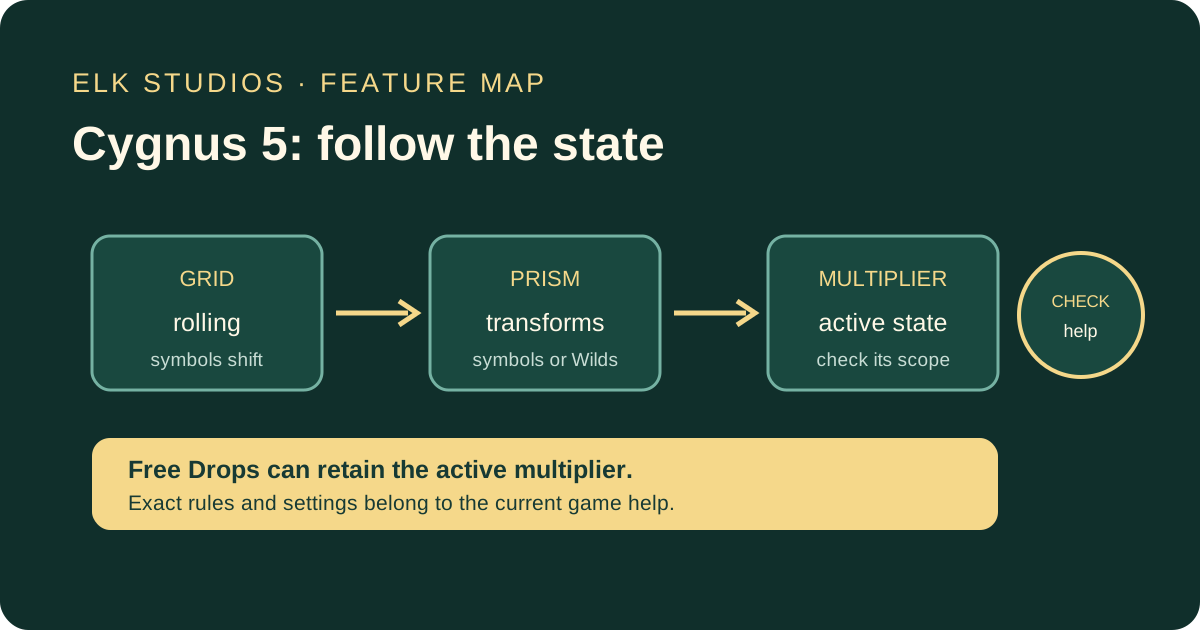
Cygnus 5 is an ELK Studios slot built around a changing grid rather than a static reel layout. The supplier’s public product page describes rolling symbols, multiplier Wilds, symbol transformations, expanding reels, Free Drops, Meteor Strike and a Super Bonus. A Prism can transform payout symbols or create a chain reaction when it reaches another Prism. The currently active multiplier can be carried into Free Drops, while additional drops may be awarded during that feature.
That summary gives a useful mental model: symbols move, a transformation can alter what appears on the grid, and the multiplier state changes how a later win is evaluated. It does not tell you the exact return-to-player setting, the volatility label, hit frequency, stake range or the precise paytable of the build opened at a casino. Those figures need to be read in the game’s own information panel. No operator client or current game-help file was supplied for this review, so it does not repeat numeric settings from review sites or claim that the game is offered to New Zealand accounts.
The article treats Cygnus 5 as one product and keeps the rules, feature sequence, settings checklist, mobile considerations and demo question together. It does not split the subject into separate bonus, RTP or demo URLs. Its purpose is to help a reader identify what the feature names mean, what the supplier confirms, and what still requires the exact client’s help screen before any account-specific conclusion can be made.
Identify the exact game and version
Start by matching the name in the casino’s game lobby to the title on the supplier page. Cygnus 5 belongs to a numbered series, so a result for Cygnus, Cygnus 4 or Cygnus 6 is not automatically a rule reference for this game. Names, art and a shared series do not guarantee identical reels, paytables or feature logic. Keep the complete displayed title in notes, including its number and any variant label shown by the operator.
ELK Studios’ game catalogue lists Cygnus 5 as its own title, and its dedicated supplier page labels the profile “Live now” at the time checked on 6 October 2026. That establishes a public supplier listing and its page-level release wording. It does not prove that a particular casino distributes the game, that a New Zealand account can open it, or that the version available there uses the same settings as another market. Distribution and account eligibility are operator questions.
If a casino launches the game, note the exact client title, version or information date if displayed. Open the help and paytable from inside that client, not only from an external search result. A supplier catalogue can describe the headline mechanics; the client’s information panel should explain symbol values, triggers, award conditions and any selected mathematical configuration. If the game lobby and in-game title do not match, do not guess which version is loaded.
A review page may be about the same title yet describe a market-specific configuration, an earlier interface or a demo file. This matters especially for titles with selectable feature modes or more than one published setting. Treat any numeric value from a third-party page as a question to verify, not as evidence about the operator currently open.
How to read the rolling-symbol grid
The supplier describes Cygnus 5 as a reel slot with rolling symbols and expanding reels. In practical terms, the grid can change during a paid round as symbols move or positions become available. This changes the visible combination opportunities over the course of the feature sequence. It does not mean every spin expands, every symbol wins, or a larger screen guarantees a better payout. The in-game rules must define when the layout changes and which symbol positions count at each evaluation.
A useful way to follow a round is to separate four events. First, identify the symbols that land. Second, check whether the game evaluates a win at that point. Third, observe whether the rolling or expansion action changes the grid. Fourth, read the result after the new layout is evaluated. A single animation can contain several transitions, so watching only the final board may hide how an effect was triggered.
When symbols move, the active paytable still matters. A visual transformation may create a paying symbol, a Wild, a feature symbol or a non-paying state. The product page uses the term “rolling symbols,” but the public summary does not provide a full symbol-by-symbol sequence. The help menu should state what moves, which positions can be affected, and whether the game repeats an evaluation after a transformation.
The expanding layout also makes screenshots easy to misread. A promotional image can show a later or bonus state rather than the base game. It may present the widest version of the grid without showing the trigger that opened those spaces. Use the help text and a freeplay screen, where available and permitted, to learn which elements are persistent and which reset. This review does not present a screenshot or claim to have tested the game client.
If the game provides a round history, compare it with the current help. A history entry can help distinguish an initial result from a subsequent rolling-symbol event. It should not be used to infer future outcomes or an unlisted probability. The goal is to understand the order of events and reconcile a displayed award with the information supplied for the exact build.
Prism and symbol transformation
Prism is a named feature on the official product page. ELK says that a Prism activates when it reaches the bottom, transforming symbols along one or more lines into the same payout symbol or into Wilds. The supplier also says that a Prism meeting another Prism can start a chain reaction. This is the central transformation idea to understand before reading the bonus sequence: a Prism is not just another ordinary symbol in a fixed payline.
The phrase “one or more lines” should be read as a feature description, not a guarantee that every Prism affects the entire grid. The public summary does not specify the precise number of affected lines, the selection method, which symbols can be transformed, or whether a chain reaction always produces a win. Those details belong to the active game help. A player should not infer a rule from one animation or from a static image.
When a Prism transforms a payout symbol, ask whether the original symbol identity disappears, whether the new symbol is evaluated immediately, and whether a Wild can substitute for every paying symbol or only some. If the help uses terms such as “line,” “row” or “reel,” note how it defines them in this game. A casual description can use these words differently from a technical paytable. The exact wording matters when a transformed symbol appears at a border or in a newly expanded position.
A chain reaction is a sequence of feature interactions, not a promise of an accumulating win. If one Prism contacts another, the second event may create a further transformation, but the final result still depends on the symbols, positions and paytable conditions. Record which part of the feature changed and when a win was credited. Do not count intermediate animations as separate returns unless the game history shows them as awarded results.
This feature is also a good example of why a short review can explain the concept while leaving settings open. A reader can understand that Prism changes symbols and may chain, yet still need help text for precise trigger conditions. A responsible review labels those layers separately instead of turning a supplier headline into a fabricated complete rulebook.
Multiplier Wilds and the multiplier state
The official page describes a multiplier symbol that increases the current active multiplier when it reaches the leftmost column or the bottom, then turns into a Wild. That description contains two stages: the multiplier symbol changes the current state, and the symbol itself becomes a Wild. The order is important because the active multiplier may affect a win after the update, while the new Wild may help form a combination.
The supplier profile does not explain every interaction. It does not identify the starting value of the active multiplier, whether it applies to every win or selected wins, or how it behaves when a round contains more than one multiplier symbol. It also does not define whether different lines receive separate calculations. The in-game help and paytable need to answer these questions. Until then, describe the feature at the level the supplier confirms and do not invent a formula.
A multiplier can look like a simple number overlay, but its practical meaning depends on scope. Does it multiply only the win in a particular line, the aggregate payout for the spin, or an award after another feature? Does a new multiplier add to the current value or replace it? Does a feature reset it after each round? Those are not cosmetic details; they determine how the result is calculated.
The official product page says that the active multiplier is carried into Free Drops and remains persistent during that bonus. This establishes one persistence relationship. It does not say the multiplier is permanent across paid rounds or across a full casino session. The reader should separate “persistent throughout the bonus” from “persistent everywhere.” If the live client shows a counter before the bonus begins, make a note of its starting value and compare the final summary with the game’s explanation.
When an animation shows a multiplier turning into a Wild, keep the symbol’s old role and new role distinct. The multiplier can change the feature state before the Wild contributes to an evaluated combination. If the display overlays both events at once, the round history may be easier to interpret. This is a way to understand settlement, not a technique for changing the chance of the next feature.
Meteor Strike and feature-symbol replacements
Meteor Strike is described by ELK as a randomly triggered feature that replaces a number of payout symbols on the grid with feature symbols. This can alter the board after ordinary symbols have landed. The public description confirms the broad replacement mechanic, but it does not publish a specific probability, a fixed number of replacements, or a guarantee that a particular feature symbol will appear on every trigger.
To understand a Meteor Strike, first identify which symbols were replaced. Then check what each newly revealed feature symbol does, whether its effect resolves immediately, and whether it can activate another part of the game. A symbol change is not necessarily a payout. It may create a Wild, a multiplier, a bonus symbol or another step. The help panel should connect the icon to the resulting action.
Because the feature is described as random, do not treat a long pause without Meteor Strike as evidence that one is “due.” A previous strike does not establish that the next paid round will or will not trigger another. Likewise, a feature animation appearing close to a bonus state does not prove that the two systems share a hidden trigger unless the current rules say so.
The supplier says that one of the Super Bonus modes through X-iter includes a guaranteed Meteor Strike in each Free Drop. That statement applies to the named mode described on the supplier page, not automatically to every base game round or every Free Drops feature. It also does not mean each strike guarantees a win. A guaranteed feature event and a guaranteed monetary return are different ideas.
When comparing a mode with ordinary play, look for the exact entry price, the mode’s starting state, its included feature events and its displayed return setting. The public page is a useful description of the menu, but the live client’s information should control an account-specific decision. This guide does not quote feature-mode prices or claim that a specific operator has that menu active.
Free Drops and the bonus progression
The supplier says a bonus symbol reaching the leftmost column triggers the Free Drops Bonus game. The active multiplier is carried into the bonus and remains persistent throughout it, and further Free Drops can be triggered. This means the feature has a state that can continue changing after entry. The opening position and the way the game reached it may matter to the bonus result.
“Free” describes how the bonus drops are funded within the game sequence; it does not mean the round is free of risk. A paid wager is required to start a base round, and the bonus outcome can still return less than that stake or nothing beyond it. If a feature can be entered through a separately priced mode, that cost should be compared with the ordinary stake and disclosed by the live menu.
The current game help should explain how the trigger symbol reaches the relevant column, whether the condition must occur during one paid round and what happens if multiple bonus symbols appear. It should also describe how additional drops are awarded, whether the multiplier can change during them and what state ends when the feature concludes. The official summary does not supply all these details, so this article keeps them marked as help-screen checks.
A bonus can contain several layers: an entry trigger, a starting multiplier, changing reels, symbol replacements and further drops. Read the rules in sequence rather than treating “Free Drops” as one single action. The exact order can explain why a board state changes before a payout is displayed. If the user interface provides an event history, compare the named feature and final amount with the help text.
Additional drops can prolong the state but do not establish a minimum win. A feature may continue without forming a paying combination, or a transformation may not produce a credited award. Avoid equating a longer animation with a better result. The settlement screen, not the duration of a bonus, determines what the account receives.
Super Bonus and X-iter modes
ELK’s product page names both a Bonus and a Super Bonus and describes X-iter as a way to choose predefined game modes. The public page says its Cygnus 5 menu has multiple modes with different entry costs and feature conditions, including a Super Bonus mode. This is a supplier-level feature description, not a promise that every casino exposes the menu or uses a particular mode price.
A mode selection is an additional stake decision. Before choosing one, confirm the amount charged, the exact state it starts, which feature is guaranteed or more likely, whether the ordinary game can end without a feature, and the listed RTP or rules for that mode. A mode that guarantees an event does not guarantee the event will pay enough to cover its price. Record the total cost before confirming rather than comparing a mode price only with the base stake.
The standard game and optional modes should not be blended in a review. A feature can work differently when it is bought or entered through X-iter than when a bonus happens during ordinary play. The product description may say that a mode begins nearer to a selected feature; the help panel should state the exact conditions and payout model. A description of one mode is not a universal rule for every Free Drops round.
If an operator’s version does not show the X-iter menu, that does not by itself establish that the game is missing or broken. The operator may not expose the option, the market may configure it differently, or the current client may have changed. Check the game’s help and the operator’s information before assuming an omission is an error.
Optional features can make a game more complex, but complexity is not an advantage by itself. If the sequence is difficult to follow, use the help panel or a permitted demo to learn the steps without placing a wager. Do not use a high-cost mode as a shortcut to understand the basic rules.
RTP, volatility, cap and other settings
RTP is a long-run theoretical return parameter for a game configuration. It is not a forecast for one session, a guarantee of a refund or a promise that a particular stake will return a particular amount. A game can have more than one published configuration, and an operator’s version may not use the same setting cited in a review article. The current help screen is the evidence needed for the exact client.
Volatility describes how a game’s results may be distributed over time; it does not tell a player what the next spin will do. Terms such as medium, high or a numerical rating should be read as the supplier’s or operator’s classification, not as a personal prediction. Two secondary reviews can label the same title differently because they may use separate scales or copy different sources. A review label is not a replacement for the current game help.
A maximum-win figure is a theoretical cap, not a likely outcome or a target. Even if a supplier lists a ceiling, the active build’s help should be consulted for the precise limit and the basis of calculation. Check whether the cap is expressed as a multiple of the total stake, whether a mode has a different ceiling, and whether a separate currency cap applies. This article does not reproduce a numeric cap from a promotional profile because the current in-game help was not supplied for verification.
The same evidence rule applies to hit frequency, stake limits, bonus triggers, mode costs and payout tables. Search results may show figures from other jurisdictions or an earlier product sheet. If a number is not visible in the active client or current game help, leave it unconfirmed. Do not infer the value from a screenshot, an unrelated game in the series or another operator’s version.
A careful pre-play record can include the client title, help date, selected RTP if shown, volatility description, maximum win wording, currency, minimum and maximum stakes, and the mode list. If the game does not display a field, write “not shown” rather than filling the gap. That simple distinction protects a reader from mistaking a review-site figure for an operator fact.
Mobile play, controls and a permitted demo
The supplier lists a desktop display recommendation for an optimal experience, but a casino may package the client differently across devices. On a phone, check whether the full grid, paytable and help controls are easy to reach before playing. A layout that scales down should still allow the reader to open the feature descriptions and see the stake selected. Do not assume that a reduced interface means the underlying rules have changed.
Touch controls can place the spin button close to stake controls. Before starting, verify the selected amount and whether an optional mode is active. If animations are fast, a history or speed setting may help the reader follow Prism, Meteor Strike or a multiplier event. These are usability checks rather than game strategies; faster animations do not alter the mathematical rules.
A demo can be useful for learning the order of features without staking real money, where the supplier or operator makes it available and the user’s location is allowed. This review has not opened or tested a demo. A demo can also use a different environment from the real-money client, so it cannot establish the active RTP, currency, local availability or casino settlement. Check those details in the actual operator help before relying on them.
The official supplier page includes a play link, but that does not mean every visitor can launch the game or that a casino account in New Zealand has access. Availability can depend on distribution and jurisdiction. No account was created and no operator access was tested for this article.
Compare Cygnus 5 with its own series carefully
The series name is a useful navigation clue, not a licence to borrow rules. ELK’s catalogue lists Cygnus 5 separately from later or earlier Cygnus titles. A different numbered title may use similar visual language or a related theme while changing the grid, trigger, feature sequence or mathematical settings. Link to another review only to help readers navigate; keep the rules separate.
Before comparing two entries in the series, list their primary mechanic, the way a round changes, the bonus entry condition, any state that persists and the active help settings. Use an operator’s help panel for each title rather than a single series-level description. If a feature name appears in both, verify that its effect is the same. Shared branding does not make the two paytables interchangeable.
An existing guide to Cygnus 6 can help a reader see how another entry is documented on this site, but it should not answer a Cygnus 5-specific question. This page links to the ELK supplier hub and the catalogue where both titles can be identified independently. It does not compare their expected returns or recommend one as financially preferable because verified operator configurations were not supplied.
The best comparison is narrow and factual. Note what the supplier confirms for each exact game, what the current client confirms, and which fields remain unavailable. That approach is more useful than a generic claim that a sequel is “better,” “safer” or “more volatile.” It also leaves room to update one title without silently changing the other’s record.
A practical settings checklist
Before relying on a review, check these items in the active game: exact title and version; help or rules date; symbol and win evaluation; Prism and Meteor Strike definitions; Free Drops entry and persistence; current multiplier scope; any Super Bonus mode; selected return configuration if shown; volatility wording; maximum-win basis; and stake range. Record the table or casino name separately, because the same supplier product can appear under multiple operators.
Next, compare the review with what the client displays. If the article uses a mode name that is not present, the operator may expose a different configuration. If the review gives a numerical setting that the help screen does not show, do not treat the review as a substitute for missing information. If the official game page and client describe different feature states, retain the exact wording and seek clarification before play.
A good settings note distinguishes three kinds of evidence: supplier-confirmed feature descriptions, operator-confirmed game configuration and editorial explanation. This page uses the first category for the feature flow; it leaves current RTP, volatility and stake settings open because the operator client was unavailable. Search results were used to map questions and competing explanations, not to override the first-party rule source.
Finally, decide on an entertainment budget and a stopping point before you open a real-money game. A published return percentage does not make a session predictable. Do not increase a stake to chase a feature, recover losses or make a game feel “due.” A feature map can explain the sequence; it cannot make the outcome certain.
Frequently asked questions
What is the Prism feature in Cygnus 5?
ELK says a Prism activates when it reaches the bottom and transforms symbols along one or more lines into a payout symbol or Wild. A Prism reaching another Prism can start a chain reaction. The exact affected positions and timing should be checked in the current game help.
How does Free Drops begin?
The supplier says a bonus symbol reaching the leftmost column triggers Free Drops. It also says the active multiplier carries into the bonus and persists during it. The current client should be checked for the exact trigger and any additional-drop conditions.
What does Meteor Strike do?
The supplier describes Meteor Strike as a randomly triggered feature that replaces some payout symbols with feature symbols. Its exact frequency and replacement rules are not established by the public summary and should not be guessed.
Is Cygnus 5 available in New Zealand?
The official supplier lists a product profile, but that does not establish distribution by a particular casino or access for a New Zealand account. Check the operator’s current game lobby and account terms; this review did not test availability.
What is the current RTP?
This article does not verify a current operator RTP because the active game-help screen was not provided. Use the return setting displayed by the exact client. Do not transfer a figure from a third-party review or another market.
What is the volatility?
The precise active label remains unverified here. Volatility wording can vary between source pages and rating scales; use the current game help where it is available and do not treat a label as a prediction of the next round.
Does the game guarantee a win in Super Bonus?
A mode may guarantee a particular feature event, but that does not mean the event guarantees a positive or profitable result. Check the live mode description and cost before selecting anything.
Can I use a demo to confirm the real-money settings?
A permitted demo can help explain controls and feature order, but it may not share every setting with a real-money operator client. This review did not launch a demo. Confirm account-specific values in the active game help.
Sources and verification boundary
Checked 6 October 2026. The ELK supplier page confirms the feature descriptions used above and labels its Cygnus 5 profile “Live now.” The current operator help, RTP variant, volatility, exact cap configuration, stake limits, and New Zealand casino availability were not supplied or tested. ELK’s linked product-sheet PDF returned HTTP 403 in the research browser, so no figures from it were used. No NZ search-volume data was available. This article is informational and contains no casino referral button.