Crypto account guides · South Island guide
Crypto casino balance currency: coin units, fiat displays and game stakes
 Best casinos available in New ZealandUpdated 7 November 2026
A crypto casino balance can be represented in several ways at once: the asset deposited, an operator’s internal account unit, an optional fiat estimate, and the currency or unit shown by a game. Those figures should not be treated as interchangeable. This guide explains how to identify each field, reconcile a change in the displayed total, and preserve evidence without assuming that a NZD figure proves New Zealand eligibility.
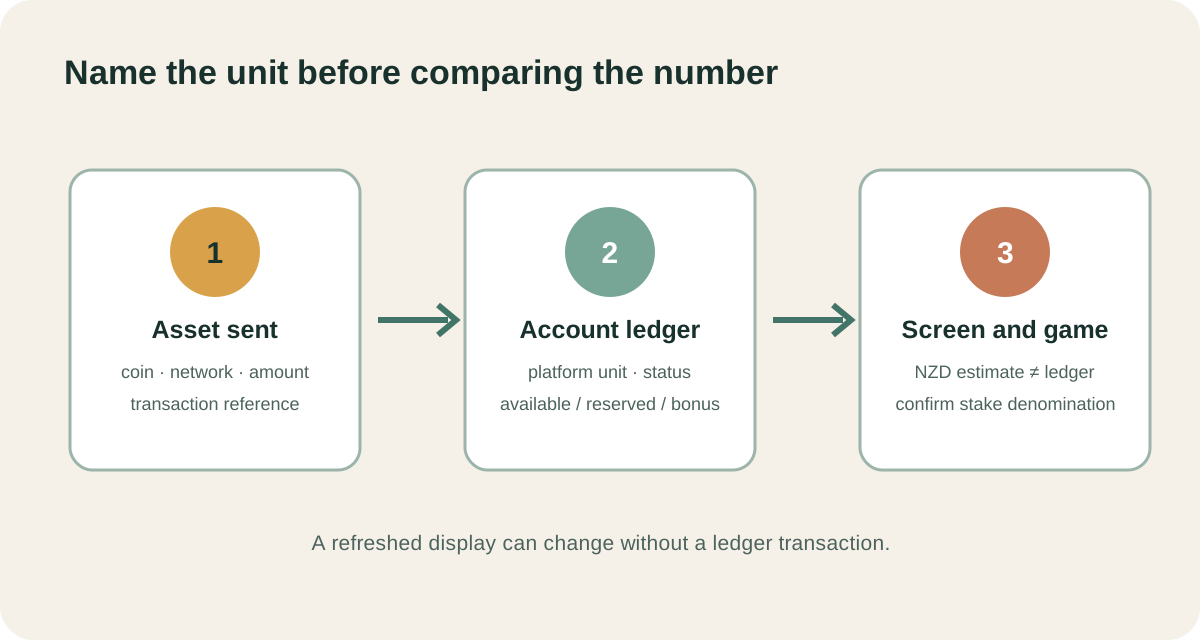
The short answer: identify the unit behind every number
The phrase “account balance” can refer to more than one number on a crypto gambling platform. A cashier may record an asset deposit, an account service may convert it into an internal unit, the header may show an approximate New Zealand dollar value, and the game may display the stake in yet another denomination. A reader who compares those numbers without checking their labels can mistake a display conversion for a credit, or miss that a game is staking from a different balance pocket.
Start with the field’s job. Ask whether it is the amount actually stored in the account ledger, a view-only conversion, a reserved amount for an unfinished round, or a promotional balance subject to separate terms. Then check the selected game’s stake unit and the platform’s rules for converting it. A number beside a currency symbol is not enough by itself: the screen should say whether the value is an account unit, estimated value, playable funds, locked funds or a transaction amount.
This article uses Duelbits’ public help pages as a dated example of one platform’s terminology. It does not claim that Duelbits accepts New Zealand customers, that any named product is available to a reader, or that all crypto casinos use the same ledger model. The official help checked on 8 October 2026 also contains a difference in the name used for internal units, so the active cashier and current account terms matter more than a remembered label.
Four denomination layers that should not be collapsed
1. The asset sent to the platform
A blockchain transfer has an asset and a quantity: for example, a supported token amount on a named network. That is the amount the sending wallet tried to transfer. It is not necessarily the amount credited to a casino balance. Network fees, minimum deposit rules, confirmation requirements and exchange rates can affect what the cashier eventually records. Those details belong to the specific asset, network and transaction flow; do not assume that sending the same token on a different network is supported.
Keep the transaction hash, the asset ticker, network, quantity and timestamp from the sending wallet. Compare them with the operator’s deposit record rather than a rounded dollar estimate. If the site credits after a conversion, the credited unit may have more decimal places or a different value from the outgoing wallet line. The deposit screen, terms and account history need to explain the conversion point and any applicable fee. If they do not, ask support to identify the credited ledger unit and the rate timestamp before drawing a conclusion.
2. The account’s ledger unit
An operator can maintain a balance in a platform-specific unit or in a fiat accounting unit even when deposits arrive in cryptocurrency. This internal ledger is the value the cashier uses to add, reserve, debit or release funds. It may be called coins, credits, points, dollars or something else. The label alone does not say whether it is a cryptocurrency that can be withdrawn as-is. Read the withdrawal terms and the account history to understand whether the unit represents an amount owed to the account or only a display convention.
Duelbits’ public “Understanding Display Currencies” help page says, as checked on 8 October 2026, that deposits in crypto or fiat are converted to a USD-equivalent internal balance, while selected fiat display currency is an on-screen conversion. A separate Duelbits fees and processing page uses the term “Bits” when describing deposit conversion. Those are two official help articles with different terminology. The discrepancy is a reason to capture the current cashier wording and ask support which unit applies to a particular account, not a basis to silently choose one label.
3. The optional fiat display
A fiat display can translate the ledger unit into a familiar estimate such as NZD. If the platform describes the choice as display-only, changing the dropdown changes how the balance is presented, not the ledger amount. The estimate can move when the exchange rate changes even though there has been no deposit, withdrawal or game round. A decimal can also change because the interface rounds the displayed value differently from the underlying unit.
On Duelbits’ cited help page, NZD appears among the available display choices and the page says rates can update. This confirms the help article’s description of its display feature at the time checked. It does not show that a casino account can be opened from New Zealand, that an operator has local approval, that a particular deposit asset is available to a reader, or that a displayed conversion can be withdrawn in NZD. Treat the currency selector as a view setting unless the current terms explicitly say otherwise.
4. The game’s stake denomination
The game may show its own unit in the bet controls. Before a round, check the number, symbol or currency code next to the selected stake. Some games can inherit the account unit; others can convert a displayed stake or require a particular currency mode. If the account header says NZD but a game’s help or stake selector says USD, the NZD amount may be a converted estimate rather than the amount debited from the ledger.
The relevant question is not “what does the page look like it costs?” It is “what account unit is deducted when this accepted stake settles, and where does the platform disclose the conversion?” Check whether a game has a separate balance selector, whether a bonus round uses a different unit, and whether the history records the amount in the game unit or account unit. Never infer an exchange rate from a single rounded stake label.
A map of common balance fields
| Screen label or concept | What it may represent | Evidence to check |
|---|---|---|
| Deposit amount | Asset quantity sent or cashier amount submitted | Wallet receipt, transaction hash and cashier record |
| Account balance | Ledger unit the platform records | Account terms and history entry |
| Estimated value | Conversion for display, perhaps in NZD | Currency selector label, rate note and timestamp |
| Available | Funds not currently restricted from a particular action | Cashier rules and account detail view |
| Reserved or pending | Amount held while a transfer, game round or review is unresolved | Transaction status, round history or support explanation |
| Promotional | Credit governed by promotion-specific conditions | Promotion terms and separate ledger entries |
| Game balance | Amount the current game can wager from | Game lobby, stake selector and round record |
These are concepts to look for, not standard labels that every provider must use. A platform may combine available and reserved amounts in one number, show a bonus pocket only after opening the promotions view, or present the game balance without the wider cashier. If a label is missing, record the visible screen and request the exact definition rather than importing terminology from a different operator.
Available, reserved and promotional amounts
“Available” usually answers whether the interface will let a user select an amount for a particular action. It does not by itself prove that the entire figure is withdrawable, because the terms can distinguish playable funds, pending withdrawals, verification holds and bonus funds. A cashier button being enabled is evidence about the current interface, not a complete statement of legal entitlement or transaction timing.
“Reserved” or “pending” can appear when the site is still processing a withdrawal, waiting for blockchain confirmations, reviewing an account, or reconciling a round. These states have different causes. Do not treat a pending withdrawal as a wager or a game loss. Write down the transaction or round identifier, the displayed status, the time and the relevant amount. Then compare the account history before and after the state changes. A support response should explain which event moved the funds and what condition releases them.
Promotional balances need their own line. A bonus may be non-cash, limited to certain games, subject to wagering or expiry terms, or displayed alongside cash. Those are offer-specific conditions and can change. The practical checklist is to identify the source of each credited amount, read the conditions linked to that credit, and find out whether the game is drawing from cash, promotional funds or a defined priority order. Do not assume that “balance” means “cash available for withdrawal.”
Why a displayed balance can change while the ledger does not
Suppose a screen reports an internal amount and an approximate NZD equivalent. If the exchange rate used for the estimate updates, the NZD line can move while the internal amount remains constant. A screenshot taken several minutes later may therefore show a different estimate without any account transaction. That is a presentation change. The ledger history, asset quantity and conversion timestamp are the records needed to determine whether funds actually moved.
Rounding creates a second difference. An interface may display two decimal places, round down small fractions, or convert each game stake separately. A series of individually rounded values may not add up to the rounded total shown in the header. A small apparent gap can be caused by display precision, but it should not be dismissed automatically. Check the exact internal amounts in history and the platform’s stated rounding method. If the site supplies no precision rule, ask support to show the calculation for the relevant transaction.
A third source is timing. The cashier rate at deposit may determine credited internal units, while the header uses a later rate for its fiat estimate. An asset’s market price can change between the send, credit and display moments. The same account can thus preserve its recorded units while showing another fiat estimate. A clean comparison needs the source asset, credited amount, rate or conversion note, time zone and interface timestamp for each side.
The game launch check
Before selecting a stake, pause at the first game screen and read the denomination next to the bet controls. Open the help or paytable and find whether displayed wins are expressed in stakes, account units or a named currency. Then check the operator’s game information for any note that the platform balance is converted. If the game launches in an unfamiliar unit, return to the cashier or ask support before placing a wager; do not use a tiny “test” stake to discover how a financial conversion works.
If the account offers more than one wallet or currency pocket, verify which one the game launch selected. A platform can separate crypto holdings, fiat credit, bonus funds and gaming funds. A game may use only one pocket, or it may first convert a selected pocket into its own unit. The launcher’s success message is not proof of the amount that will be debited. Look for an accepted-bet receipt or round history and compare its unit with the stake screen.
Some games may show an informational balance during loading and a separate current-round stake once the table opens. Recheck after switching games, currencies, devices or browser sessions. Saved display preferences can be local to a device or browser. A number on a phone is not a reliable reference for a laptop if the two views use different display settings or refresh times.
A practical reconciliation checklist
- Record the starting view. Capture the account balance, the selected display currency, the page time and any label such as “estimated” or “available.” Keep a copy only in a secure location because account screenshots can contain personal data.
- Record the transaction source. For a deposit, save the asset, network, sent amount, transaction hash, completion time and cashier credit record. For a game round, save the game title, round ID, accepted stake and settlement status.
- Separate the units. Write the asset amount, operator ledger unit, fiat estimate and game stake denomination in separate columns. Do not add figures with different units.
- Check status categories. Note if money is cash, pending, reserved, promotional or associated with an unfinished game round. Preserve the exact wording shown in the account.
- Refresh once and compare. If the fiat estimate changes, check whether the internal ledger entry changed too. Avoid repeatedly refreshing and taking a screenshot without recording the times.
- Read the relevant terms. Find the current cashier and game-help definitions. Record the page title, URL and date checked; do not assume an old help article still controls the active account.
- Ask a narrow support question. Provide the transaction or round ID and ask which internal unit was credited or debited, which conversion was used and at what time, and whether any portion remains restricted.
- Keep the reply with the record. If support gives a calculation or a status explanation, preserve the answer with the date. It can clarify an interface discrepancy without replacing the account statement.
This sequence is useful because it turns a vague “my balance changed” report into a traceable question. It also prevents the reader from comparing a blockchain wallet, a display estimate and a game ledger as though they were one database. The main aim is to establish which record owns the number under review.
What to ask support
Use a concise request that identifies the one event you are checking. For a deposit, include the transaction hash, network, asset ticker, sent quantity, cashier time and the credited account entry. Ask: “Which internal unit was credited, what conversion or fee was applied, and which timestamp controls the calculation?” If the agent refers to “coins,” “Bits” or another platform term, ask whether that is the ledger unit or only a screen label.
For a game stake, provide the round ID and the accepted-bet receipt, then ask which balance pocket funded the round and what denomination was used at acceptance and settlement. If the amount was reserved, ask which event releases or posts it and where that transition appears in the statement. Avoid sending seed phrases, private keys, passwords, full payment-card data or a wallet signature. Support should not need secret recovery credentials to explain an account entry.
For a display question, name the chosen currency, the balance before and after refresh, and the times visible on the screenshots. Ask whether the fiat line is a live estimate and what rate source or update interval the interface describes. A support answer that only repeats the current displayed number does not explain a discrepancy; request the source unit and conversion step.
New Zealand context and the limit of the example
This guide is written in en-NZ and uses NZD as the reader’s local display example. A NZD selector is a formatting option, not a location check, licence, customer-eligibility decision or approval to gamble from New Zealand. A platform help page can be globally available even when its account services are restricted by country. Do not infer availability from language, currency or a country appearing in a dropdown.
There is also a current advertising constraint for New Zealand readers. The Department of Internal Affairs says the advertising prohibition under the Online Casino Gambling Act 2026 is in effect and says the advertising rules apply to operators that publish or arrange advertisements, including third parties. Regulation 40(c) of the Online Casino Gambling Regulations 2026 identifies an advertisement involving an affiliate arrangement as prohibited. This is an editorial compliance hold, not individual legal advice. The existing site route is not used here.
The compliance check is separate from the balance explanation. A provider’s currency settings do not establish who may lawfully advertise, who can access a platform or which consumer rules apply. If the statutory position or official guidance changes, a later editorial review must check the current primary source and obtain appropriate review before changing commercial links.
Frequently asked questions
If I switch to NZD, has my crypto been converted into New Zealand dollars?
Not necessarily. A currency selector can change a display estimate only. The cited Duelbits help page describes its selected fiat as an on-screen equivalent and says the underlying account unit is separate. Check the specific platform’s current terms and transaction history. If it says “display currency,” do not treat the shown NZD figure as a fiat deposit or a withdrawable NZD asset.
Why did the NZD figure change when I did not play?
The estimate may use an exchange rate that updates, or the display may round at a different precision. Compare the internal account unit and event history at the exact timestamps. If the ledger amount changed as well, check for a deposit, withdrawal, fee, game entry, reserved balance or adjustment rather than attributing everything to exchange rates.
Can a game use a different currency from the account header?
It can, depending on the platform and game. Read the stake selector and in-game help after launch, and compare them with the operator account history. A header estimate and a game’s stake unit may describe different layers. If the interface does not show the conversion, ask support before staking.
Is an internal “coin” necessarily a cryptocurrency?
No. An operator may use a named accounting unit that represents a balance inside its platform. The name does not establish that it is on a blockchain or transferable to an external wallet. Confirm the unit’s meaning in the cashier terms and the withdrawal instructions for the account.
Does this example confirm that Duelbits is available in New Zealand?
No. It documents wording on a public help page checked on 8 October 2026. It does not establish customer eligibility, country access, local licensing or product availability. Verify current official information for any service and do not infer eligibility from a currency option.
What is the strongest evidence when the numbers disagree?
Use the platform’s transaction and game records for the ledger entries, the wallet receipt for the amount sent, and the exact game round record for the accepted stake and settlement. Keep timestamps, units and IDs together. A rounded header figure is useful context but is usually not enough to reconcile an account event by itself.
A careful conclusion
The useful habit is to name the unit before comparing the number. Keep the asset transfer, internal ledger, fiat estimate, available or reserved category, promotional credit and game stake in separate fields. Record the current labels and timestamps, then ask support a precise question tied to a transaction or round ID. Where official pages use different terminology, report the discrepancy instead of smoothing it over.
The Duelbits pages provide one dated example of display conversion and terminology, not a universal crypto-casino rulebook. The main platform’s cashier, current terms and game help remain the sources for its active configuration. A NZD display does not prove local access. Keep those facts separate when evaluating any balance screen.
Sources and verification boundary
- Duelbits: Understanding Display Currencies — checked 8 October 2026; platform-specific description, including display estimates and its stated internal unit.
- Duelbits: Fees, Limits & Processing Times — checked 8 October 2026; official help uses a different internal-unit label, so terminology is flagged as inconsistent.
- New Zealand Department of Internal Affairs: Online gambling for advertisers — checked 8 October 2026.
- Online Casino Gambling Regulations 2026 — checked 8 October 2026; regulation 40(c) addresses advertisements involving affiliate arrangements.
Sponsored offers shown by the shared site components are separate from the editorial game or account evidence above. They do not establish local eligibility or verify an operator configuration. Read the current operator terms and local requirements independently.