ELK Studios game guide · South Island guide
Heist Guys: rules, feature map and settings to verify
 Best casinos available in New ZealandUpdated 7 November 2026

Heist Guys is an ELK Studios slot with a six-by-six grid and supplier-described features including Super Wild, Kicker, big symbols and a map bonus. The game’s distinctive task is to follow how a board event connects to the map state, then check what the client actually settles. This guide covers the original Heist Guys only and does not merge it with the separate Heist Guys 2 title.
The short answer
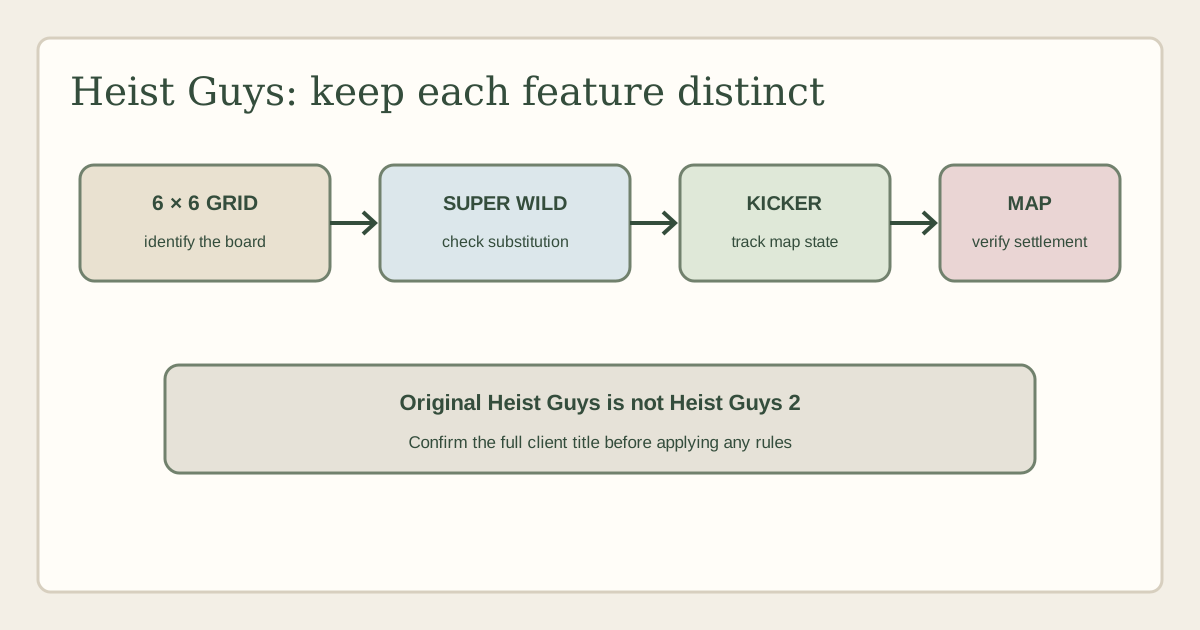
Heist Guys is a slot from ELK Studios whose public product page describes a six-by-six grid, a Super Wild, Kicker, big symbols and a map bonus. Those features give a reader a workable outline: start at the grid, identify a special symbol, see whether it alters the board or progress, then follow the map feature as a separate state. The supplier summary does not provide the full rules for every operator configuration.
The first thing to get right is the title. This page covers Heist Guys, not Heist Guys 2. The sequel has its own State Jar and map-game guide on this site. Shared artwork, a heist theme or a familiar Wild does not mean the games use identical triggers, settings or bonus paths.
No current operator game-help screen was available for this review. This page therefore does not state an RTP or RTP variant, volatility, hit frequency, stake limits, max-win configuration, bonus odds or feature-buy price. Nor does it claim New Zealand access or demo availability. Those details must be verified in the exact game client and operator terms.
Make sure the loaded title is Heist Guys
Open the game information panel and confirm the displayed title and ELK Studios provider credit. Compare it with ELK’s Heist Guys page and the official catalogue. Look for the supplier-described six-by-six grid and named Super Wild, Kicker, big symbols and map bonus. These clues are more useful than a thumbnail, but the exact game title still controls.
Do not silently remove the final “2” from a sequel title or treat both pages as aliases. The site has a separate Heist Guys 2 guide focused on that title’s State Jar, Super Wild and map-based Heist Game routes. The original and sequel may share some terminology, but a shared term is not proof of an identical rule. Use the title and help panel that the current client presents.
For a later verification note, record the operator, account region, currency, date, client identifier and help revision if displayed. If the lobby shortens the title, note the full name once the game opens. Keep a screenshot of the rules panel where permitted by the operator. A dated record helps distinguish an actual update from two websites describing different builds.
The supplier catalogue can establish that ELK publishes the title. An operator listing is separate evidence, and an account being eligible in New Zealand is a further question. No specific operator listing was verified for this article. Do not treat an overseas review, game stream or catalogue entry as proof of local availability.
Understand the six-by-six board before the heist features
ELK describes a six-by-six grid. That board shape gives a reader a place to follow special symbols, but does not establish how ordinary wins form. The active paytable should state whether symbols connect by lines, clusters or another rule, whether adjacency matters, which symbols pay, and whether a feature symbol has any role in ordinary evaluation.
Start by identifying the row and column boundaries and any status indicators around the grid. Check whether the map or feature progress appears inside the board or in a separate panel. During a round, record the initial symbol arrangement before the game animates a Super Wild or large symbol. Then see whether the board is re-evaluated after each action or only after a sequence ends.
A six-by-six layout may look crowded on a phone. It can be harder to tell whether a symbol is one enlarged object or several positions, especially when a label or animation overlaps the cells. Use the legend and help panel instead of estimating by sight. The number of visible cells does not imply that every cell is eligible for every feature.
Ordinary settlement needs its own explanation. A special symbol can change the grid without directly paying, while a regular symbol combination may be credited before a map event begins. Read the history for a completed round and identify whether each listed amount is a separate award or part of a running total. Do not attribute every credit that appears during an animation to the final map bonus.
Super Wild: verify its scope and sequence
The official Heist Guys page names a Super Wild. The name indicates an important Wild feature but does not, by itself, specify substitution rules, size, movement, persistence or a multiplier. Check the active help for the exact eligible symbols and the part of the round where the Super Wild operates. Avoid importing a familiar meaning from another title.
Observe the symbol from appearance to settlement. Does it occupy one grid cell or cover a larger area? Does it transform or replace other symbols? Can it remain after a board change? Does the help say that it substitutes for all paying symbols or exclude particular symbols? Each answer changes how a reader should interpret the board. The short supplier page does not verify those client-specific details.
If the Super Wild appears alongside the Kicker, note which event happens first. A Kicker might modify a round or send progress to a feature, but the name alone cannot establish its role. The current help should describe the interaction. If no rule explains their overlap, mark it unresolved rather than assuming that one feature activates the other.
Also distinguish a Super Wild from a Big Symbol. One may have substitution behaviour; another may change the area covered by a symbol. If both appear in the same event, record the symbols separately, note the resulting board and then check the game’s evaluation. The animation can show a large graphic without explaining whether it represents one object, multiple positions or a visual effect.
Kicker and the route from the grid to the map
ELK lists Kicker as a named Heist Guys feature. Treat it as a rule label to investigate, not as a complete definition. Check what qualifies as a Kicker event, which position or symbol must be present, whether the action happens automatically, and what state is changed as a result. The supplier’s summary does not establish all of those conditions for the active build.
If the Kicker affects a progress display or map, write down the exact transition. What is the starting meter or map state? What changes after the event? Does the game open a new area, award an item, reveal a feature or merely update a status indicator? A progress animation is not the same as the start of a playable bonus, and neither automatically indicates an amount paid.
Check how the Kicker interacts with the ordinary grid. Does it replace a symbol, appear beside one, or act after an outcome has already been evaluated? Use the result history to determine whether the event creates a separate award. If the interface does not show enough detail, do not convert the supplier’s feature name into a definite payout rule.
The map is useful as a navigation metaphor because it makes progression visible, but a map image is not a promise that a player can choose a route. Find out whether the client offers choices or follows an automatic rule. If there is a genuine choice, read the on-screen instructions and any cost before confirming. This guide does not say that Heist Guys has a particular purchase option or cost.
Big symbols: separate scale from value
ELK’s public page lists big symbols. “Big” may describe how a graphic occupies the board, but the current help must say whether the symbol spans multiple positions, affects evaluation as one symbol or is simply enlarged for presentation. Do not assume that visual size multiplies a win or makes a symbol more likely to match.
When a big symbol appears, compare the board before and after it lands. Count the affected positions only if the help says how those positions are treated. Check whether the big symbol substitutes, pays in a different way, participates in the map feature or interacts with the Super Wild. If the game has a special evaluation rule for it, preserve the rule’s exact terms rather than describing all large symbols as one mechanic.
The history can show whether one big symbol resulted in multiple winning combinations, one combined award or no award. A screenshot alone may not make the evaluation clear. If the interface lists separate lines or a total, use the game’s own wording. Do not calculate an estimated payout with values borrowed from a third-party table or an unrelated build.
If a big symbol appears during a bonus, check whether it follows the same rule as in the base game. Feature modes can change eligible symbols or how the grid is evaluated. The supplier summary does not establish all mode-specific rules. Describe the observed mode and consult the relevant help entry before generalising.
The map bonus and round settlement
The supplier describes a map bonus. A reader should identify the point where ordinary play ends and the map state begins, the symbols or progress that trigger the transition, and how the feature concludes. The public page establishes the feature label but does not disclose every entry condition, map step or operator-specific settlement rule.
At entry, record whether the map shows already collected progress, a newly opened area or a new choice. Then follow each action in the sequence. If an item is revealed, find out whether it is a marker, a multiplier, a direct credit or a condition for another event. If the map changes, determine whether that transition consumes a turn or happens automatically. Do not treat an unrevealed tile as a guaranteed award.
Look for a clearly stated end condition. A map feature may end when a counter completes, a route terminates or a defined action occurs; the exact rule needs to come from the active help. When the mode finishes, check how the result is added to the round history and whether the interface returns to the base game. A final amount may combine prior events, so avoid adding intermediate displays twice.
The original title’s map feature must remain separate from Heist Guys 2’s route. The sequel page has different named state elements. Even where both screens use a map, a shared visual device does not make entry, progression or settlement identical. Compare the relevant help panels side by side only after confirming the exact title of each client.
RTP, volatility, stakes and optional settings
No current operator help panel was supplied. As a result, this page publishes no RTP figure or variant, volatility rating, hit frequency, stake range, win cap, Kicker probability or map-bonus odds. Public feature copy can explain named mechanics without establishing the settings enabled by an operator. Third-party reviews may describe a different country, version or date.
For RTP, use the exact number and label shown by the game’s information panel. Note the client build, mode and date, and whether the operator describes more than one configuration. Do not combine values from various casinos into one range. If a display shows a default and a selected setting, record both without implying that the default is active.
For volatility and hit rate, quote only labels and values the active help actually provides. A volatility term describes a broad outcome pattern and cannot tell someone when a map bonus will arrive. A hit-frequency figure, if published, needs a stated definition and scope. Do not infer either from a reviewer’s sample or an animation that happened in one session.
Read the currency and total stake carefully. An optional mode could alter exposure if offered, but this review does not verify that an option exists for every version of Heist Guys. Before selecting any paid feature, read its cost and outcome description in the live client. For a win cap, preserve whether it applies to a round, feature or stake multiple. An incomplete number can be less useful than no number.
Mobile use, practice mode and New Zealand access
If an eligible operator offers Heist Guys, check the actual mobile client rather than assuming compatibility from the supplier page. The six-by-six grid, map panel, symbol legend, balance, stake control and history should all remain readable. Make sure the map does not hide the board and that a Big Symbol is distinguishable from multiple smaller objects.
Before a round, verify the selected amount and look for any active mode marker. During a Kicker or map transition, allow the game to finish and use the history if the order is unclear. If a connection drops, follow the operator’s session-recovery process and retain any round reference. Do not restart a round or make a second wager because an animation appears stalled.
No demo client was inspected for this page. If a practice mode is offered, it can show where the help and controls are located; it cannot verify the cash game’s configuration or establish expected returns from a small sample. Confirm that the practice title says Heist Guys rather than Heist Guys 2.
New Zealand availability remains unverified. Supplier documentation is not an operator’s present lobby or a regional eligibility decision. Check the operator’s terms for the location and account type relevant to you. This page does not recommend or promote an operator and does not make a claim that a game is legally or practically accessible to every reader in New Zealand.
A useful checklist for reviewing a map round
Make a short observation sheet before trying to explain a feature. Start with the full title and client version. Note the grid state and any map progress. When a Super Wild appears, record its position and the help rule for substitution. If a Kicker occurs, write the before-and-after state of the map or meter. If Big Symbols appear, confirm how many positions are treated and what the evaluation panel reports.
Then check the transition into the map bonus. Record the trigger language, whether a choice is offered, what actions occur automatically and how the mode ends. Compare that description with the result history. Use the client’s terms for each stage, and separate direct observation from confirmed rule text. A feature video without help can show what happened once but may not show the complete condition.
For the numeric fields, make a separate line for RTP and variant, volatility, stake range, max win, feature cost and any disclosed probabilities. Leave a field blank if the active help does not show it. Include the currency, game version and date so a future reviewer can tell whether a change is real. Do not copy a number from an unrelated review to avoid an empty cell.
The checklist is also a safeguard against confusing game title and edition. Check “Heist Guys” before writing, then check whether the feature names belong to the original or its sequel. That single step can prevent a seemingly polished article from attributing another client’s rules to the wrong title.
Frequently asked questions
Is this the same game as Heist Guys 2?
No. This guide is for Heist Guys. The site’s Heist Guys 2 page covers that separate title. Confirm the full in-client name before applying any rules.
What does the map bonus do?
ELK identifies a map bonus, but the short supplier summary does not establish its precise entry trigger, route or settlement. Check the current client help and history before describing its steps or possible outcomes.
How does the Kicker work?
Kicker is a named feature in the supplier material. The exact condition and state change require the active operator’s rules. Do not assume it directly pays or advances a map in a particular way.
What are the RTP and volatility?
No current operator help was available, so this review does not verify either field. Check the information panel for the exact build, date and configuration. Third-party tables can refer to other versions.
Is Heist Guys available in New Zealand?
No specific operator listing was verified. Check a current operator lobby and its regional terms. A supplier page confirms product documentation, not access for a particular account.
Is the big symbol automatically a win?
No. Its appearance and size do not prove a paid combination. Read the paytable for the exact evaluation rule, then use the history to see what the game credited.
Can I use a demo to confirm the cash-game rules?
A demo can be useful for navigation if one is offered, but it may use a different configuration. It cannot verify the cash client’s selected settings or estimate long-run return from a short sample.
What should I do if the map route or cost is unclear?
Pause and read the client’s instructions or ask the operator for clarification. Do not select an optional mode if its cost or effect is uncertain. This guide does not confirm a specific purchase option for the title.
Sources and verification boundary
- ELK Studios: Heist Guys — supplier feature summary, checked 6 October 2026.
- ELK Studios games catalogue — catalogue listing, checked 6 October 2026.
- Related but separate title: Heist Guys 2 on this site. Its rules are not treated as evidence for this page.
- No current operator game-help screen, NZ operator listing or demo was supplied or verified. Numeric settings and access remain unknown.
- Competitor pages sampled on 6 October 2026: Fruity Slots, AboutSlots, Gambling.com UK. Search previews at other results were not treated as inspected rules evidence.