ELK Studios game guide · South Island guide
Nightmaker: rules, features and settings to verify
 Best casinos available in New ZealandUpdated 7 November 2026
Nightmaker is an ELK Studios slot whose public feature page describes a Feature Row, big symbols, symbol multipliers, splits and substitutions, Wilds, Bonus and Super Bonus modes, and Beast Spins. These mechanics are easier to review as distinct actions: a symbol can change size, value, identity or role, and a feature mode can alter the round sequence. Operator-specific rules remain unverified without current in-game help.
The short answer
Nightmaker is an ELK Studios game with a feature set that includes a Feature Row, big symbols, symbol multipliers, splits and substitutions, Wilds, Bonus and Super Bonus states, and Beast Spins. The supplier’s public page is useful for learning those feature names and their broad relationships. It does not contain enough information to verify every trigger, symbol value, setting or settlement rule for a particular operator build.
Read the game by separating the kinds of change. A big symbol changes the space a symbol appears to occupy; a split changes its representation; a multiplier modifies a qualifying value only as the rules define; a substitution changes which symbol role is being evaluated. Those events may be linked, but they are not interchangeable. The current game help should explain when each happens and how the result is settled.
No operator help screen was available for this review. It therefore states no numeric RTP or variant, volatility, hit frequency, stake range, feature probability, maximum win or optional-mode cost. New Zealand access and demo availability are not verified. Use the actual game client and operator terms for those questions rather than importing figures from a third-party review.
Confirm the client and its rules source
Open the title’s information panel and verify that it says Nightmaker and ELK Studios. Compare the displayed name and feature labels with ELK’s Nightmaker page and the official games catalogue. A dark theme or night-time artwork cannot identify a ruleset. The title, provider and help content together provide a stronger match.
Record the operator, account region, displayed currency, date inspected and any build number or help revision. If an operator shortens the lobby title, use the full client name in the record. If there is no version label, say that it was not displayed. A later reader needs to know whether a settings claim refers to the same build, not just the same brand name.
Supplier and operator evidence answer different questions. ELK’s public page establishes a supplier description. A casino’s current lobby can establish that the operator lists the title. Its regional terms and account controls determine whether a particular person can access it. No specific New Zealand operator listing was verified for this article, and this page does not claim availability to NZ accounts.
When labels differ, preserve them instead of silently harmonising. For example, a client may use a short feature name while ELK’s page uses a longer phrase. Compare what the help says the feature does; a shared term is not proof that an old article or screen recording matches the current client. If the meanings cannot be reconciled, treat the difference as an open question.
The Feature Row and event order
ELK names a Feature Row in Nightmaker. The product summary does not fully explain whether the row selects an effect, displays a modifier, alters a later outcome or has its own evaluation. Begin by locating it on the board and checking the specific help entry. Record what appears in the row, what activates it and the step where its effect is applied.
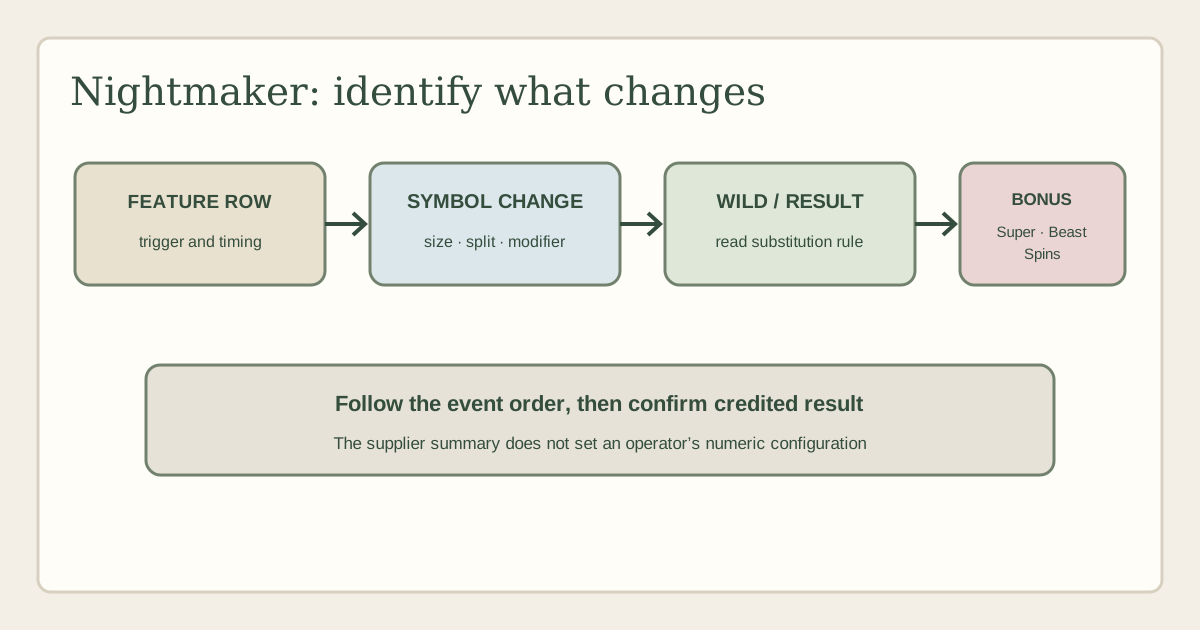
Event order matters because the same screen may show ordinary symbols and a special row action. First note the initial reel result. Then record any row selection or change. After that, observe whether a Wild, split, multiplier or big symbol is added or modified. Finally, check when the game evaluates the result and what the history records. This keeps the feature’s trigger separate from its effect and settlement.
Check whether the row’s displayed state persists after a spin or exists only during one event. A highlighted tile can represent current progress, a selected feature or a temporary animation. Do not call it stored progress unless the rules say it carries over. If the panel has a counter, confirm its label and reset point instead of interpreting it based on its position.
The Feature Row can create a useful structure for a review: list the available outcomes, then explain each one using the client’s definitions. The public supplier description is not enough to populate that list. If you cannot inspect the active help, say which names are confirmed and what remains unknown. Do not invent a choice menu, random-selection rule or player decision simply because the row is visible.
Big symbols, splits and board positions
The supplier lists big symbols and split mechanics. A reviewer should explain those separately because size and splitting can affect the board in different ways. A big symbol may occupy or represent more than one position, while a split may turn one symbol into multiple pieces or states. The exact geometry and evaluation need to be confirmed in the paytable for the loaded game.
Compare the board before and after each event. Note which symbol changed, how many visible positions are involved and whether the game describes those as individual symbols or one expanded symbol. Then check whether the resulting positions can form ordinary wins, interact with Wilds or participate in a feature. Do not assume that a large image counts as multiple independent symbols or that a split produces extra wins.
An animation is not a settlement record. After a big symbol or split, use the history panel if possible and check whether the client lists a paid combination, a transformed symbol or an intermediate action. The feature can alter the board and still fail to produce a credited award. A guide should avoid saying that a split “creates a win” unless the help makes that direct relationship explicit.
Also check whether these effects can occur together. If a symbol splits while a Feature Row modifier is active, determine which action precedes the next evaluation. If a Big Symbol appears during a bonus, verify that its rule is the same as in base play. Do not infer sequence from one observed outcome or transfer the behaviour from another ELK game that uses similar visuals.
Multipliers and what they modify
ELK lists symbol multipliers. A multiplier is meaningful only when the game defines its target and timing. It might be attached to a symbol, applied to a combination or used during a specific feature. The supplier’s brief product summary does not give the exact operator configuration or full calculation, so this guide does not state a numeric multiplier or describe an unverified formula.
When reading the help, identify what the multiplier is attached to and the event that activates it. Does it apply to one position, one combination, a whole feature or a running total? Does it combine with another multiplier, and if so, how does the game describe that calculation? Is it visible before the qualifying result or added afterward? Each answer should come from the client, not a reviewer’s inference from an animation.
Follow a qualifying outcome through the history. If the client shows a base amount and a multiplier separately, retain both labels. If it shows only a final result, do not back-calculate an assumed base amount. Avoid hypothetical currency examples unless the rules explicitly use them; arbitrary sample values can be mistaken for the game’s actual paytable.
A multiplier display can feel persuasive, but it does not guarantee a payout. The feature still needs a qualifying value or result, and the game settles it according to its rules. A multiplier’s presence cannot establish expected return, future feature frequency or a winning system. Explain what the multiplier modifies without suggesting that it creates value from nothing.
Wilds and substitutions
The supplier page identifies Wilds and substitution effects. Check the paytable to learn which symbols a Wild substitutes for and which symbols are excluded. A title may use different Wild types in different features, and some special symbols do not substitute. Do not apply a conventional rule to every Wild solely because it carries that name.
Record whether a Wild is static, moving, expanding, sticky or limited to a named state only when the help says so. The supplier’s high-level Nightmaker description does not establish all possible persistence rules. If a Wild remains on screen after an animation, that observation may describe one particular sequence; it does not prove that the same state lasts for every round.
Substitution and splitting may be related. A symbol that changes identity might become a Wild, or it might merely be divided into separate symbols. The client’s rules should say which result occurs. Identify the original symbol, the trigger, the resulting type and the point at which the game evaluates the board. If the help uses distinct names, preserve them rather than broadening both to “Wild conversion”.
Wilds can also appear alongside multipliers. Check whether the multiplier belongs to a Wild, to a target symbol or to a later feature. A screenshot containing both is not proof that the multiplier applies to every Wild-created combination. Describe only the interactions the current help explicitly links. If a value or role is unclear, mark it unverified.
Bonus, Super Bonus and Beast Spins
ELK names Bonus, Super Bonus and Beast Spins as Nightmaker features. The public page does not establish their precise entry conditions, number of actions, retriggers, end rules, carried symbols or payout calculations for a particular operator build. Read each feature’s own help entry and treat these labels as distinct until the client explains their relationship.
When a Bonus begins, record the trigger condition and the state of the board at entry. Check whether the Feature Row selects a modifier, whether any Wild remains active, and how big or split symbols behave in the mode. Then record the end condition. A counter might represent actions remaining, progress or an accumulated amount; use its label instead of guessing from the display.
The Super Bonus should be compared with the ordinary Bonus based on rules, not on its name. Check what changes: entry condition, board, symbol set, available feature or duration. Do not claim the Super Bonus is more profitable or guarantees a higher award. If the interface gives no direct comparison, describe only the differences it states.
Beast Spins is a named mode that deserves its own verification. Find out how the game enters it, whether it uses separate rules and what is carried from the prior state. If the screen offers a mode selection or purchase, read the price and outcome terms before proceeding; this article does not confirm that every operator build offers that control. A thematic name does not indicate an optional buy or a particular cost.
After a feature, check the round history and compare its displayed subtotal with the final credit. Avoid counting a running feature total a second time. If the game uses a special evaluation in Beast Spins, keep it separate from an ordinary Bonus result. A careful review explains what the interface reports, not what a feature name sounds like it should do.
RTP, volatility and other numeric settings
No current operator help screen was supplied for Nightmaker. This page therefore does not state an RTP figure or variant, volatility, hit frequency, stake range, feature trigger probability, maximum win or Beast Spins price. These values may be selected or presented differently across operators. Supplier mechanics are not enough to verify the setting a particular casino client uses.
When a client provides RTP, record the exact figure, variant label and any conditions. Note whether it refers to the base game, a mode or the title configuration. If more than one option appears, distinguish available settings from the setting in use. A third-party list may refer to a different market or a prior build, so preserve source and date when comparing.
For volatility, report the operator’s stated category only if the help includes it. Explain that a label describes a statistical pattern, not whether an individual will see a bonus or how long a session will last. Hit frequency also needs the provider’s definition; a percentage without its event basis can be misleading. Neither field should be inferred from user comments or a small sample of spins.
Check stake and total exposure in the displayed currency. A feature option can change the amount committed if such an option is present; this review does not verify one. A maximum win should include its unit and mode scope. A stake multiple, a feature cap and a fixed currency limit cannot be treated as the same field.
RTP is a long-run theoretical measure rather than an individual-session promise. Volatility does not make a feature predictable. Neither an accumulating multiplier nor a dramatic screen event is a reliable way to forecast the next result. If the client’s help omits a figure, leave it unreported.
Mobile, demo and session checks
If an eligible operator lists Nightmaker, review it on the device you intend to use. Confirm that the Feature Row, symbol legend, multiplier text, Wild labels and bonus instructions remain legible. On a compact display, a big symbol can obscure other positions and a split can be hard to distinguish from an animation overlay. Open the history after a feature to understand the settlement.
Check that the stake, balance and active mode are visible before starting a round. Read the control labels carefully and avoid tapping a paid option unless its cost and rules are clear. If a connection interruption occurs, follow the operator’s official round-recovery process and keep any reference number. A frozen animation is not evidence of a settled outcome.
No demo client was inspected. If a practice mode is lawfully offered, it can help you locate controls and understand the names of the features. It cannot verify the live cash configuration or show a reliable estimate of RTP or feature frequency. Confirm the title and mode in the client, especially if the operator uses a generic Nightmaker tile.
New Zealand operator access was not verified. ELK’s public catalogue shows a supplier entry, not whether a particular operator currently lists Nightmaker or whether an account is eligible. Check the operator’s current lobby and regional terms. Do not rely on search snippets or foreign screenshots for that decision.
A step-by-step evidence sheet
For a round-level note, create three columns: screen observation, supplier description and operator rule. In the first column, write exactly what changed. In the second, record the high-level feature language on ELK’s page. In the third, copy the active help’s trigger, order and settlement. Leaving a cell blank is appropriate when the evidence is missing.
Use one line for the Feature Row, one for a big symbol or split, one for a multiplier or Wild, and one for a Bonus, Super Bonus or Beast Spins transition. Record whether each event occurred in base play or within a named mode. This organisation prevents a single animation from being used to support several unrelated claims.
For any result, distinguish the display of an intermediate symbol from an amount credited. Check the round summary for what the game paid, when it paid and whether prior feature values were included. If there is no history, note that limitation. Do not add your own arithmetic unless the game rules give the formula and all inputs.
This method is also practical for a review update. If a supplier page changes its feature names, the public description can be refreshed. If an operator changes an RTP variant, only the configuration note for that client needs attention. Clear source boundaries make the article less likely to carry an outdated casino setting into a new version.
Frequently asked questions
What is the Feature Row in Nightmaker?
ELK names the Feature Row, but the public summary does not supply its full operator rules. Use the active help to confirm what the row selects or changes, how it is triggered and when its effect is evaluated.
How do big symbols differ from splits?
They are separate supplier-described mechanics. One concerns a symbol’s size or occupied area, while splitting concerns a symbol changing into multiple parts or states. The exact geometry and evaluation must be checked in the client.
Does a multiplier always increase a win?
Only when the rules apply it to a qualifying result. Check what it modifies, when it is applied and whether it interacts with other features. A multiplier shown on screen is not by itself a payout guarantee.
What are Beast Spins?
Beast Spins is a named Nightmaker feature in ELK’s public description. The exact entry conditions, state and settlement need the game’s current help. Do not assume it is a purchase or that it offers a particular return.
What RTP does Nightmaker use?
No current operator configuration was provided. This review does not publish a number. Check the loaded game’s information panel and note its exact variant, client and date.
Is Nightmaker playable in New Zealand?
No New Zealand operator listing was verified. Check the relevant operator’s current lobby and eligibility terms; a supplier page does not establish account access.
Can a demo tell me the feature frequency?
No. A practice mode can help with interface familiarity if available, but a short sample cannot measure the game’s long-run settings or predict when a feature will occur.
What should I do if the bonus screen is unclear?
Pause before taking any optional action, read the exact help and check whether the screen changes the stake. Ask the operator for clarification if the rule or cost remains unclear.
Sources and verification boundary
- ELK Studios: Nightmaker — supplier feature summary, checked 6 October 2026.
- ELK Studios games catalogue — catalogue listing, checked 6 October 2026.
- No current operator game-help screen, NZ operator listing or demo client was supplied or verified. Numeric settings and account access remain unknown.
- Competitor coverage sampled on 6 October 2026: Online-Slot, CasinoWizard and Bonkku. BigWinBoard returned an access interstitial and was not treated as inspected evidence.