ELK Studios game guide · South Island guide
Pirots 4: rules, core features and settings to verify
 Best casinos available in New ZealandUpdated 7 November 2026

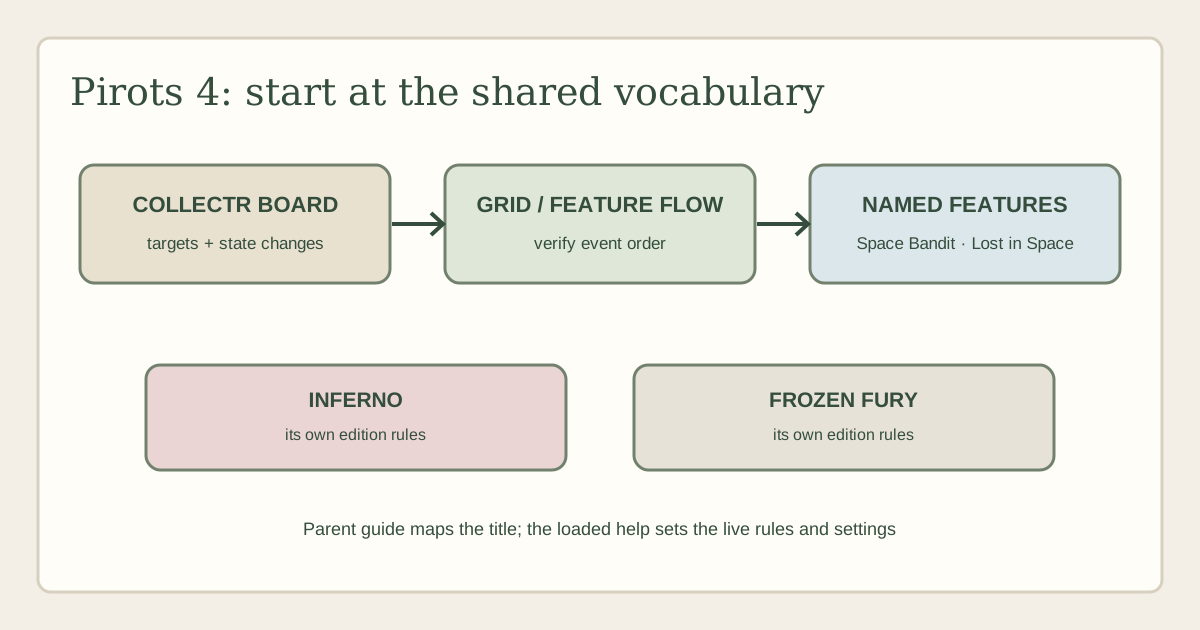
Pirots 4 is ELK Studios’ game entry whose supplier page describes a CollectR mechanic, grid expansion, Space Bandit, Lost in Space and bonus states. This overview explains how to navigate those concepts without treating every Pirots 4-branded world as the same ruleset. Its focus is the parent-level game guide; the site’s existing Inferno and Frozen Fury pages remain the place for those named editions.
The short answer
Pirots 4 is a slot from ELK Studios that centres on a CollectR board and combines bird collection with grid changes and named feature states. ELK’s public page identifies Space Bandit and Lost in Space alongside the core mechanic. Those labels help a reader understand the broad feature map, but do not establish the exact order, triggers or values in a particular operator’s build.
This is a parent-level Pirots 4 overview, not a second review of every themed edition. The site already has separate pages for Pirots 4 – Inferno and Pirots 4 – Frozen Fury. Those pages cover the edition-specific feature vocabulary. Here the useful question is how to identify the general Pirots 4 structure and decide which client-specific help to read next.
No current operator game-help screen was supplied. Accordingly, this guide does not publish a numerical RTP or variant, volatility, hit frequency, stake range, feature price, maximum win or trigger probability. It also does not claim a New Zealand listing or demo. A supplier catalogue entry and an operator’s configured game are different evidence sources.
Identify the version and keep the family tree clear
Begin in the loaded game’s own information panel. Read the full title, provider, version or build identifier if shown, and any subtitle naming a themed world. Compare that wording with ELK’s Pirots 4 page and the official games catalogue. Do not rely on the lobby tile alone: a tile may shorten a subtitle or use shared series artwork.
The title boundary matters because games in a series can retain familiar vocabulary while changing feature details. A player who has read one edition might recognise CollectR, birds or a space motif and still be facing different rules for a special symbol, bonus entry or grid state. Similarity is a navigation clue; it is not permission to copy exact conditions from another page.
Keep the general Pirots 4 page separate from its named edition reviews. Use this article for the common identification framework and the supplier-described parent mechanics. If the client explicitly says Inferno or Frozen Fury, continue to that edition’s page for a bounded explanation, then verify all actual settings in the current help. If a title has a different subtitle or feature set, do not force it into either existing article.
Record the operator, account region, currency, displayed title, client date and help revision. Those details make later comparisons meaningful. An archived review might describe a build no longer offered, or a setting selected for another market. Without a dated client record, a number from a search result cannot be connected reliably to the game in front of you.
What the CollectR label tells you
ELK describes Pirots 4 as using its CollectR mechanic. The term signals a collection-oriented feature, but the supplier’s short public summary is not the full operating rulebook. It does not, by itself, tell a reader which symbols are collected, where a collector can move, what condition adds an item, what is removed from the board, or when a result is settled.
Read the CollectR explanation with the board visible. Identify the ordinary symbols, collection targets, special characters and any progress indicator. Then trace one collection event from its starting state to the final board. Ask what initiated the movement, which object was collected, whether it changed a meter or symbol, and whether the game performs another board evaluation. Those stages are more informative than a general statement that a bird “collects prizes”.
A collection can have several possible meanings. It may remove a target, add progress, transform a symbol or contribute a value to a later feature. The current help should name the object and describe its effect. Do not assume an item is immediately credited simply because it disappears into an animation, and do not call a changed meter a cash award unless the client labels it as one.
When several birds or targets appear together, note whether the game assigns different roles to different symbols. Colour, costume or animation can help identify them visually, but does not prove a distinct rule. Use the symbol legend and help text. If one character moves before another, check whether that order is a fixed rule or just the order of a single animation.
Grid expansion: a board change, not a payout
ELK lists an expanding grid as part of Pirots 4. An expanded board changes the set of positions the game can use. The high-level description does not specify what starts an expansion, which area opens, whether new cells receive symbols immediately or how long the larger layout remains active. These details belong to the help for the exact edition and operator build.
To understand the expansion, compare the screen immediately before and after the change. Mark the new positions, any symbols placed there and whether the game conducts an evaluation right away. Then find out if a later drop or collection can affect those cells. This distinguishes an enlarged play area from a decorative animation or a feature panel that merely appears outside the reel grid.
Persistence is another important question. Does the board return to its initial shape after the current outcome, after a feature, or only when the game resets? A screenshot from the middle of a round cannot answer that. Use the status text and history to identify when a transition occurs. If no client explanation is available, describe the visual change without claiming how long it lasts.
Expansion and collection may interact, but the parent product summary does not establish every combination. Do not assume a collector can reach newly opened positions, that extra positions improve the chance of a win, or that the expanded layout persists into a bonus. Ask the help which symbols are in range and when it evaluates them. The phrase “grid expansion” is a feature name, not a probability statement.
Space Bandit and the role of a named character
Space Bandit is one of the named elements on ELK’s Pirots 4 product page. A character name can make a feature easier to remember, but the guide still needs to explain what the character does according to the rules. The current operator help should say whether Space Bandit changes symbols, interacts with collected items, moves across the board, or contributes to another phase.
When the character appears, follow the client’s description rather than reading an action into the animation. Note the start condition, the symbols or positions affected, and whether the feature changes the board or the settlement. If a character takes an item away, determine whether the item is removed, stored or converted. If the screen shows a counter, confirm what the counter represents and when it resets.
Keep Space Bandit distinct from other series characters. A similar appearance in an edition does not guarantee the same function. A parent-level overview should say that ELK names Space Bandit in Pirots 4; an edition-specific article should state only the actions that its own product page and active help support. If the current client uses a revised label, record it rather than silently mapping it to an older description.
The event history can clarify sequence. Check whether Space Bandit acts before a collection, after a grid expansion or during a bonus. A bonus screen might make the character appear as though it has a different role. Do not fold all of these into one trigger unless the rules do so. An explanation that preserves the event order helps a reader understand the game without turning every screen change into a promised benefit.
Lost in Space and transition into another state
The supplier names Lost in Space as a feature. That name tells a reader where to look in the help menu, but it does not explain how the feature begins or what state follows. Check whether entry comes from a symbol pattern, a collection condition, a separate game event or another rule stated by the client. Then note whether the feature has its own board, set of actions or settlement method.
Record what is carried into the feature and what is reset. A progress marker may continue, while ordinary symbols do not. A character could be retained, replaced or repositioned. The product summary does not answer those questions at operator level. If a help panel shows the transition, preserve its exact terms: entry condition, player choice if any, automatic action, and how the feature ends.
Do not tell a reader that “Lost in Space” is a bonus buy or that it can be selected on demand unless the current interface explicitly offers that option and discloses the cost. A feature name and a purchase control are different things. If an optional mode is present, its displayed amount and rules must be checked before a choice. This page does not assert that such a control is available.
The name also should not be used to promise a return. A special state can alter the play sequence without guaranteeing a particular outcome. Explain its mechanics in neutral terms, then separate the game’s final credit from intermediate symbols or counters. A displayed collection, meter increase or flight animation is not automatically a cash win.
Bonus language and feature boundaries
ELK’s page refers to bonus states in the Pirots 4 feature set. The operator’s help is needed to verify the exact trigger, duration, retrigger logic, carried board state and end condition. Never infer those details from a bonus name or from a different Pirots edition. A familiar character can appear in two versions and still behave differently.
When a bonus begins, record the immediate entry state: board shape, visible progress, available actions and any counter. Then follow whether the game makes choices automatically or prompts the player. If a feature offers a decision, read the screen carefully and note what each option changes. Do not describe a control as strategic or optional unless the rules show a real choice and explain its effect.
Separate normal play from the bonus resolution. The ordinary game can produce one set of symbol outcomes, while the feature may use another board, collection path or sequence. The history may combine them into a single total or display stages separately. Use the client’s terms and ensure the description does not count the same credited amount twice.
It is especially important to separate a general Pirots 4 overview from Inferno and Frozen Fury. The Inferno guide is limited to that fire-themed edition, while the Frozen Fury guide follows that edition’s distinct named features. Do not copy an exact trigger, symbol value or rule from either into the parent page without evidence that it applies to the exact build being discussed.
Settings: what a current operator help panel must establish
No current operator help screen was provided for the Pirots 4 client in this assignment. Therefore this page does not state an RTP percentage, a set of RTP variants, volatility, hit rate, stake limits, a win cap, collection probabilities or an optional feature price. Those facts are configuration-specific and may differ among operators. ELK’s public overview describes mechanics, not necessarily every numeric setting enabled in a particular casino.
For RTP, copy the exact figure or variant label from the loaded client and record the title/build and date. Do not combine figures reported by separate reviews into a range. The difference may reflect a different operator, market, mode or older configuration. If the operator help lists multiple variants, distinguish the available choices from the value currently selected.
For a stake range, note the currency and the amount actually committed per round. A displayed base bet can be different from total exposure if an optional mode or additional control changes the stake. For a win cap, record the exact unit and scope; a maximum expressed as a multiple of stake is not comparable to a fixed currency value unless the rules specify both. This guide leaves such fields unknown rather than guessing.
Volatility, if the operator publishes a label, describes a broad outcome distribution. It does not predict when a collection or bonus will occur. RTP is a theoretical long-run measure and does not promise a return in one session. A growing progress indicator or large symbol animation is not a forecast. A reviewer should avoid converting feature descriptions into claims about likely returns.
Mobile, demo and New Zealand availability
If an operator makes Pirots 4 available to an eligible account, check that the client displays the board, progress indicators, symbol legend and settlement history clearly on the device in use. On a small screen, a grid expansion can move important information off-screen or make a changed position hard to distinguish. Confirm that the help remains accessible while you are reviewing the feature.
Mobile support should be assessed on the actual client, not inferred from a supplier page or desktop video. Check that touch controls do not obscure the stake, balance or game rules, that the game does not crop the expanded board, and that a selected amount is visible before a round begins. If a feature animation makes it difficult to identify what changed, review the history rather than trying to remember the sequence.
No demo client was opened for this guide. If a practice version is lawfully available, it can help locate menus and learn the broad state changes. It cannot establish which cash-game RTP setting is selected, nor can a small number of practice outcomes measure the feature frequency. Confirm that the demo is the exact edition you want to understand.
New Zealand access is not verified. ELK’s listing is not proof that an operator currently offers Pirots 4 to a New Zealand account. Check the operator’s current lobby, account eligibility and terms. Do not infer local access from a foreign casino page or from a generic catalogue entry. No particular New Zealand operator was confirmed in the material reviewed here.
A careful route through a feature sequence
To analyse one round, start by describing the initial board without interpretation. Mark ordinary symbols, collection targets, characters and progress displays. Next note the first event that changes state. If the grid expands, write what positions were added; if a character acts, identify the target and the result; if a bonus begins, capture its entry condition and mode label.
After each event, check whether the game evaluates a win or merely prepares another action. A new board can trigger a further evaluation; a collected item can update progress; a feature icon can lead to a different state. Those are different outcomes. When the client displays a credited amount, capture the history or round summary if available. Do not call an intermediate counter a payout before the game settles it.
Keep evidence in three categories: what the screen visibly did, what the supplier page says, and what the active operator help confirms. For instance, the supplier’s page may name Lost in Space; the visible client may animate a character; the help should describe how the feature starts and resolves. An article should not collapse these evidence levels into one supposedly universal rule.
If the interface gives no clear explanation for a branch, write down the uncertainty and ask the operator for the current game rules before playing. A clear missing detail is preferable to an invented trigger. This is particularly important when an option changes the stake, takes the user into a bonus or affects a feature state that can be confused with an ordinary payout.
How this page relates to other Pirots coverage
This URL owns the parent-level query: a reader wants to understand Pirots 4 as a title and find the right rules source. It can describe the CollectR vocabulary, grid changes and the presence of named supplier features without repeating every edition’s review. The separate Inferno and Frozen Fury pages answer the narrower question about those exact worlds.
The boundary protects both usefulness and accuracy. Someone who searches for the parent title should be able to learn how to identify the game, what kind of feature map ELK publishes and which parts require the current help panel. Someone who searches for a subtitle should not be forced to sift through a series essay to learn edition-specific mechanics. Existing internal links provide that route.
This guide is not an all-games catalogue for ELK Studios and does not replace the provider hub. It also does not compare operator bonuses or rank casinos. Its scope is one game family entry, the named public mechanics and the evidence needed to evaluate a particular client. Keep that scope in mind when updating the page: a change to one edition does not automatically update all Pirots 4 pages.
Frequently asked questions
Does this page review Inferno or Frozen Fury in full?
No. It is the parent-level Pirots 4 overview. The existing Inferno page and Frozen Fury page cover their own edition boundaries. Current operator settings still need to be checked in the loaded help.
What does CollectR mean in Pirots 4?
ELK describes CollectR as a core mechanic, but the exact collection targets, movement, state changes and settlement must be checked in the active edition’s help. Do not assume that every themed edition uses identical collection rules.
What are Space Bandit and Lost in Space?
They are named features on ELK’s Pirots 4 supplier page. The brief public summary does not establish all triggers and outcomes. Consult the operator help for the exact client before stating their order, costs or payouts.
What is Pirots 4’s RTP?
No current operator game-help screen was supplied, so this review does not publish a numerical RTP or variant. Use the current client’s information panel and note its configuration and date. Do not merge third-party figures from different editions.
Is Pirots 4 available to New Zealand players?
Availability was not verified. A supplier listing is not a current operator listing or an account-eligibility confirmation. Check the operator’s terms and lobby for the relevant region.
Can a demo prove how often a feature appears?
No. If a practice mode exists, it can help with navigation and feature vocabulary. A short sample cannot establish a feature probability, RTP or expected result, and may use a different configuration from the cash game.
Does an expanded grid mean a better chance of a win?
The supplier description confirms that the grid can expand, but the result depends on the game rules and configuration. Additional positions do not by themselves establish a higher chance or a particular return. Read the help for the expansion and evaluation rules.
What should I check before an optional mode?
Confirm that the exact client offers it, read its current cost and effect, and check the total amount at risk before confirming. This page does not assert that a particular option or price exists for every Pirots 4 build.
Sources and verification boundary
- ELK Studios: Pirots 4 — supplier summary, checked 6 October 2026.
- ELK Studios games catalogue — catalogue listing, checked 6 October 2026.
- Related, edition-bounded pages: Pirots 4 – Inferno and Pirots 4 – Frozen Fury, both existing on this site.
- No current operator game-help screen, NZ operator listing or demo client was supplied or verified. Numeric settings and availability remain unknown.