ELK Studios game rules · South Island guide
Illogicool: rules, features and settings to verify
 Best casinos available in New ZealandUpdated 7 November 2026
Illogicool is a six-reel, six-row ELK Studios slot with a separate Cool Reel above the main grid, Trouble symbols, several Wild types and a Free Drop bonus. The supplier says two adjacent Troubles become sticky, then spread on subsequent wins until covered symbols change into the same paying symbol. Feature symbols on the Cool Reel become active only after reaching the main grid. This guide separates those states and does not infer RTP, volatility, cap or New Zealand availability from third-party pages.
The short answer
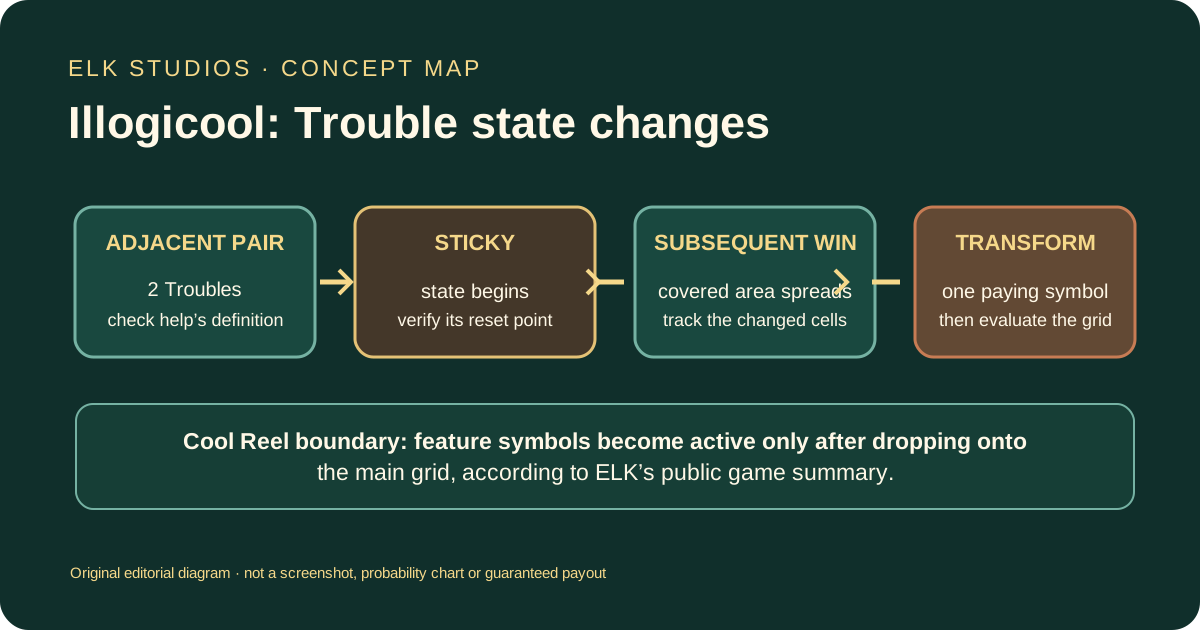
ELK describes Illogicool as a six-reel, six-row slot with expanding, sticky and Mystery Wilds and a bonus multiplier. Above the main grid is a Cool Reel containing paying and feature symbols. Those feature symbols become active once they drop onto the main grid. The signature Troubles mechanic begins when two adjacent Trouble symbols land: they stick, and subsequent wins make them spread until all Trouble-covered symbols are turned into the same paying symbol. A Double Trouble rule adds an extra expansion when two Troubles land in the same reel slot. Three or more Bonus or Super Bonus symbols trigger the Free Drop bonus; ELK says it can begin with up to 25 spins and a ×30 multiplier.
That public summary gives useful mechanics but does not verify an operator’s RTP, volatility, win cap or active configuration. ELK’s official Game Data Sheet returned HTTP 403 when checked on 7 October 2026, and no casino help screen was supplied. This article does not treat third-party settings or a supplier launch status as proof of New Zealand access.
Identify Illogicool and the relevant display areas
The assigned game is Illogicool by ELK Studios. Check the provider credit and full title in the game information panel before using a review. The official page labels the product “Live Now,” which is a catalogue status; it does not identify an operator or jurisdiction. A lobby listing, demo and real-money client can have different availability and settings.
The product’s display has a six-by-six main grid and a Cool Reel above it. These are two functional areas, not seven ordinary rows that can all be evaluated at once. ELK says the top reel carries paying and feature symbols and that a feature symbol only becomes active after it drops to the main grid. This means the position and state of a symbol matter. A feature icon visible above the grid should not automatically be counted as an active feature event.
Record the exact interface states separately: top-reel symbols, main-grid symbols, sticky positions, Wilds, Bonus or Super Bonus symbols, and any current multiplier display. The written help may use labels that differ slightly from the artwork. Use the help’s definition when explaining a trigger; visual proximity or an animation alone is not a complete rule.
ELK’s public page provides qualitative rules and recommends a 1600×900 desktop resolution with a 16:9 ratio when scaling. The available text does not provide a complete paytable or numerical configuration. A current casino client’s help is needed to determine the active RTP setting, symbols, win evaluation, cap and stakes. No client was tested for this review.
The Cool Reel: visible does not mean active
The Cool Reel is the top reel in the supplier’s description. It contains both paying and feature symbols. ELK says that feature symbols become active when they drop down to the main grid. This is a state transition: the symbol can be visible in the top area without yet having the effect associated with it. The exact movement and landing conditions should be checked in the active help.
When a top-reel feature icon appears, note its type and location. Then check whether it moves down, where it lands and what the game says happens next. If it remains above the main grid, do not describe it as a triggered feature. If it descends, record the effect label and any changed symbols or multiplier. This keeps the feature trigger separate from a decorative symbol in the upper display.
The supplier’s overview does not say whether every feature symbol is available on every spin, how a drop is selected, whether more than one can activate at once, or whether a landed effect persists. Those details need the client rules. A later review should not import a top-reel rule from another ELK game merely because it also has a feature row or a special reel.
The Cool Reel also has paying symbols. Their payout treatment and relationship to the main grid are not spelled out in the short description. Find the paytable’s symbol values and evaluation path. A symbol may be displayed in a separate strip but only count after a drop; use the game’s written rules to understand when and how it participates in a result.
Trouble symbols and their spread
ELK describes two adjacent Troubles becoming sticky. Each subsequent win makes them spread until all Trouble-covered symbols turn into the same paying symbol. The mechanic combines adjacency, retention, later wins, expansion and a final symbol transformation. Each part should be kept distinct. The supplier summary does not give the exact adjacency directions, number of covered positions per win or the order in which the final paying symbol is chosen.
First find the help definition of adjacent. It may mean orthogonal neighbours, diagonal neighbours or a specific relationship; do not assume a general grid definition. The word “two adjacent” is a condition, and the game’s diagram should show which positions qualify. Note whether the symbols must be exactly two or at least two, whether they can appear across different reels and whether both must be Troubles at the same time.
Once the condition is met, the Troubles are described as sticky. Check what “sticky” means for this title: do they stay only through the current spin’s cascade, through a respin, or through a larger feature sequence? The supplier says each subsequent win helps them spread, but the public summary does not define every reset boundary. A sticky state is a rule, not a promise that the symbols will remain indefinitely.
The spreading step is tied to wins. This is important because it does not say Troubles spread after every paid spin or every visual animation. For a round log, record the initial Trouble positions, the adjacent pair, the next qualifying win, which positions were covered and whether the game reports more than one expansion. If no win occurs, do not claim the pair has advanced merely because the game showed a new frame.
The transformation at the end is also precise: the supplier says all Trouble-covered symbols are turned into the same paying symbol. It does not specify which symbol is selected or whether the choice is random, weighted or governed by a separate rule. The active help must explain that selection. The transformed layout then needs an ordinary win evaluation under the paytable; a change to one symbol type does not automatically guarantee a payout.
Double Trouble
ELK describes Double Trouble as an extra Trouble expansion triggered when two Troubles land on the same reel slot. Keep this condition separate from the ordinary adjacent-pair rule. One refers to a spatial relationship between Troubles; the other names a same-slot event and an extra expansion. The help should clarify what “same reel slot” means in the active interface and how the extra expansion is shown.
If Double Trouble appears, note where both Troubles landed, which position the client treats as the same slot and what positions become covered. The event may be visually quick, so using the history or feature explanation can prevent a false description. Do not assume that all subsequent win-driven spread is also part of Double Trouble; the supplier presents the special same-slot condition as an extra event.
The effect of an extra expansion is structural. It may expose additional covered positions or change a later transformation, but the supplier summary does not say that the expansion raises a multiplier or pays a fixed amount. Use the correct terms. If the game shows a larger Trouble area, that is evidence of a board change, not evidence of a cash award until the result panel settles a winning combination.
When documenting an example, distinguish three moments: adjacent Troubles stick; a subsequent win causes ordinary spread; same-slot Troubles cause the named extra expansion. They may be related in an observed sequence, but not every event should be collapsed into “Troubles spread”. This distinction makes the rule easier to check and avoids applying Double Trouble to any two symbols that merely look close.
Wild symbols and feature boundaries
ELK’s overview lists expanding Wilds, sticky Wilds, Mystery symbols and a bonus with a persistent multiplier. The accessible summary does not fully describe each Wild’s trigger, target positions or substitution rule. A name like “expanding” explains a type of change but not the exact columns or event that activates it. The current client help must supply those details.
Read the Wild types one by one. For each, ask which symbols it can replace, whether it can appear in the Cool Reel or only the main grid, when it expands, how long it stays sticky and whether a Mystery symbol changes into a Wild or a paying symbol. A single general statement about “Wilds” could obscure different scopes. Keep a note of the exact symbol label shown in the paytable.
Wilds can help complete a combination, but they do not guarantee that a particular one will form. A Wild might be in a position unrelated to a qualifying sequence, or another rule may exclude a symbol. If two Wilds touch, that does not prove they combine. The paytable defines substitution and settlement; the animation only shows feature motion.
The persistent multiplier mentioned by ELK is associated with the bonus description. “Persistent” should be understood within the named bonus state, not as a carryover into later sessions or unrelated paid spins unless the help explicitly says so. Check when the multiplier begins, what changes it, whether it applies to each win or a total, and at what point the bonus resets. No numeric multiplier is asserted here from the public text.
Free Drop bonus entry and progress
ELK says three or more Bonus or Super Bonus symbols trigger the Free Drop bonus. The public page says the feature starts with up to twenty-five spins and a ×30 multiplier. These numbers appear in the supplier summary and are reported as supplier-described headline terms, not independently checked against a current operator build. They may not define every supported configuration or every entry route.
Before relying on the feature, open the current help and confirm the symbols that count, whether the trigger can occur on a particular set of reels and whether Bonus and Super Bonus symbols have different effects. Note the awarded number of drops and the initial multiplier shown by the client. ELK’s use of “up to” means the start can vary; it should not be restated as a fixed 25 every time.
During the feature, observe how a Free Drop is consumed, which Wilds or Troubles remain, whether the Cool Reel still participates, and how the multiplier persists. A bonus screen can show a counter and multiplier, but the help should say whether a triggered event changes either. If more Bonus symbols appear, check whether that retriggers, adds spins or affects another feature state. The supplier’s short summary does not expose all retrigger and reset rules.
The feature trigger does not guarantee a positive result. A bonus is a mode with its own evaluation, not a separate payout guarantee. A multiplier also requires a qualifying win to affect an amount. Record the total awarded after the feature ends and use the client’s history for settlement. Do not interpret a high starting multiplier or a large number of potential drops as a promise of a particular return.
RTP and alternate game settings
RTP is a theoretical long-run percentage for a defined game build. It does not tell a player what one session will return or predict the next outcome. A title may be distributed in more than one return configuration. To review an RTP accurately, name the exact game version, operator and setting source.
ELK’s Illogicool product page links a Game Data Sheet, and the official game assets catalogue lists the title. The data-sheet PDF returned 403 Forbidden on 7 October 2026. The accessible product page describes mechanics, not a readable current operator RTP table. No casino help screen was provided. This review therefore does not give a numeric RTP, list supposed variants or claim one is active in New Zealand.
The proper later check is inside the exact casino client. Record the title, provider, operator, access date, version when shown, RTP field and any configuration label. If several values are listed, distinguish the catalogue of options from the setting actually loaded. If no value is visible, mark it “not shown” and ask the operator for the applicable rules or game data. Do not use a third-party number merely because it appears in a recent review.
This distinction also applies to volatility, hit frequency and maximum win. Each is its own field and should have a source. The Trouble spread, Cool Reel and bonus multiplier do not reveal any of those values. A long-running feature or a dense screen says nothing reliable about the statistical distribution of all outcomes.
Volatility, win cap and stake details
No authoritative volatility label for the active Illogicool build was available in this research. A competitor may describe the game as a particular risk category, but the inaccessible primary sheet and absent operator help mean that this guide does not adopt that label. Volatility is not synonymous with “lots of features” or “large bonus multiplier”. It describes outcome distribution over time and requires data or an attributed supplier setting.
Similarly, no current maximum-win figure or stake range is verified. If the active help lists these values, check the units and the scope. A cap may apply to a feature or a full round; a stake range may differ between currencies or markets. Keep the numeric text exactly as shown, and do not convert it across currencies without a dated exchange source. If a value is missing, say it is not confirmed.
The ×30 multiplier stated in ELK’s overview is a bonus-start detail, not the RTP, volatility or maximum-win number. Likewise, “up to 25 spins” is not the maximum payout or the probability of entering the bonus. Review copy should keep each metric in its proper category to avoid implying a total value that the source did not publish.
A feature can influence how a single round resolves while leaving the underlying probability and payout distribution unknown. To answer “how risky is it?” responsibly, seek the published volatility field and RTP for the actual version. Until then, focus on the known mechanics and say what evidence is missing.
Review one feature sequence carefully
Use a small observation sheet. Start by confirming the title and noting the initial six-by-six grid, Cool Reel, stake display and any active feature labels. If Troubles appear, record their coordinates and check adjacency against the help. If they become sticky, mark what remains fixed and for how long. After a win, note whether they spread; do not credit a new spread to a paid spin unless the feature rule states that it occurs there.
If two Troubles land in the same reel slot, look for the Double Trouble label and record the extra expansion. Next, follow any covered symbols through their transformation. Identify the paying symbol shown by the client and evaluate the final grid using the paytable. This chain separates the trigger, expansion and settlement, making the guide clear even if the animation presents them quickly.
For the Cool Reel, note a feature symbol while it is above the main board, then whether it descends and becomes active. That exact boundary is central to understanding the feature. For a bonus, record whether Bonus or Super Bonus symbols triggered it, the drops and multiplier shown, and any state that persisted. Use the result history to see how the final award was calculated.
An illustrative sequence is not a probability claim. For instance, two adjacent Troubles stick, a later win spreads the covered area, and a later transformation changes the covered symbols. This explains the category of events ELK describes. It does not establish how often that chain occurs, which symbol is selected, or that a payout must follow. Be explicit about what is an example and what is a published rule.
Mobile use, demo and market availability
ELK recommends a 1600×900 desktop screen and 16:9 scaling for desktop. The recommendation does not confirm mobile support or an operator’s mobile implementation. The 6×6 grid and separate top Cool Reel can be difficult to interpret in a compact view if the feature labels or help button are hidden. No phone, tablet, casino client or demo was tested in this review.
If the title is present on a mobile device, check that all six rows are visible or clearly scrollable, that symbols in the Cool Reel remain distinguishable from those on the main grid, and that the help and bet controls are reachable. Open a rules panel before playing and see whether it explains the cool-reel activation boundary, Trouble adjacency and bonus persistence. Avoid assuming a small screen uses identical client behaviour to desktop without checking the rules version.
A demo can help show how a Trouble expansion or Cool Reel drop is presented, but only when it is the same title and a clearly identified version. Check whether it uses simulated credits, omits purchase options or hides RTP data. A demo can illustrate UI flow; it cannot prove a casino offers Illogicool or that its live build uses a particular RTP. No New Zealand demo was verified.
The supplier’s “Live Now” marker does not prove local operator availability. The Department of Internal Affairs’ current guidance describes New Zealand online casino advertising restrictions and third-party obligations. This affiliate-site draft has no CPA buttons pending compliance review; the existing /go/south/south-cashdesk-8a14.php route was not changed or clicked. This is a local editorial draft, not confirmation of public distribution permission.
A focused checklist for the current help panel
Verify the exact title and provider, six-by-six board, Cool Reel position, feature-symbol activation point, Trouble adjacency rule, sticky duration, win-driven spread condition, number of covered positions per spread, symbol-selection rule, same-slot Double Trouble trigger, expanding/sticky/Mystery Wild definitions, Wild substitutions, Free Drop trigger symbols, starting drops, multiplier value and persistence, retriggers, RTP variant, volatility, cap, stakes, mobile layout, demo identity and operator country terms. Capture the source and date next to every numeric value.
If the help screen uses a term such as “adjacent,” “sticky,” “Mystery” or “Free Drop,” quote or closely paraphrase its meaning instead of replacing it with a generic industry definition. If a field is missing, mark it unverified. The supplier’s overview is sufficient to map the broad game loop, but not to settle every state boundary or numeric setting.
The checklist should not be used to imply that all settings exist or are exposed in the client. It is a way to organize a later fact-check. A future update should only add a number if the source clearly identifies Illogicool and the same configuration; otherwise the article remains more accurate by naming the gap.
Questions readers ask
What happens when two Trouble symbols are adjacent?
ELK says they become sticky. Subsequent wins make them spread until covered symbols turn into the same paying symbol. The exact adjacency rule and spread size should be checked in current help.
What is Double Trouble?
The supplier says that two Troubles landing in the same reel slot trigger an extra Trouble expansion. The client help should define “same reel slot” and show the affected positions.
Do symbols on the Cool Reel count as active features immediately?
ELK says Cool Reel feature symbols become active once they drop onto the main grid. Check the current help for the trigger and any exceptions.
What is the RTP for Illogicool?
It was not verified for an operator build. The official Game Data Sheet returned 403 on 7 October 2026, and no active client help was supplied.
Does the bonus always start with 25 drops and ×30?
ELK’s public summary says the feature can start with up to 25 spins and a ×30 multiplier. Confirm the exact values shown by the active client; “up to” is not a fixed count for every entry.
The ELK Studios supplier index helps distinguish this product from other titles; New Zealand support links are collected on the safer gambling page.
Summary
Illogicool’s signature reading task is to distinguish the top Cool Reel from the main grid, then follow Troubles through adjacency, stickiness, win-driven spread, Double Trouble expansion and symbol transformation. The Free Drop bonus and its multiplier are a separate state, while Wild types need their own substitution and persistence rules. ELK’s page supports the qualitative outline; it does not verify current RTP, volatility, cap, stakes or operator availability. Check the active help and retain title/version context for every value.
Sources and verification boundary
- ELK Studios: Illogicool — supplier status and feature descriptions; checked 7 October 2026.
- ELK Studios: Game Assets — official catalogue lists Illogicool and links its data sheet; checked 7 October 2026. PDF returned 403 Forbidden.
- Department of Internal Affairs: Online gambling for advertisers — guidance checked 7 October 2026.
- AboutSlots: Illogicool review — competitor sample opened 7 October 2026; no numeric setting was adopted without the primary sheet or operator help.
Supplier prose supports the qualitative mechanics stated above. Exact RTP variants, volatility, hit rate, max win, stake range, event probability, active operator configuration, mobile support, demo and New Zealand availability remain unverified. No operator client, demo or CPA route was opened.