ELK Studios game guide · South Island guide
Ice Wolf 2: rules, wolf features and settings to verify
 Best casinos available in New ZealandUpdated 7 November 2026

Ice Wolf 2 is an ELK Studios slot built around a frozen play area, a separate feature row, wolf effects and a bonus. The public supplier summary checked here does not establish an operator’s RTP, volatility label, stake limits or New Zealand availability.
The short answer: follow the board state, not just the wolf animation
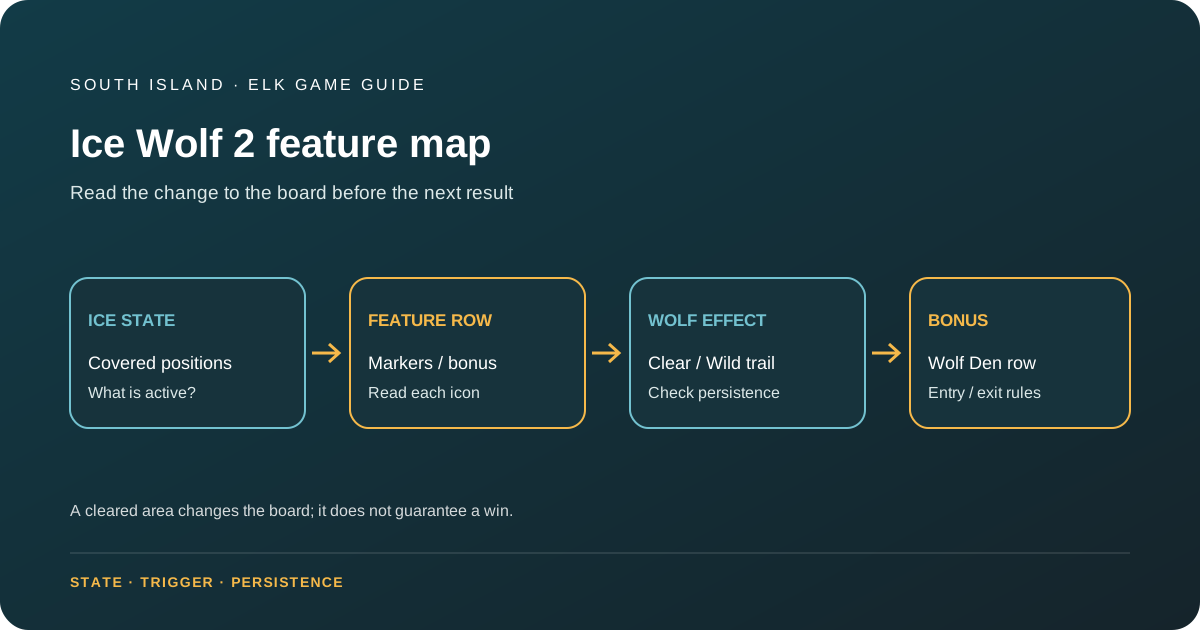
Ice Wolf 2 is easiest to understand as a sequence of board states. Its official ELK Studios description identifies a multi-reel game, a separate feature row, ice that can be cleared, several kinds of Wild and a bonus with an activated Wolf Den row. Some positions begin covered by ice. The important question is not simply whether a wolf appears; it is what area that particular wolf clears, which symbols become active afterwards, and whether a Wild trail or multiplier effect remains for the next part of the round.
The publicly accessible supplier summary checked for this guide does not establish the active RTP configuration, volatility classification, minimum or maximum stake, currency, bonus frequency, payout cap, or operator-specific settings. Those fields should be read from the exact game help panel supplied by a casino, if a lawful operator version is available to inspect. No New Zealand availability is inferred from the supplier listing.
This page is a mechanics guide, not a report of personal play. It explains what the public supplier material supports and gives a practical way to check the remaining fields without borrowing numbers from a different Ice Wolf title or from another jurisdiction.
Identify the version and the separate screen areas
Before interpreting a feature, confirm that the title shown in the game is exactly Ice Wolf 2. The sequel name matters because it distinguishes this product from the earlier Ice Wolf game and from unrelated games that use wolf imagery. Open the information menu and compare its heading with the official ELK Studios product page. If the game help shows a build, version or rules date, record it beside any figure you use.
The supplier describes a multi-reel layout with a distinct feature row. Those areas have different roles. The feature row carries features, bonus symbols and multipliers; it is not just another row of ordinary paying symbols. The ice section masks parts of the play area, and wins or wolf effects can clear that ice. When covered positions open, they can change which symbols are active and the shape of the available play area.
For a clear reading, make a simple sketch or list three layers: (1) active symbol positions; (2) covered or inactive positions; and (3) the feature row that can change the board. Then label what each event affects. A normal symbol win may remove ice in a defined way; a wolf can clear a directional area; a bonus can activate another row. These should not be collapsed into a generic “the grid expands” description because the cause and result differ.
What the ice does to a round
Ice is a state marker: it indicates that a portion of the board is not yet functioning like an open symbol position. The official page says that players can access features by clearing ice through wins or by triggering a wolf feature. That gives the reader two routes to watch, but it does not mean every ordinary win clears the same amount of ice or that every wolf has the same effect.
When reading the game help, look for the exact ice-removal rule. Does a win uncover positions on its own reels, an entire row, or a selected area? Does the help say that a clear happens only after a particular win? If the public page only gives the broad interaction, leave the detailed clearing pattern to the in-game rules instead of guessing from a video or screenshot. The uncovered area changes future opportunities, but an expanded board does not guarantee that the next spin wins.
Separate the one-spin result from the state that carries forward. A symbol combination may settle once, while an uncovered area changes the layout for later spins. A Wild trail may remain for a later action, or may be only part of one effect; check the current help to see which. That distinction affects a sensible explanation of the game. “This spin paid” is different from “this spin changed the board for later spins.”
The changing surface can make a screenshot misleading. One frame can show only the starting ice, while another can show a later expanded state. If a reader compares two images, check whether both are from the same phase and version. A feature animation should not be treated as evidence about the base game’s initial configuration or about the number of symbols that can be active in a particular operator build.
The feature row has its own job
The feature row is an information-rich strip. ELK says it contains feature markers, bonus symbols and multipliers, and that clearing ice or triggering a wolf can give access to its features. That tells a reader where important events originate, but each icon still needs its own rule. A multiplier printed in the row is not automatically a multiplier on every win. The help must say which symbol or prize it affects and when it is applied.
Read the row from left to right only if the game rules say position matters. A visual sequence can tempt a player to assume a line or a ladder, but the actual condition could be based on the symbol that lands, an open position, a feature marker, or a trigger. If the row changes after a feature, record that change before interpreting the following spin. Do not use the word “payline” for the feature row unless the game help defines it that way.
When a bonus symbol appears in this row, the supplier says activating a bonus symbol in the feature row triggers the bonus. The bonus then activates the Wolf Den row, allowing more wolves during each spin. For a complete version-specific explanation, check the help for how the bonus symbol is activated, what the feature costs if any optional mode exists, what starts the bonus, and how a bonus can end or retrigger. The accessible supplier description does not specify every operator setting.
An activated row can introduce additional ways for wolf effects to participate. Keep the bonus feature separate from the ordinary board: the same wolf name may have a different frequency or position in the Wolf Den state. The fact that more wolves can appear describes more feature opportunities, not a promise of more value or a particular payout.
Howling Wolf: a directional clear
The Howling Wolf clears ice in a ninety-degree angle either to the left or to the right. This is a board-clearing effect, so its practical result depends on where the wolf acts and which positions in that direction remain frozen. A helpful explanation describes direction and area, then says that newly opened positions can affect later play. It should not imply that a howl clears the whole board if only one directional path is specified.
When checking the help, ask what selects the direction, whether the wolf’s position determines the line, and whether the effect can include the feature row. The public feature summary gives the broad angle but not every possible trigger or operator configuration. If the interface animates a sweep, follow the labelled squares instead of interpreting the animation alone. A visual arc can be decorative, while the actual rule may clear only a defined row or column.
The Howling Wolf is also a good example of why an effect should be written in three parts: trigger, affected positions, and lasting consequence. “The wolf howls” describes an animation. “The howl clears frozen positions to the left or right at a right angle” describes the supplier’s stated effect. “The cleared positions remain open for subsequent spins” would need confirmation from the current help. When a persistence detail is missing, leave it unconfirmed.
Do not treat the directional clear as a guarantee that the newly opened route contains a win. It alters available positions, not the result of future random outcomes. A feature can create more active symbol space without making every subsequent spin successful. That is why a board-state explanation is more accurate than a promise-like description of “unlocking bigger wins.”
Ice Wolf and the Wild trail
The supplier’s description distinguishes an Ice Wolf feature from the Howling Wolf: the Ice Wolf clears an ice row and leaves a Wild trail. The two parts of that sentence matter. First, the ice row changes state. Second, Wild symbols are placed along a trail. They are separate effects and readers should check whether the trail is horizontal, whether it occupies all positions in the cleared row, and whether it lasts for a single result or across a respin sequence.
The term “Wild” usually means a symbol can substitute for some other symbols, but the eligible symbols and exclusions must come from the title’s paytable. Do not assume it substitutes for a bonus symbol or a feature icon. If the help lists exceptions, preserve them. If the feature row has its own Wild behaviour, avoid merging it with the regular reel symbols until the rule panel confirms that they interact.
A Wild trail can change the geometry of a later result. To explain it clearly, walk the reader through a neutral sequence: ice is cleared; the game leaves Wilds in the specified positions; the next eligible result is calculated under the game’s substitution rules. Do not add sample payouts or say that the trail makes a win inevitable. Without the paytable values and the exact positions, a cash example would be fabricated.
The trail also invites an important version check. If an operator’s help uses a different feature name or describes a different persistence rule, quote the operator version and date rather than treating the supplier’s short summary as the customer-facing rule. The supplier page documents the game concept; the active help controls the exact configuration shown to the player.
Golden Ice Wolf and multiplying Wilds
ELK’s summary describes a Golden Ice Wolf pack that clears its own column and adjacent columns, with Wilds in the centre. It also lists regular, multiplying, sticky and sticky-multiplying Wild categories, and says wolf effects can add or increase a multiplier. These descriptions indicate several layers: a larger area can be cleared; central positions can receive Wilds; and some Wilds can have multipliers or persistence rules.
Do not collapse those layers into one guaranteed outcome. The game help should explain what counts as the Golden Ice Wolf pack, which positions are cleared, how the centre Wilds are selected, and whether the multiplier is attached to one symbol or a sequence. “Sticky” describes persistence in some interval, but it does not by itself say whether the Wild stays for a spin, a respin, an entire bonus, or until another condition. Record the exact duration from the rule panel.
If a multiplier can increase, distinguish the increase event from the payout calculation. Does a wolf add a fixed amount to a displayed multiplier, add several multipliers together, or raise the value of an individual Wild? Does the multiplier apply only when that Wild contributes to a winning combination? These are distinct questions. A summary that merely says the multiplier increases does not settle how it is applied to a win.
When a feature affects adjacent columns, draw the affected positions before counting a prospective combination. A cleared column may add active positions, while the central Wilds may substitute only in particular rows. The width of the cleared area does not translate directly into a number of ways or paylines. Only the paytable or live rules can establish how the game evaluates those positions.
Bonus and Wolf Den row
The publicly accessible supplier description says the bonus is triggered by activating a bonus symbol in the feature row. Once the bonus starts, the Wolf Den row is activated so more wolves can appear on each spin. This is enough to explain the bonus’s central idea: it makes wolf events part of a special state and opens an additional row of feature activity. Exact entry thresholds, initial spin count, retriggers, bet modes and end conditions are not all stated in the brief public summary.
Inside the bonus, track three things independently: available actions or spins, active board positions, and the wolf effects that occur. A single animation might clear ice and add Wilds while also changing a multiplier. To read the outcome, wait for the game to show the final state and the win calculation. Do not add a multiplier from one event to another unless the help says they combine; some features may replace, reset or apply values in a different order.
If another bonus symbol appears during the feature, look for a stated retrigger rule. The supplier summary does not make every retrigger condition explicit, so it should not be assumed. Similarly, a “Super Bonus” appears in ELK’s product summary, but the accessible description alone does not establish how a player reaches that state. The title’s game help must determine the trigger, cost, content and rules for any separately named Super Bonus.
For a reader comparing the base game and bonus, a table can help: entry condition; board state; active rows; wolf appearances; multiplier rule; persistence; exit rule. Fill only the rows the help confirms. Blank values are informative because they show what was not published in the source inspected, instead of disguising uncertainty as detail.
Check the payout ceiling in the active game help
The official ELK summary checked for this guide does not provide a payout ceiling that can be tied to a current operator configuration. A maximum-win field, if displayed in a particular version’s help, should be recorded as that version’s limit and not as an expected result. A ceiling by itself would not reveal the chance of reaching it, how often a bonus occurs, or the distribution of ordinary outcomes.
The public page does not provide a current operator-specific RTP figure in the accessible summary checked for this article. It also does not establish a single volatility label for every configuration, a local NZD stake range, an operator maximum bet, or a cash equivalent of the ceiling. Third-party pages may list numbers for other markets or builds, but those values cannot stand in for the version a New Zealand reader might see. The responsible field value for those items is “not verified from the active operator help.”
RTP, if shown in the game help, is a theoretical long-run return attached to that configuration. It is not a session forecast. Volatility labels are useful only when the source and scale are clear; one publisher’s “high” is not necessarily comparable to another’s “high.” A max-win ceiling likewise says nothing about how frequently smaller outcomes occur. Keep each field separate instead of using one as a proxy for another.
If a mode menu presents an optional feature or priced entry, record its exact displayed cost and rules, then check whether the mode has its own RTP or cap. Do not multiply a supplier headline by a New Zealand dollar stake unless the operator supplies the actual stake range and currency. A feature-entry statement is about the start of a round, not a promise to recover its price.
Settings checklist for the active operator version
Before relying on a rules summary, confirm the following fields in the exact product that the operator serves:
- The full title and, where shown, software or rules version.
- The currency and minimum and maximum stake for the selected game mode.
- The displayed RTP for the base game and for any optional feature mode.
- The game’s own volatility wording, if published, and who supplies that label.
- The max-win rule and whether it differs between normal and bonus play.
- The definition of a paid win, Wild substitution, and any excluded feature symbol.
- The direction, size and persistence of each ice clear or Wild trail.
- The bonus trigger, initial actions, retriggers, and ending condition.
- Whether a demo is actually present and what version it represents.
If a field is missing, save the name of the help menu and the date you checked. Do not backfill a local stake range from a third-party review that uses euros, pounds, or another casino’s limit. Do not turn a missing RTP into an assumed fixed percentage based on the studio’s other recent titles. These checks are the difference between a title overview and an operator-specific settings report.
Mobile help and demo access
The game page and the game itself are separate interfaces. A responsive supplier page can be read on a phone while an operator embeds the slot in a different frame. If the actual game is accessible, find its rules icon before playing. Check whether the full game layout, feature row and win panel fit on screen, whether a help table scrolls independently, and whether the labels remain readable in portrait and landscape.
If a multiplier or mode price is clipped, do not guess. Expand the information pane, zoom the interface if it permits, or request the rules in text form. If the controls overlap the content, take time to read the complete rule before using any feature. This is usability guidance, not a claim that this team tested a live operator version or any particular phone.
A demo or video can help a reader recognise the ice and wolf animations, but it cannot verify the real-money operator’s RTP, currency, stake limits, account eligibility or cashier conditions. A recorded spin is not a statistical test and should not be used to infer an average outcome. No demo was launched while preparing this guide. If access is restricted by market or operator, do not use a workaround to bypass the restriction.
Who this mechanics guide is useful for
The game’s most distinctive reading task is managing the relationship between a covered board and several effects that reveal or transform positions. Readers who prefer to understand a feature before seeing an animation may benefit from tracking the feature row separately from ordinary symbols. It is also useful for anyone comparing Ice Wolf 2 with the earlier Ice Wolf: keep the sequel’s supplier-described board and named wolf effects distinct from any remembered rule of the original.
The guide is less useful as a way to choose a casino. It does not identify an operator, current game availability, an NZ-specific version, a currency, or a cashier. Nor does a high headline ceiling tell a reader whether a game is suitable for a personal budget. No strategy can force an ice clear, wolf feature, bonus or maximum win to happen.
For a careful comparison, first decide what question matters: board growth, directional feature area, Wild persistence, bonus state, or mathematical settings. Then read that part of the help and note the exact version. A feature can be interesting from a design perspective while still being unsuitable for someone seeking a simple round or wanting a verified local setting. A rules page should support that distinction without praising risk or implying a financial result.
Questions readers commonly ask
What is Ice Wolf 2’s main mechanic?
The official description centres on ice that can be cleared to reveal more of the play area, a separate feature row, and wolf effects that clear positions or create Wilds. The precise outcome depends on which wolf feature occurs and on the version’s help text.
How does the Howling Wolf work?
ELK describes it as clearing ice in a ninety-degree angle either left or right. Check the game’s own help for the trigger, selected direction, affected positions and whether those spaces remain open.
What does the Ice Wolf do?
The supplier summary says the Ice Wolf clears an ice row and leaves a Wild trail. The exact positions, Wild exclusions, and persistence of that trail should be confirmed in the active game help.
What does the Golden Ice Wolf add?
The supplier says the Golden Ice Wolf pack clears its own column and adjacent columns, with Wilds in the centre. The exact multiplier application and duration still need the title’s help panel.
What is the maximum win?
The public product summary does not establish a current operator payout ceiling. Check the active game help for the version being considered; a displayed ceiling is not an expected return or a statement about the likelihood of reaching it.
What is Ice Wolf 2’s RTP or volatility?
The public supplier summary checked for this guide did not establish the active operator’s RTP or an operator-specific volatility label. Confirm the exact values in the game’s own help; figures listed by another market or reviewer may refer to a different build.
Is Ice Wolf 2 available to New Zealand players?
The supplier catalogue does not establish New Zealand operator availability or customer eligibility. This page makes no availability claim. Check current local regulatory and operator information rather than treating a game listing as permission to access a service.
Can a demo prove the game’s payback?
No. A demo can illustrate an interface or mechanic but cannot establish the real-money configuration or prove a short-run payout pattern. Read the active rules and RTP panel for the operator build.
Where can I browse other ELK titles?
Use the ELK Studios catalogue guide for supplier-level navigation and the game guide index for existing title references. The catalog page does not replace a specific product’s rules.
For local break and support information, visit our New Zealand safer gambling guide.
Sources and verification boundary
Primary product source checked on 6 October 2026: ELK Studios Ice Wolf 2. It describes the board; feature row; ice-clearing access; Howling Wolf; Ice Wolf; Golden Ice Wolf; Wild categories; bonus trigger through a feature-row bonus symbol; and activated Wolf Den row. The publicly accessible product summary did not verify the active operator RTP, a universal volatility rating, stake limits, payout cap, feature probabilities, current operator settings, or NZ distribution.
Competitor pages reviewed on 6 October 2026 included Bigwinboard, SlotCatalog, FruitySlots, and Hideous Slots. They publish overlapping but market-specific figures and ratings; these were not treated as universal operator settings. Primary regulatory context checked the same day: DIA advertising guidance and the Online Casino Gambling Regulations 2026. No demo, operator account or CPA route was opened. Search-volume data was not provided.