ELK Studios game guide · South Island guide
Phoenix Graveyard II: rules, features and settings to verify
 Best casinos available in New ZealandUpdated 7 November 2026

Phoenix Graveyard II is an ELK Studios slot whose supplier summary describes a five-reel, four-row layout, a Feature Row, moving Phoenix and Reaper Wilds, symbol splits and separate Bonus and Super Bonus states. Those terms are a useful starting map, not a complete operator paytable. This guide follows the features in a way that helps a reader distinguish the board, special-symbol actions and round settlement.
The short answer
Phoenix Graveyard II is an ELK Studios slot built around a five-reel, four-row board and a feature system that includes a Feature Row, Phoenix and Reaper Wilds, symbol splits, and Bonus and Super Bonus states. The supplier’s public product page establishes those named elements. It does not tell us which operator build a New Zealand player can access, nor does it replace the rules and paytable shown by the game currently loaded at a particular casino.
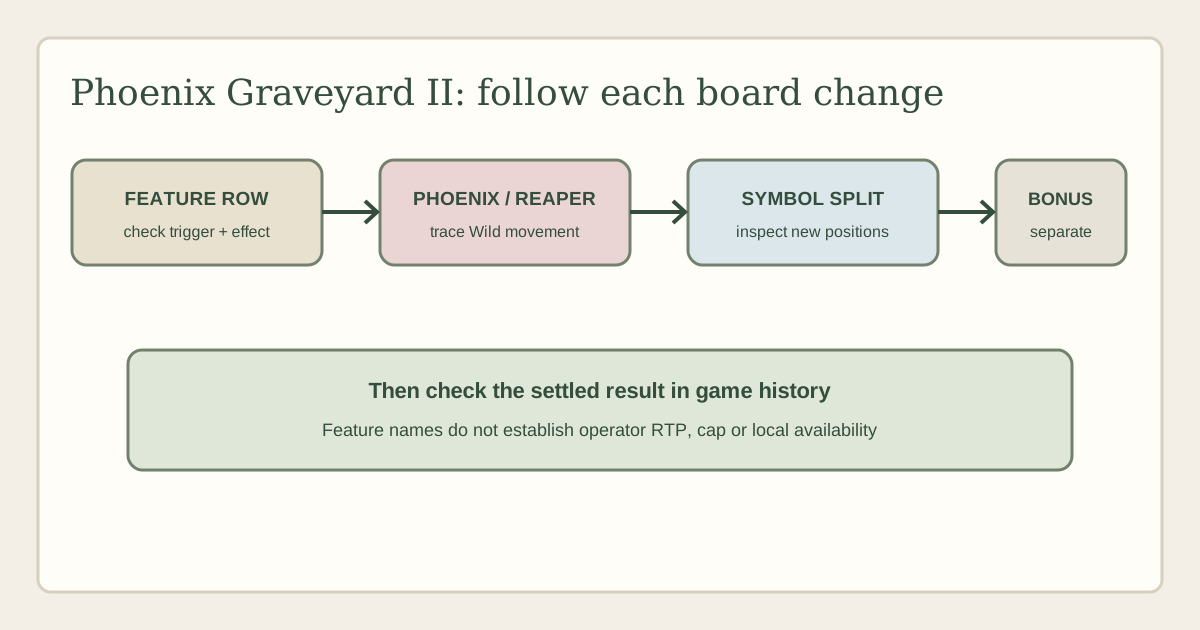
For a practical review, follow the events in order: identify the base board, see what the Feature Row changes, track whether a Phoenix or Reaper moves, check whether a symbol splits, then verify how the result is evaluated. Keep those actions separate from the final award. No current operator game-help screen was available for this review, so no RTP value or variant, volatility label, hit frequency, stake range, feature price, win cap or probability is stated here. New Zealand availability and demo access are also unverified.
Confirm the exact title before using a guide
Start with the game’s own information or help panel rather than a casino thumbnail. Confirm that the client identifies Phoenix Graveyard II and ELK Studios, then compare the title and named features with ELK’s Phoenix Graveyard II product page and the official ELK catalogue. The Roman numeral matters: an older game, sequel, similarly themed title or local lobby abbreviation may not use the same board or feature rules.
When recording what you find, capture the operator name, the account region shown in the account settings, the game’s displayed currency, the date, the exact client title and any build or help revision identifier. Copy the wording of the information panel, especially if it names a mode or setting. A screenshot of a title tile is weak evidence for a configuration; a help panel inside the actual game is more useful because it is tied to the client that has loaded.
Keep three claims distinct. ELK listing a title confirms a supplier catalogue entry. An operator listing that same title confirms that it appears in that operator’s current catalogue, subject to account conditions. Neither fact by itself establishes that a specific New Zealand account is eligible to open it. Check the operator’s current regional terms and lobby if that question matters; this page does not claim local access.
If the title is shortened, compare more than artwork. Look for the Feature Row and the Phoenix and Reaper names, then check the help description for symbol splits and both bonus labels. If the visible mechanics do not match, treat the client as a different or modified version until the supplier and operator materials explain the difference. Do not transfer numbers or instructions from another slot just because the screen uses a similar graveyard theme.
Read the five-reel board and Feature Row separately
The supplier describes Phoenix Graveyard II as a five-reel, four-row slot with a Feature Row. That tells a reader the basic screen shape and that one row has a special role, but not whether the Feature Row is part of the ordinary symbol evaluation, selects an effect, modifies a later spin or acts as a separate feature display. The active help needs to answer those operational questions.
When the game first loads, identify the visible reels and rows, then locate the row the interface marks as the Feature Row. Check whether it contains ordinary symbols, feature icons or a display that changes after the initial outcome. Record when the row is evaluated and how the game describes its effect. If the row changes during a sequence, note what changed before interpreting a win animation.
The visual position of an element is not enough to determine how it pays. A symbol placed in a highlighted row may still need to meet an ordinary win condition; a feature icon may instead launch a separate action. Check whether the help uses words such as “activates”, “adds”, “transforms”, “moves” or “splits”. Those verbs describe different operations, and a good guide should preserve those distinctions rather than bundling everything into “special reels”.
Also check the game’s ordinary win rule. The supplier summary does not provide a full paytable in the material available for this review. It therefore cannot establish symbol values, evaluation direction, whether matches are line-based or use another arrangement, or which symbols substitute for which others. Read the loaded paytable for that information. Never infer a conventional slot rule from the reel count alone.
If the interface animates several things in a short sequence, pause on the history or round-summary panel if available. Identify the initial result first, then list any Feature Row action, symbol change and Wild movement. This simple separation prevents a player or reviewer from attributing the same credit to multiple events. The animation explains presentation; the rules and settlement screen explain what the game counted.
Phoenix and Reaper Wilds: follow movement, not just appearance
ELK’s public summary identifies Phoenix and Reaper Wilds that move. This makes movement a defining part of the feature vocabulary, but the brief product description does not disclose every starting position, direction, trigger, stopping condition or interaction with other symbols. The operator help should be used for those exact details. Until then, explain the mechanic qualitatively and avoid inventing a route.
For each moving Wild event, begin by noting where the Wild appears and what causes it to move. Then follow each visible step: the position it leaves, the position it reaches, any symbols it passes or replaces, and whether another evaluation occurs after the move. A Wild can be relevant because of the cells it occupies at the end, because of a transformation during movement, or because the movement itself opens another feature. Only the client rules can distinguish those cases.
Do not describe a Wild as covering a full reel or row unless the help states that. “Moves” could mean one cell, a sequence of positions, or a special path; the word alone does not settle the geometry. Check whether a moving Wild remains in place through a later step or disappears after its interaction. Persistence affects how a player reads the next screen, so it should not be guessed from a single screenshot.
The two names should also remain distinct. The supplier labels Phoenix and Reaper Wilds separately, which suggests that a reader should look for separate effects or states. Do not assert that one moves in a particular direction, triggers a particular multiplier or substitutes for a specific symbol without current help. A feature map can show both branches, but a branch label must not turn into a fabricated rule.
When movement coincides with a Feature Row change, note the order. Did the row select an effect and then the Wild move? Did the Wild movement reveal or activate the row? Did a symbol split happen before the final Wild position was settled? The supplier summary does not resolve every combination. A useful review calls out that gap plainly and points readers to the game’s current help rather than guessing a priority rule.
Symbol splits and what a split does not prove
ELK lists symbol splits among the features. A split changes the presentation or arrangement of a symbol, but that description alone does not establish the exact result. The active help should identify which symbols can split, whether one symbol becomes multiple parts or positions, whether the new pieces keep the original symbol identity, and what happens before the next win evaluation.
Watch one split event from start to settlement. Record the symbol that changes, the action that initiates it, the resulting positions and any later reel or row evaluation. A split may create more positions for a subsequent check, or it may be an intermediate step within a special feature. Do not call it a win until the game displays a credited result or the history labels the payout. More symbols on screen are not the same as more paid combinations.
Check whether splitting can interact with a moving Wild. If a split occurs near a Phoenix or Reaper, determine which event happens first and whether the Wild can occupy a newly created position. If the help does not describe that combination, do not claim it is possible or impossible. An observed animation can illustrate one outcome, but only the rules reveal whether it is an ordinary path, a special case or a presentation choice.
Also check how the feature behaves when a split symbol is already part of a winning group. Does the game settle the initial group, transform first, or make an additional evaluation? The result history may show separate awards or one combined total. That distinction matters for a clear explanation and for any later comparison with another slot. Avoid language that suggests a split multiplies a win unless the paytable or help explicitly describes that calculation.
The Feature Row as a decision point
Treat the Feature Row as its own question rather than assuming its name explains its function. Open the relevant help entry and identify whether the row chooses a modifier, reveals a feature, changes a symbol, or determines the next action. Then verify whether the effect is immediate or applies after the visible reel outcome. A clear explanation should state the trigger and the consequence as two separate parts.
If the row displays a marker or feature icon, check whether that icon is retained, consumed, replaced or merely used to describe the current round. A persistent marker can be easy to confuse with a collected symbol. Follow the interface’s status text and round history to see whether the row is storing progress or presenting a one-off instruction. The product summary does not give this lifecycle in detail.
The row may also influence how a reader interprets Bonus and Super Bonus states. Confirm whether a bonus begins from a Feature Row result, from symbols on the reels or from a combination of conditions. Do not infer that the row is a bonus trigger just because it displays special imagery. The loaded client should show the actual trigger language, and a title-specific guide should quote it accurately only after checking.
For a concise manual note, write down four things: what activates the Feature Row, which row items can appear, what the selected item does, and when the game evaluates the outcome afterward. If the operator help omits any of those, mark it unknown. This is more useful than an unqualified sentence that the row “adds random features”, which could incorrectly imply that the game makes a selection at a particular time or gives the player a choice.
Bonus and Super Bonus are separate labels
The supplier’s public page identifies both Bonus and Super Bonus states. Their names show that the game distinguishes two modes, but do not reveal the trigger thresholds, number of rounds, duration, retrigger conditions, symbol restrictions or expected result. These specifics must come from the help of the exact client. Do not assume “Super” means a fixed larger return, a guaranteed feature or a particular number of spins.
When a bonus begins, record the event that started it and the state of the board at entry. Check whether the game carries a Feature Row selection, a Wild position or another marker into the mode. Then read the bonus description and find its end condition. If the display uses a counter, distinguish a remaining-action counter from an accumulated-win display. They can look similar while measuring different things.
For Super Bonus, compare only what the client explicitly says differs from the ordinary Bonus. It may use a different board state, symbol set or event sequence, but the public summary does not establish which. A careful review lists verified differences and leaves the rest open, rather than borrowing assumptions from a sequel or another ELK title.
Read the game history after a completed feature if it is available. It may separate base-game wins from feature awards, or show the final value as one total. Use the wording visible there when explaining settlement. A feature title is not evidence about expected return, and a brief play sample cannot establish how often a state occurs. That remains true even if a particular run produces a memorable sequence.
Settings to verify in the current help panel
No operator game-help screen was supplied for this assignment. For that reason, this guide does not publish a numeric RTP or an RTP variant, volatility classification, hit frequency, stake range, maximum win, bonus probability or price for an optional mode. Those values can vary by operator configuration and may change over time. An official supplier feature page is not a substitute for the settings shown in the active client.
For RTP, record the exact label and whether it applies to a specific game configuration, not merely the title family. If multiple choices are listed, copy each value and note which one is enabled for the loaded game. Do not merge different figures into a range unless the operator help presents them as alternatives for that version. A third-party review may describe another market, build or date.
For volatility, use the actual label if the help provides one and explain it as a description of outcome distribution, not a prediction about a session. For stake settings, record the displayed currency, minimum and maximum, and whether optional modes alter the amount. For a cap, copy its scope and denominator exactly: one feature, one round or a stake multiple are not interchangeable concepts. This guide leaves all of those fields unverified rather than importing figures from search results.
RTP is a long-run mathematical measure, not a promise that an individual deposit will be returned. Volatility does not tell a player when a bonus will appear. Moving Wilds, splits or a feature animation cannot guarantee a positive result. If the operator help is inaccessible, treat the missing setting as a reason to pause rather than a reason to fill the gap with an affiliate table.
Mobile, demo and access checks
The supplier page documents features but does not confirm that every operator offers the game on every device. If an eligible operator lists it, check that the client’s help, balance, selected stake and round history remain legible on the device. Make sure the Feature Row is visually distinct from the ordinary reel area and that both moving Wild labels can be identified after an animation.
A small screen can make sequential effects difficult to follow. If the board scrolls, symbols are hidden by overlays or the rules panel does not fit, use the client’s full help before a round. The fact that a game opens in a mobile browser does not prove that all controls or disclosures are accessible. Check touch targets and whether the game confirms a selected stake before play. Do not mistake an animation or temporary overlay for a final result.
No demo mode was inspected for this review. A practice version, if offered, can differ from the cash client and may not expose the same configuration or limits. It can help locate the controls and understand the visible sequence, but a short set of practice spins cannot verify RTP, volatility or feature frequency. Confirm any mode label in the operator’s own client.
New Zealand availability is not established here. ELK’s catalogue is a supplier source; it does not name an operator account or confirm regional eligibility. Check an operator’s current terms and game lobby before relying on an availability claim. A review page from another country, a video or an archived screenshot cannot substitute for that check.
A practical way to review one round
Use a fixed observation order so the board does not turn into an untraceable sequence of animations. First capture the initial reel outcome and identify any Feature Row state. Next note whether a Phoenix or Reaper Wild appears and where it moves. Then check for a split symbol and record its before-and-after state. Finally, look at the game history to see what was actually evaluated and credited.
For each event, keep “observed”, “supplier says” and “operator help confirms” in separate columns in your notes. For example, a moving icon can be observed on screen; ELK can describe it as a moving Wild; the current operator help can state its precise trigger and persistence. Those are related facts, but they have different evidence. Keeping them separate makes later updates much easier and prevents a supplier summary from being presented as a full game rulebook.
If a feature sequence is too fast, use a permitted history function rather than trying to reconstruct it from memory. Record the exact help section title, the date, the client version if available and the page or menu path. If the client has no history, note the limitation and describe only the supplier-confirmed mechanic. Do not create an example with made-up values to make the explanation look more exact.
Before playing, set a personal spending limit and time limit that suit the entertainment budget. An optional feature mode, if present, can change the amount committed per round. Recheck the total stake before selecting it, and stop if the game or client makes the cost unclear. Do not try to recover losses by increasing a stake or extending a session. In New Zealand, use independent support resources if play is causing harm or stress.
What this review includes and leaves out
This is one page about Phoenix Graveyard II. Its scope includes identification, the supplier-described Feature Row, moving Phoenix and Reaper Wilds, symbol splits, Bonus and Super Bonus states, and the fields a reader should verify in operator help. It does not create separate RTP, demo, bonus or rules pages. The aim is to keep the search task and the reader’s journey together in one reference.
This guide also avoids claiming that the title is available to New Zealand players. That question depends on an operator’s current catalogue, account eligibility and terms. Likewise, it does not rate the game from a personal play session, report an invented test, or describe a winning strategy. No testing session was performed for this page.
The page is distinct from a general ELK catalogue guide: it follows one title’s feature vocabulary. It is also distinct from any review of another Phoenix title or related slot. A broad studio article may discuss supplier history, but this page should be updated only when evidence for this specific client changes. If the official game page is revised, the operator help must still be checked independently for current settings.
The most useful next step for a reader is to open the information panel of a legally available client and compare its title, provider, feature names and exact settings with the checklist above. If the information panel is missing, ask the operator for the game rules before relying on an old review. A transparent unknown is more valuable than a precise number copied from the wrong version.
Frequently asked questions
Is Phoenix Graveyard II the same game as the original Phoenix Graveyard?
The assigned title is specifically Phoenix Graveyard II. Treat a title without the sequel marker as a separate product unless the supplier or operator explicitly identifies it as the same build. Compare the information panel, provider credit and named features before applying any rule or number from another title.
What are the confirmed features in this guide?
ELK’s product summary names the Feature Row, Phoenix and Reaper Wilds that move, symbol splits, and Bonus and Super Bonus states. This confirms the vocabulary, not every trigger, order, value or operator-specific rule. Exact details belong to the current in-game help.
What is the RTP for Phoenix Graveyard II?
No current operator help was available here, so no RTP or RTP variant is verified. Check the information panel of the exact client you intend to use, and record the configuration label and date. Do not copy a figure from a casino list for another market.
Can I play it in New Zealand?
This page does not confirm New Zealand access. A supplier catalogue listing is different from a current operator listing and from a particular account being eligible. Check the operator’s regional terms and current lobby; do not rely on a foreign screenshot.
Is there a free demo?
No demo was checked. Availability depends on the operator and may differ from the cash game. If a lawful practice mode is offered, use it to learn the interface, not to estimate return or feature frequency.
How should I read a moving Wild or a symbol split?
Track the initial position, the action and the final board, then check whether the client records a separate evaluation. A movement or split animation is a rule event, not automatically a credited win. Confirm trigger and persistence in help.
Does Super Bonus mean a better expected return?
The name alone does not establish expected value. Read the exact trigger and feature rules. A mode label cannot guarantee a payout or tell a player what a particular session will return.
What should I check before choosing an optional mode?
Read the displayed cost, total stake, rules and eligibility before confirming anything. This review does not verify that Phoenix Graveyard II has a particular optional mode or what it costs. If the amount or settlement is unclear, do not select it.
Sources and verification boundary
- ELK Studios: Phoenix Graveyard II — supplier-published title and feature summary, checked 6 October 2026.
- ELK Studios games catalogue — supplier catalogue, checked 6 October 2026.
- No current operator game-help screen, NZ operator listing or demo client was supplied or verified. Operator-specific settings and access remain unknown.
- Competitor pages reviewed for coverage comparison on 6 October 2026: Fruity Slots, Casinos.com, SlotsBoard. Search-result pages unavailable at some sources are logged in the research note rather than treated as inspected evidence.